GIMP vs Pixlr: which photo editor fits you?
By Pixuvia · · Updated

GIMP vs Pixlr is a choice between an installed open-source editor and a browser editor built around AI. GIMP costs nothing, runs on Linux, Windows and macOS, and gives you a full layered editor with non-destructive filters and its own XCF project files. Pixlr opens in a browser tab (with desktop and phone apps too), splits into a quick editor and a layered one, and leads with AI tools paid for with credits, inside a monthly or yearly subscription.
Pick GIMP for deep editing at no cost with your files kept on your own computer. Pick Pixlr for quick edits, social images and AI tools, if a subscription suits you.
A note before the details: we make Pixuvia, a browser photo editor, and we cover it briefly near the end. Every fact about GIMP and Pixlr below comes from their own websites, help pages and release notes, checked in November 2026, with links in the sources. We opened our own layered PSD in Pixlr Editor, signed out and without running any AI tool; we did not run GIMP for this page, so for GIMP we quote its own documentation.
On this page
- GIMP vs Pixlr at a glance
- How you pay for GIMP and Pixlr
- Platforms: desktop app or browser tab
- Editing tools compared
- PSD support in GIMP and Pixlr
- AI features in GIMP and Pixlr
- Learning curve: GIMP or Pixlr for beginners
- Who should choose GIMP, and who should choose Pixlr
- A third option: Pixuvia
- Questions
- Sources
GIMP vs Pixlr at a glance
| Question | GIMP | Pixlr |
|---|---|---|
| What it is | One desktop editor (latest stable 3.2.8, November 2026) | Two web editors, Pixlr Editor (layers) and Pixlr Express (quick edits), plus AI generators |
| How you pay | Open source under the GNU GPL, no charge; donations welcome | Subscription: Plus, Premium or Ultra (with an Ultra MAX upgrade), monthly or yearly |
| Ads | None | Every paid tier lists editing without ads |
| Where it runs | Installed on Linux, Windows and macOS, on x86 and ARM | In the browser, plus a desktop app for Windows and Mac and mobile apps for iOS and Android |
| Own project format | XCF | .PXZ (Pixlr document) |
| PSD | Imports and exports; adjustment layers and smart objects come in empty, text as pixels | Says it supports layered PSD; listed exports are JPEG, PNG and WebP |
| Editable adjustments | Non-destructive filters on layers, groups and channels | An Adjustment menu with Curves, Levels and more; adjustment layers not mentioned on the pages we checked |
| AI tools | Not listed in its release notes | A long list, plus image, video and audio generators, paid with AI credits |
| Best for | Detailed editing and painting at no cost, Linux users, open-source workflows | Beginners, quick social edits, heavy AI use on any device |
How you pay for GIMP and Pixlr
GIMP costs nothing. It is released under the GNU General Public License, and its FAQ says you can use it for any purpose, commercial work included, with no restrictions on what you make with it. GIMP shows no ads and has no paid tier or account; the download page links to donations if you want to support the project.
Pixlr is a subscription. Its pricing page lists three tiers, Plus, Premium and Ultra, with an Ultra MAX upgrade on Ultra, each billed monthly or yearly. Plus lists editing without ads, unlimited saves and a monthly allowance of AI credits. Premium adds more credits, access to all of Pixlr's image, video and audio models, more AI generations running at once, private mode for generations and a library of fonts, templates and elements. Ultra adds a larger credit allowance, a priority queue for AI generations and extended high-resolution exports.
A few terms from the same page are worth reading before you subscribe:
- Pixlr says it is unable to process refunds once a subscription payment has gone through (app store purchases follow the store's rules).
- Subscription credits reset at each renewal rather than carrying over, and drop to zero when you cancel; credit packs bought separately don't expire.
- AI availability is not guaranteed and may vary with demand and system capacity.
If you never want to pay for an editor, GIMP covers a full desktop workflow. If you want Pixlr's AI tools regularly, budget for a plan and its credits.
Platforms: desktop app or browser tab
GIMP is a desktop program. Its download page lists version 3.2.8 for GNU/Linux, macOS and Windows, with Flathub, the Snap Store and the Microsoft Store as other ways to install it, and the 3.2.8 release lists builds for x86 and ARM. gimp.org lists no web or mobile version, and the download page says the GIMP team doesn't publish GIMP in Apple's App Store. Once installed, GIMP works on files on your computer with no website involved.
Pixlr starts in the browser. Its Suite page says it is available as a web app, a desktop app for Windows and Mac, and mobile apps for iOS and Android, and the pricing page says plans work across web, desktop and mobile through one Pixlr account. Because the web version only needs a browser, it also runs on Linux and Chromebooks, where Pixlr lists no desktop app.
Where your work is kept differs too. GIMP saves XCF files wherever you choose. Pixlr's Editor and Express pages both say history is only saved temporarily in the browser cache, so to keep a layered project you download it as a .PXZ file.
Editing tools compared
Both cover the core of photo editing: layers, masks, selections, painting, healing and cloning, text and blend modes. The difference is depth against speed.
GIMP 3.0 and 3.2
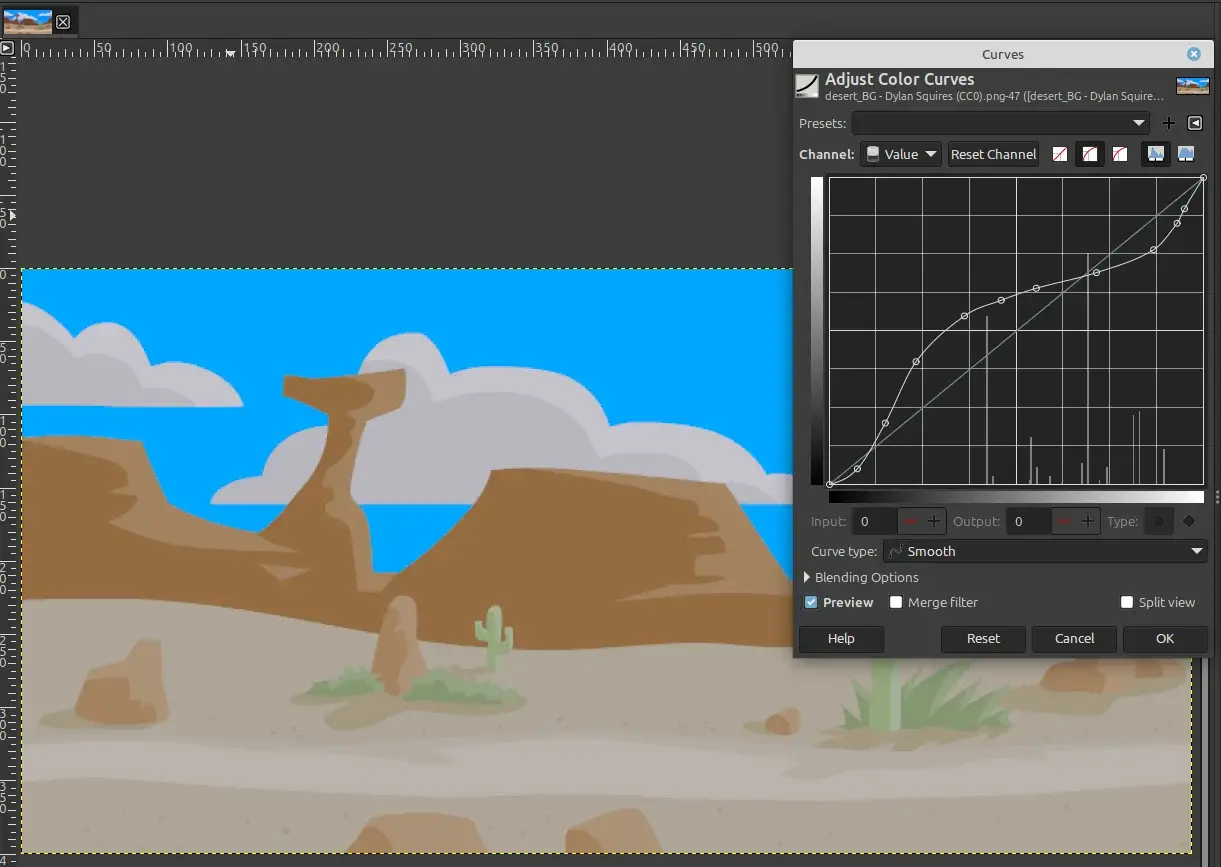
GIMP 3.0 (2025) made filters non-destructive. Its release notes say most filters, such as Curves, stay editable on the layer after you apply them, and you can show, hide, reorder or merge them later. It also added selecting several layers at once, editable text outlines, wider color management with CMYK soft-proofing, and Python 3 scripting.
GIMP 3.2, released on 14 March 2026, went further. Its release notes add link layers, which update when the outside file changes (GIMP compares them to Photoshop's linked smart objects), and vector layers drawn with the Path tool, whose stroke and fill stay editable. Filters can now run non-destructively on channels, and an empty layer group in Pass through mode with a filter on it affects everything below, which GIMP describes as a way to recreate the adjustment layer workflow of other software. The MyPaint Brush tool gained 20 brushes.
Pixlr Editor and Pixlr Express
Pixlr splits its tools between two editors. Pixlr Editor is the layered one: layers you can group, link, merge and set to blend modes; masks you can invert, apply or turn into a selection; marquee, lasso (including magnetic), magic wand and Select subject; an Adjustment menu with Curves, Levels, Hue and saturation, Color balance, Color lookup, Exposure and more; layer styles such as drop shadow, glow, outline and bevel; text layers; and Heal, Clone, Liquify, Dodge and Burn among its tools.
Pixlr Express is for quick jobs: crop with presets for Facebook, Instagram, X, YouTube and print sizes, cutouts, adjustments, effects and filters, liquify, retouching, drawing, text and stickers, with layers and blend modes kept simple.
The Pixlr pages we checked don't mention adjustment layers or smart objects. That isn't proof they're missing, but in our PSD test below, the file's adjustment layers did not come through. GIMP keeps adjustments editable through its non-destructive filters instead. Our guide to layer masks explains a technique both editors share, and layers explained covers the basics if you are new to either.
PSD support in GIMP and Pixlr
Neither GIMP nor Pixlr uses PSD as its own format, and both lose something when a Photoshop file comes in.
Opening a PSD in GIMP
GIMP imports PSD and PSB files with their pixel layers, imports and exports CMYK PSD, and since 3.2 also exports PSB and imports some layer styles such as Drop Shadow, Inner Shadow and Outer Glow. When a file has features it can't handle, it shows a compatibility notice. In the source of GIMP 3.2.8's PSD plug-in, that notice says adjustment layers and smart objects "will show up as empty layers", and that text layers, fill layers and vector masks are converted to raster layers. GIMP's help on layer effects adds that its own non-destructive filters are merged when you export, even to PSD. GIMP can also load Photoshop Curves and Levels presets and Photoshop patterns.
Opening a PSD in Pixlr
Pixlr's Suite page says it "supports layered PSD files", imports JPEG, PNG, GIF, TIFF and BMP, and lists JPEG, PNG and WebP for export. The Editor page doesn't mention PSD at all. We built a layered PSD of a red lighthouse on a rocky islet, with two groups, a layer mask, Curves and Hue/Saturation adjustment layers and an editable title, and opened it in Pixlr Editor, signed out.
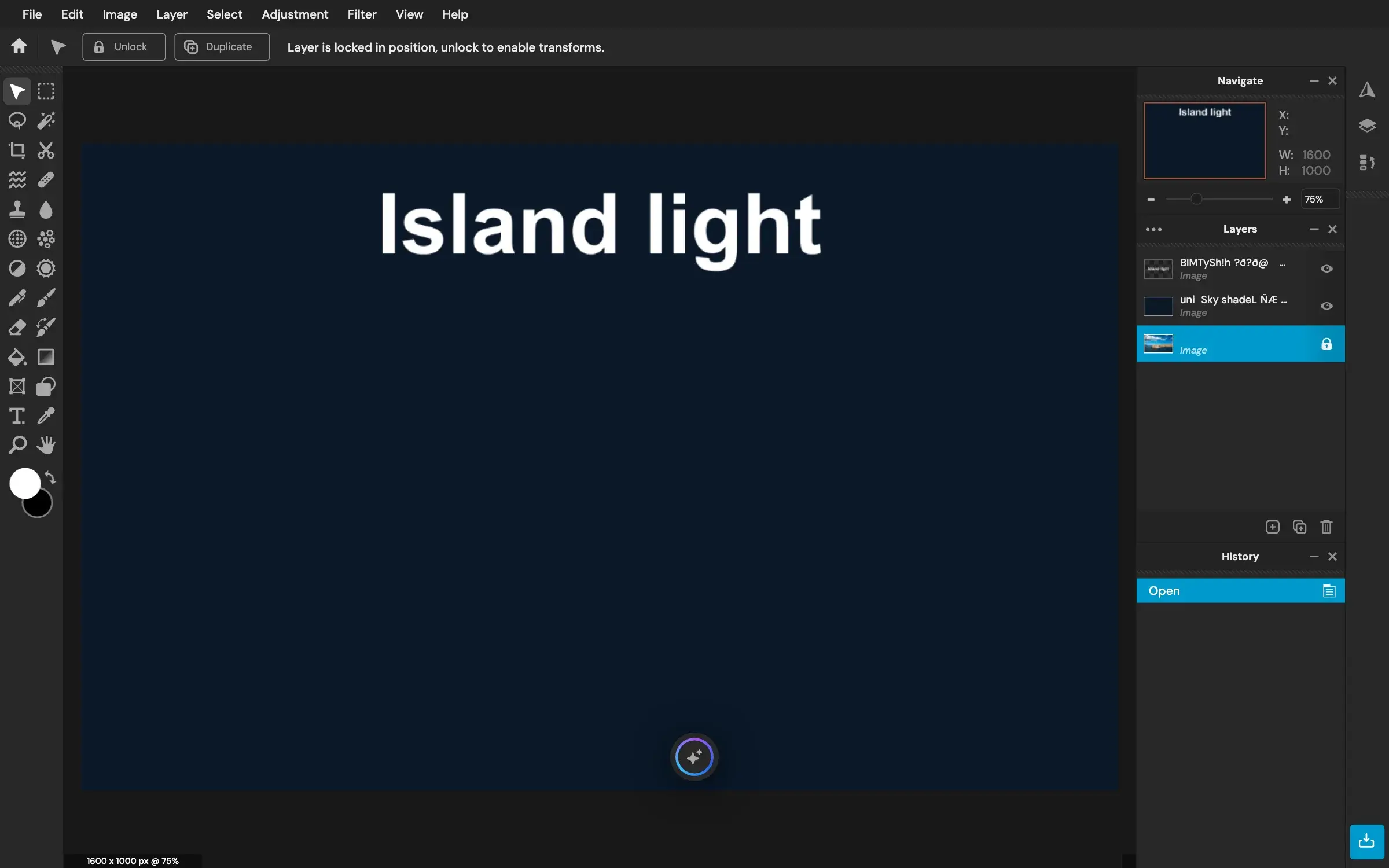
The pixel layers arrived, and the structure was lost. The groups and the layer mask were gone, so the dark Sky shade layer covers the whole photo; the Curves and Hue/Saturation adjustment layers were missing; and the title came in as an image layer rather than editable text. The layer names also came in garbled or empty. That matches what we saw in Pixlr Express on our Pixlr alternatives page. Pixlr also can't save a PSD back out, by its own list of export formats.
If PSD matters, GIMP is the better of the two because it can at least export PSD and PSB, but neither is a safe round trip for a client's layered file. For that, look at an editor that keeps PSD layers editable; our guide on opening a PSD without Photoshop covers the options, and the PSD to PNG converter flattens one in the page.
AI features in GIMP and Pixlr
Pixlr has far more AI tools. Across Editor and Express it lists generative fill, generative expand, generative transform, Instruct Editor, background remover, object remover, noise remover, super sharp, colorize, skin enhancer, face swap, sticker maker, AI auto mask, extract layers and an image upscaler, plus separate image, video and audio generators. Each AI action shows its credit cost, and plans cap how many generations run at once.
GIMP's release notes for 3.0 and 3.2 list no generative AI features, and gimp.org doesn't describe built-in AI tools. Its help documents classic tools for the same jobs done by hand: Foreground Select for cutouts, Heal and Clone for removing objects. They take longer, but they cost nothing and need no connection.
If AI edits are the main reason you open an editor, Pixlr is the better pick of the two. If you mostly retouch, composite and export, GIMP's manual tools do the job without credits. Our tutorials on removing a background and removing an object show what the AI route looks like.
Learning curve: GIMP or Pixlr for beginners
Neither maker publishes a measure of how hard its editor is to learn, so we won't invent one. What their own pages show is enough to decide.
Pixlr is built to be easy to start. Its Suite page labels Pixlr X, the quick editor now called Express, the beginner option and Pixlr E, the layered Editor, the advanced one. Express gets you from upload to export on one screen, with crop presets for social sizes, filters and one-tap AI tools; when you outgrow it, Pixlr Editor adds layers, masks and selections in the same account.
GIMP gives you a full editor from the first launch, with dense menus, docks and many filters. Its FAQ says the project isn't building a Photoshop replacement and prefers its own design to copying other programs, so tutorials for other editors won't always map onto it. The same FAQ notes that the interface has changed between versions, so pick tutorials written for GIMP 3. In return, GIMP's online manual documents its tools one by one.
Who should choose GIMP, and who should choose Pixlr
Choose GIMP if you:
- want a full editor without a subscription or ads, or prefer open-source software
- work on Linux, or want an editor that runs without a connection once installed
- do detailed retouching, compositing or painting, and keep your own projects in XCF
- need PSD or PSB export, CMYK PSD files, or scripting in Python
Choose Pixlr if you:
- are a beginner, or mostly make quick edits, cutouts and social images
- use AI tools often, such as generative fill, expand, background removal or upscaling
- want the same account in a browser, on a desktop and on your phone
- only need JPEG, PNG or WebP at the end and are happy with a subscription
Still undecided? Our GIMP alternatives and Pixlr alternatives lists cover more options, and Pixlr vs Photoshop, Pixlr vs Canva and GIMP vs Affinity compare each with other popular editors.
A third option: Pixuvia
Pixuvia sits between the two. Like Pixlr, it runs in the browser on Windows, macOS, Linux, Android, iPhone and iPad and has two editors: the Editor, with Photoshop-style tools and menus, and the Studio, built around one-job AI tools. Unlike Pixlr, the Editor opens PSD files with their layers and saves PSD back.
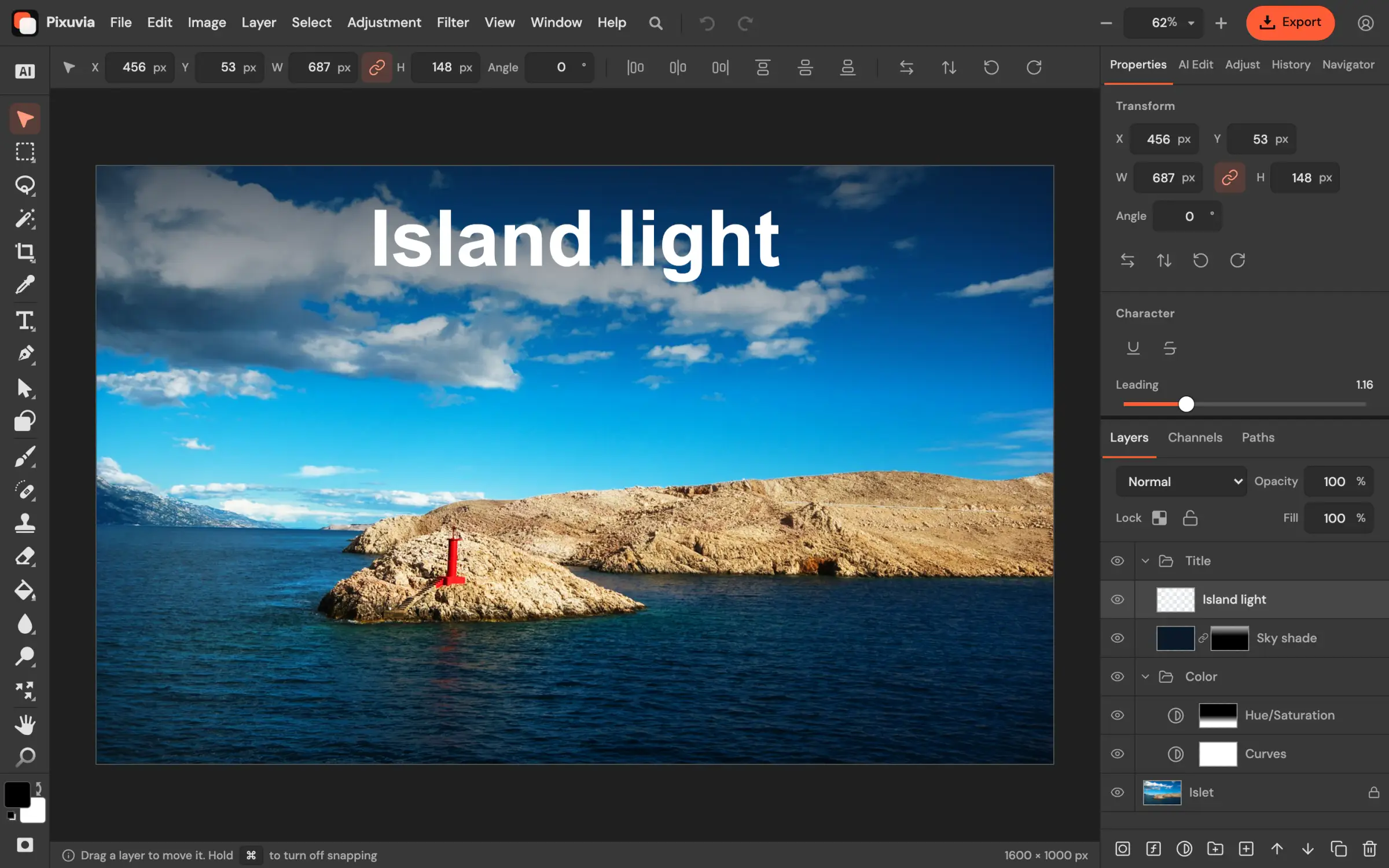
- About 50 tools, including the Pen, Quick Selection, Healing, Patch, Liquify and Puppet Warp
- 18 kinds of adjustment layers, each with its own mask, plus layer masks, vector masks and clipping masks, smart objects with smart filters and 10 layer styles
- Opens PSD files up to 60 MB with layers, groups, masks, editable text and shapes, and saves PSD, PNG, JPG, WebP, GIF, SVG, PDF and TIFF
- AI tools in both editors: remove background, erase objects, generative fill, expand, upscale, relight and edit by prompt; they need a sign-in and use credits (see pricing), while the background remover's Standard method uses no credits
It has limits. Like Pixlr, it needs a browser, so it isn't an installed open-source program like GIMP. It works in 8-bit RGB with no CMYK mode, doesn't keep alpha channels or masks and effects on groups in PSD export, opens warped or linked smart objects and text on a path as pixels, and doesn't open PSB files, which GIMP does. If those cases don't touch your files, try it with your own PSD in the online PSD editor, or see how it compares in Photopea vs Pixlr and Photopea vs GIMP.
Questions
Is GIMP or Pixlr better?
It depends on what you edit and how you want to pay. GIMP is the deeper editor: open source, at no cost, installed on Windows, macOS or Linux, with non-destructive filters, link and vector layers and its own XCF project format. Pixlr is quicker to start and has far more AI tools, in a browser, desktop app or phone app, paid through a subscription and AI credits.
Is Pixlr or GIMP better for beginners?
Pixlr is easier to start with. Pixlr Express takes you from upload to export in one screen with crop presets for social sizes, filters and one-tap AI tools, and Pixlr Editor adds layers when you need them. GIMP gives you a full desktop editor from the first launch, and its own FAQ says it does not try to copy other programs, so expect to learn its names and menus.
Does GIMP cost anything?
No. GIMP is open-source software under the GNU General Public License and costs nothing to download. Its FAQ says you can use it for any purpose, commercial work included. The project accepts donations.
Can Pixlr or GIMP open PSD files?
Both import PSD. GIMP imports pixel layers, and its own notice says adjustment layers and smart objects come in as empty layers and text becomes pixels. Pixlr says it supports layered PSD files; in our test, Pixlr Editor opened our PSD as plain image layers, without its groups, layer mask or adjustment layers, and with the title as pixels. GIMP can export PSD; Pixlr lists JPEG, PNG and WebP for export.
Does GIMP have AI tools like Pixlr?
Not built in. The GIMP 3.0 and 3.2 release notes list no generative AI features. Pixlr lists generative fill, generative expand, background and object removal, upscaling, noise removal, an image, video and audio generator and more, each run paid with AI credits.
Does Pixlr work on Linux?
Pixlr runs in the browser, so it works on any computer with a modern browser. Its downloadable desktop app is listed for Windows and Mac. GIMP has official Linux builds as AppImage, Flatpak and Snap packages.
Sources
- GIMP: Downloads (version 3.2.8, platforms and stores)
- GIMP: Frequently asked questions (commercial use, design, tutorials)
- GIMP 3.0 release notes
- GIMP 3.2 released (14 March 2026)
- GIMP 3.2 release notes
- GIMP 3.2.8 released (official builds)
- GIMP 3.2.8 source: PSD import plug-in (compatibility notice)
- GIMP Help: Layer effects
- GIMP Help 3.0: contents (tools)
- Pixlr: Pricing and FAQ
- Pixlr: Pixlr Editor
- Pixlr: Pixlr Express
- Pixlr: Pixlr Suite (platforms, file formats)