Photopea vs Pixlr: which online editor fits you?
By Pixuvia · · Updated
Photopea vs Pixlr comes down to file work against quick edits. Photopea is the pick for PSD files and Photoshop-style layers: PSD is its main format, you can edit without an account, and Premium is a one-time payment. Pixlr suits fast edits and AI tools across web, desktop and mobile, paid through a monthly or yearly subscription.
A note before the details: we make Pixuvia, a browser photo editor, and we cover it briefly near the end. Every fact about Photopea and Pixlr below comes from their own websites and apps, checked in November 2026, with links in the sources.
On this page
Photopea vs Pixlr at a glance
| Question | Photopea | Pixlr |
|---|---|---|
| Where it runs | In the browser; the site says it runs on any device | Web, desktop and mobile under one Pixlr account |
| Account to edit | Not needed; log in only for Premium or synced settings | Needed for a plan; the site says an account adds features and cloud saving |
| How you pay | Ads, or a one-time Premium payment for 30, 90 or 365 days | Subscription: Plus, Premium or Ultra (with an Ultra MAX upgrade), monthly or yearly |
| Ads | Shown without Premium | Every plan lists removing ads as a benefit |
| PSD | Opens and saves; its main format | Says it supports layered PSD; listed exports are JPEG, PNG and WebP |
| Project format | PSD | .PXZ (Pixlr document) |
| Export formats | JPG, PNG, SVG, PDF, PSD and others | JPEG, PNG, WebP |
| AI tools | Remove BG and Magic Replace, with AI credits for Premium | A long list of AI tools plus an image and video generator, paid with credits |
| Best for | PSD files, designers, Photoshop habits | Quick edits, social images, heavy AI use |
How you pay for Photopea and Pixlr
Photopea has no subscription. The editor is supported by ads, and its terms say anyone can use it for any purpose. Premium is a one-time payment for 30, 90 or 365 days, for one person or for a team. Premium removes the ads and adds more PeaDrive storage, monthly AI credits and twice as many history steps. When the period runs out, Photopea switches the account back to the version with ads, and its terms say it never sends emails, so there is no renewal to cancel.
Pixlr sells three subscription tiers, Plus, Premium and Ultra, with an Ultra MAX upgrade on Ultra, each billed monthly or yearly. Every tier lists editing without ads, unlimited saves and a monthly allowance of AI credits. Higher tiers add more credits, more AI generations running at once, private mode for generations, a fonts and templates library and, on Ultra, extended high-resolution exports. Without a plan, Pixlr offers a smaller set of credits to try its AI tools.
Two terms on Pixlr's pricing page are worth reading before you pay. Its FAQ says Pixlr is unable to process refunds once a payment has gone through, and subscription credits reset to zero when you cancel (separately bought credit packs don't expire). It also says AI availability is not guaranteed and may vary with demand.
PSD and file support: Photopea or Pixlr?
Photopea is the clear choice for PSD. Its opening and saving guide calls PSD its main format, supported for both opening and saving, and every file you open is converted to a PSD document. That means layers, masks, layer styles, text and smart objects stay editable as you work, and you can hand a PSD back to someone using Photoshop.
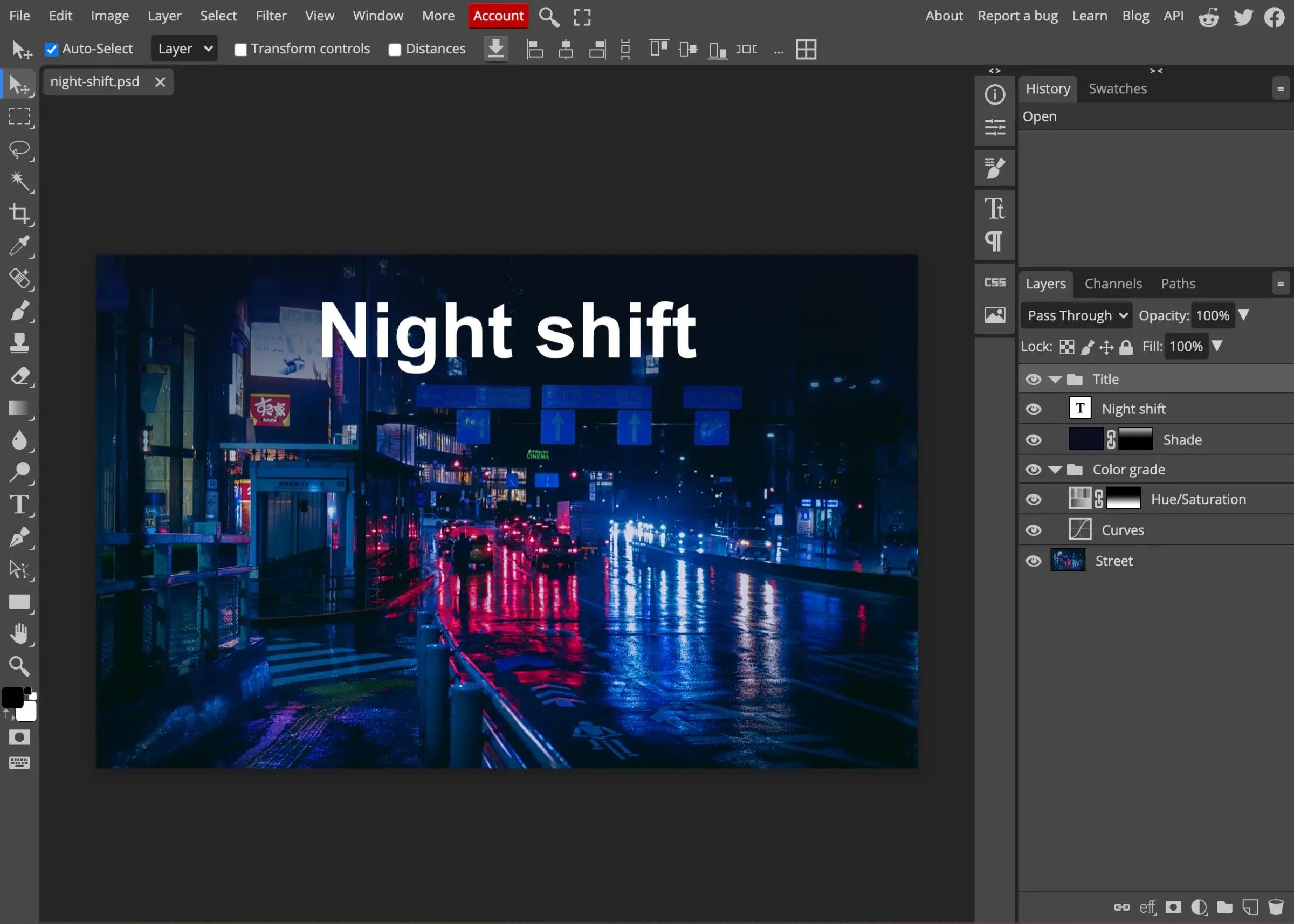
Photopea also opens a long list of other formats, including PNG, JPG, WebP, AVIF, HEIC, TIFF, SVG, PDF, AI, EPS, Figma and Sketch files, plus camera RAW formats such as DNG, CR2, CR3, NEF and ARW.
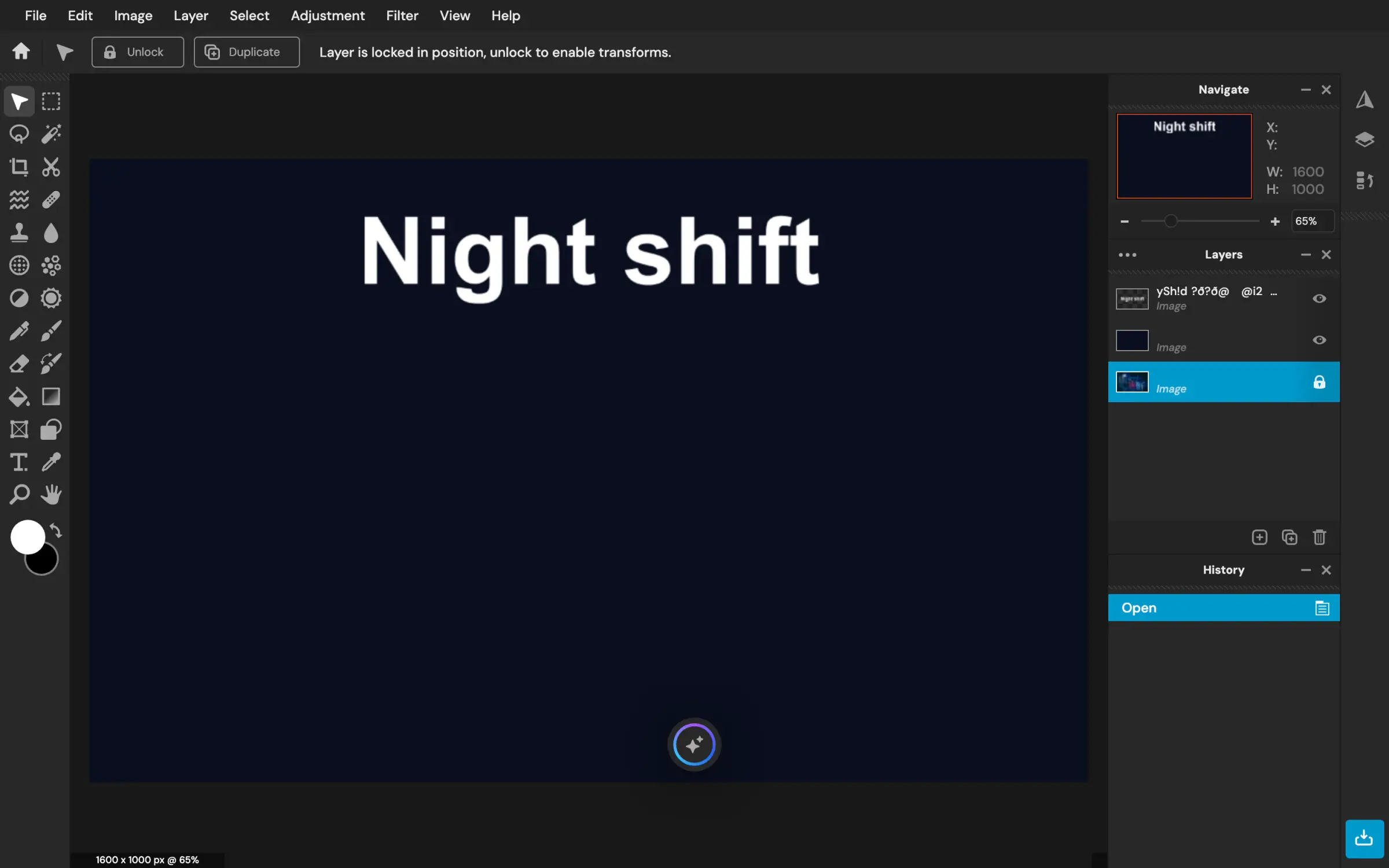
Pixlr is more limited here. Its Pixlr Suite page says it supports layered PSD files and imports JPEG, PNG, GIF, TIFF and BMP, while its listed export formats are JPEG, PNG and WebP. To keep layers between sessions, Pixlr saves its own .PXZ project file. The main Editor page does not mention PSD, and we did not test PSD export, so if a client expects a layered PSD back, Photopea is the safer bet. In our test with the layered file shown below, Pixlr Editor opened its pixel layers but not its groups, layer mask or adjustment layers, and the title came in as an image layer rather than editable text.
Need a flat image from a PSD rather than an editor? Our PSD to PNG converter turns one into a PNG in the page.
Editing tools compared
Photopea follows Photoshop's vocabulary closely. Its Learn pages cover layers, masks, layer styles, smart objects (including linked ones and smart filters), adjustments and filters, selections with Refine Edge and channels, Free Transform, brushes, text, vector shapes, artboards, actions, scripts, animation, slices, Vanishing Point, Blur Gallery and layer comps. If you learned Photoshop, most menus will be where you expect them.
Pixlr splits its tools across two editors. Pixlr Editor has layers you can add, duplicate, merge and arrange; masks, including AI Auto Mask; an Adjustment menu with Curves, Levels and Hue and saturation; text layers and templates; brushes; marquee, lasso and magic wand selections; and Select subject. Pixlr Express handles quick jobs: crop presets, cutouts, effects and filters, liquify, retouching, drawing, text and layers with blend modes.
The pages we checked for Pixlr don't mention adjustment layers or smart objects. That doesn't prove they are missing, but if your workflow depends on them, Photopea documents both. Our guide to using layer masks explains the technique that both editors share.
AI features in Photopea and Pixlr
Pixlr puts AI at the center. Across Editor and Express it lists AI super scale, generative fill, generative expand, generative transform, object remover, background remover, remove noise, super sharp, colorize, skin enhancer, face swap, sticker maker, extract layers and a generative assistant, plus a separate AI image and video generator. Each tool costs credits, and plans cap how many generations run at once.
Photopea's AI is smaller in scope. The app offers Remove BG and Magic Replace, and Premium includes a monthly allowance of AI credits; the app says AI credits are available only to Premium users. Without Premium, the app offered to run an AI tool after a short ad when we checked. Photopea's Learn pages don't document these AI tools yet, so expect fewer options and less guidance than Pixlr gives.
If AI edits are the main reason you open a photo editor, Pixlr has the deeper toolset. If you mostly retouch, compose and export, Photopea's classic tools, such as Spot Healing, Healing Brush and Patch, cover the job without credits.
Ease of use and devices
Pixlr is easier to start with. Express gives a short path from upload to export, and Pixlr Editor adds layers when you need them. Pixlr says plans work on web, desktop and mobile through one account. One caution from its own pages: history is only saved temporarily in the browser cache, so save a .PXZ file if you want to come back to a project.
Photopea asks more of a beginner because it mirrors a professional editor, with dense menus and panels. In return there is nothing to install and no account to make. Photopea says it runs on any device and processes files locally, and its terms say files you open are never sent anywhere. Its terms also warn that closing Photopea without saving loses your work, so save to your device, PeaDrive, Dropbox, OneDrive or Google Drive as you go.
Who should choose Photopea, and who should choose Pixlr
Choose Photopea if you:
- open, edit and send back PSD files, or work with designers who use Photoshop
- want to edit without an account and can live with ads, or prefer a one-time payment to a subscription
- need smart objects, layer styles, actions or scripts
- work with RAW photos or design files such as AI, Figma or Sketch
Choose Pixlr if you:
- mostly make quick edits, social images or cutouts
- use AI tools often, such as generative fill, expand or upscaling
- want one account across web, desktop and mobile
- only need JPEG, PNG or WebP files at the end
A third option: Pixuvia
Pixuvia sits between the two. Its Editor uses Photoshop-style tools and menus, and its Studio is built around one-job AI tools, plus filters, text and collages. Both run in the browser on Windows, macOS, Linux, Android, iPhone and iPad.
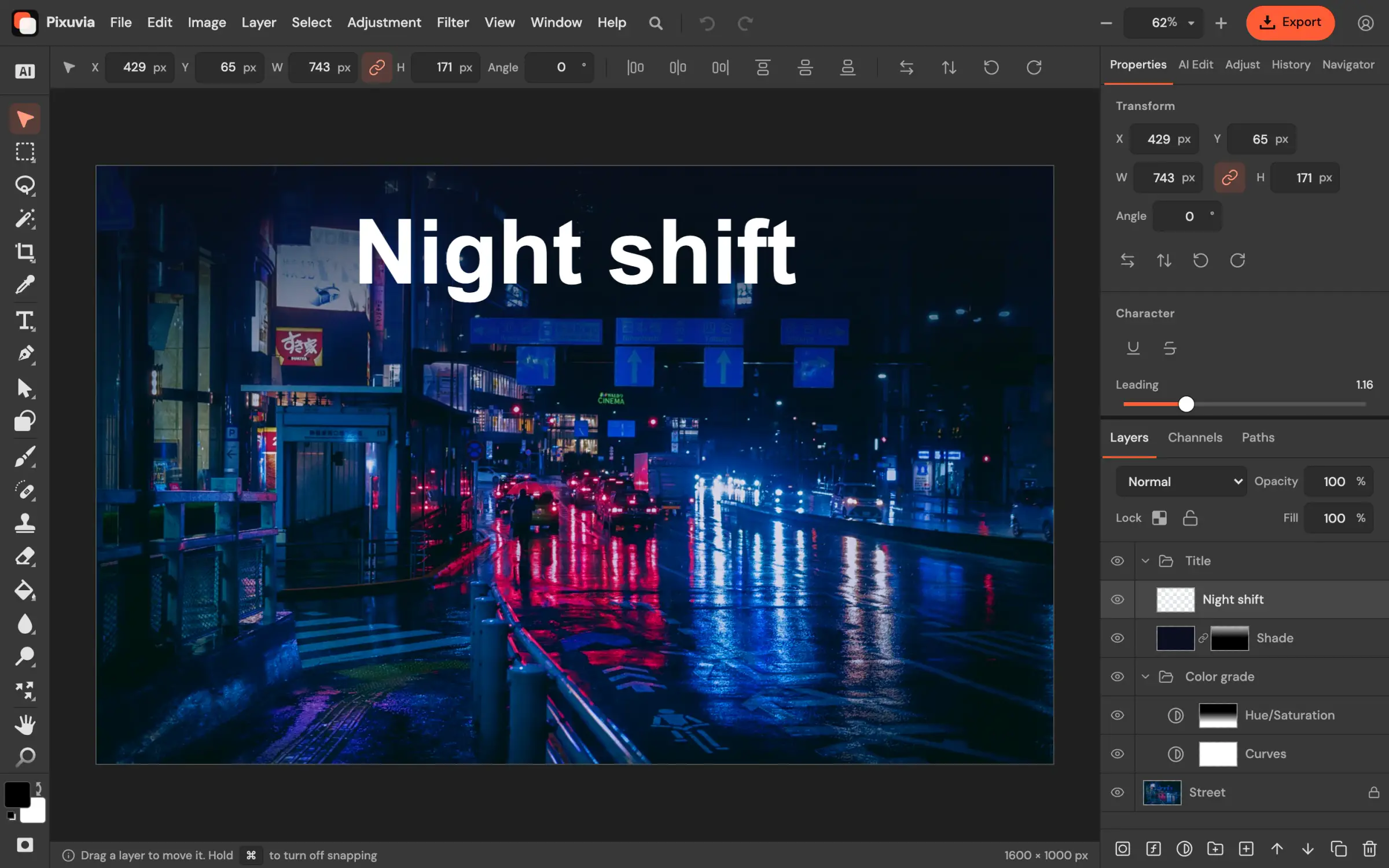
- About 50 tools, including the Pen, Quick Selection, Healing, Patch, Liquify and Puppet Warp
- 18 kinds of adjustment layers, each with its own mask, plus layer masks, vector masks and clipping masks
- Smart objects with smart filters, 10 layer styles and Photoshop blend modes
- Opens PSD files up to 60 MB with layers, groups, masks, editable text and shapes, and saves PSD, PNG, JPG, WebP, GIF, SVG, PDF and TIFF
- AI tools (remove background, erase objects, generative fill, expand, upscale, relight, edit by prompt) in both editors, which need a sign-in and use credits; see pricing
The limits matter too. Pixuvia exports 8-bit RGB, doesn't keep alpha channels or masks and effects on groups, opens warped or linked smart objects and text on a path as pixels, and doesn't open PSB files. If your files rely on these, check Photopea's documentation for how it handles them. If those cases don't touch your files, try it with your own PSD in the online PSD editor, or compare more options in our list of Photoshop alternatives.
Questions
Is Photopea or Pixlr better?
For PSD files and Photoshop-style layer work, Photopea is the better fit: PSD is its main format and it opens and saves it. For quick edits and a wide set of AI tools on web, desktop and mobile, Pixlr fits better, as long as you are happy with a subscription.
Can Pixlr open PSD files?
Pixlr says it supports layered PSD files. Its listed export formats are JPEG, PNG and WebP, and its own project format is .PXZ. If you need to send a layered PSD back to someone, check the result before relying on it.
Does Photopea need an account?
No. Photopea says you can edit and save without logging in. You only log in to buy Premium or to sync settings.
Does Photopea have a subscription?
No. Photopea Premium is a one-time payment that lasts 30, 90 or 365 days. When the period ends, the account goes back to the version with ads. Pixlr, by contrast, sells monthly or yearly subscriptions.
Which one has more AI tools?
Pixlr. It lists generative fill, generative expand, object and background removal, upscaling, noise removal and more, plus an image and video generator, all paid with AI credits. Photopea offers Remove BG and Magic Replace in the app, with monthly AI credits for Premium accounts.
Can I use Photopea or Pixlr on a phone?
Photopea runs in the mobile browser; its site says it works on any device. Pixlr says its plans cover web, desktop and mobile through one Pixlr account.
Sources
- Photopea: home page and in-app Account window (Premium terms)
- Photopea Learn: Opening and saving files
- Photopea Learn: topic index
- Photopea Learn: Smart objects
- Photopea: Accounts
- Photopea: Terms of use
- Pixlr: Pricing and FAQ
- Pixlr: Pixlr Editor
- Pixlr: Pixlr Express
- Pixlr: Pixlr Suite (file formats)
- Pixlr: Pixlr E (export formats)