GIMP vs Affinity: which editor fits your work now?
By Pixuvia · · Updated
GIMP vs Affinity used to be a simple trade: GIMP cost nothing, Affinity Photo cost a one-time fee. That changed on 30 October 2025, when Canva merged Affinity Designer, Photo and Publisher into one app called Affinity and made it available at no charge to individuals. Today the choice turns on other things. GIMP is open source, needs no account and runs on Linux. Affinity needs a Canva account, runs on Windows, macOS and iPad, and puts photo editing, vector design and page layout in one app, with AI tools for people on a Canva premium plan.
A note before the details: we make Pixuvia, a browser photo editor, and we cover it briefly near the end. Every fact about GIMP and Affinity below comes from their own websites, help pages and release notes, or from news reports of the Affinity relaunch, checked in November 2026, with links in the sources. We did not test either desktop app for this page, so where their pages are silent, we say so.
On this page
- GIMP vs Affinity at a glance
- How you pay, and the accounts each needs
- Platforms: Linux, Windows, macOS and iPad
- Editing tools compared
- PSD support: what each keeps
- AI features in GIMP and Affinity
- Raster, vector and layout: Affinity's studios
- Learning curve
- Who should choose GIMP, and who should choose Affinity
- A third option: Pixuvia
- Questions
- Sources
GIMP vs Affinity at a glance
| Question | GIMP | Affinity |
|---|---|---|
| Made by | The GIMP Team, a volunteer open-source project | Canva (Affinity was made by Serif, which Canva owns) |
| Latest version | GIMP 3.2.8 (November 2026) | The September 2026 update; iPad app launched November 2026 |
| How you pay | Open source under the GNU GPL, no charge | No charge for individuals; AI tools need a Canva premium plan |
| Account | None | A Canva account to download and activate |
| Where it runs | Linux, Windows and macOS, on x86 and ARM | Windows, macOS and iPadOS; Linux not listed |
| What it covers | Photo editing, painting, graphics; vector layers since 3.2 | Pixel, Vector and Layout studios in one app (plus Sketch on iPad) |
| Editable adjustments | Non-destructive filters on layers, groups and channels | Adjustment layers and live filter layers |
| PSD | Imports and exports, including CMYK PSD; layer effects merged on export | Imports layered PSD; sends PDF or PNG to Photoshop, not editable |
| AI tools | Not listed in its release notes | Generative Fill, Generative Expand, Super Resolve and more, with a Canva premium plan |
| Best for | Linux users, open-source fans, scripting and plug-ins | Photo editing plus design and layout in one app, on Windows, Mac or iPad |
How you pay, and the accounts each needs
GIMP costs nothing and asks for nothing. It is released under the GNU General Public License, you download it from gimp.org without signing in, and its FAQ says you can use it for any purpose, commercial work included, with no restrictions on what you make with it.
Affinity also costs nothing for individuals now, but through a different model. Affinity's FAQ says individuals can use every tool in the Pixel, Vector and Layout studios, plus all export features, "with no restrictions or payment needed", and that the app keeps receiving updates. It does need an account: you sign in with a Canva account (or create one at no cost) to download Affinity and activate its license. After that, the FAQ says, you don't need to be online, even for long periods; help, lessons, stock libraries and the Canva integrations, including AI, work only online.
The paid part is AI. Affinity's AI tools come from the Canva AI Studio and need a Canva premium plan: Pro, Business, Enterprise or Education. Organizations that need single sign-on are pointed to Canva Enterprise or Canva Education. GIMP has no paid tier at all.
If you bought the older apps, Affinity's FAQ says your Affinity V2 license stays valid and Serif keeps its activation servers online, but the V2 apps won't receive future updates, and files saved in the new Affinity can't be opened in V2. MacRumors' launch report describes the switch as trading a one-time purchase for a Canva account and Canva integration.
Platforms: Linux, Windows, macOS and iPad
This is GIMP's clearest advantage. The GIMP 3.2.8 release lists official builds as Linux AppImage, Flatpak and Snap packages, a Windows installer and a Microsoft Store version, all for x86 and ARM, and macOS disk images for Intel and Apple silicon Macs. gimp.org lists no web or mobile version.
Affinity's FAQ says it is "currently available on Windows, macOS, and iPadOS". Linux is not listed anywhere on its site, so on Linux, GIMP is the one of the two you can install. The iPad app arrived on 2 November 2026, a year after the desktop app, according to CG Channel, which reports that it needs iPadOS 18 or later. Affinity's iPad page adds a Sketch studio and says some desktop features aren't on iPad at launch, among them Books, Batch, Data Merge, recording macros and the Astrophotography studio.
Editing tools compared
Both editors cover the core of photo work: layers, layer masks, groups, selections, painting, healing, cloning and text. The difference is how edits stay editable and how much else lives in the same app.
GIMP 3.0 and 3.2
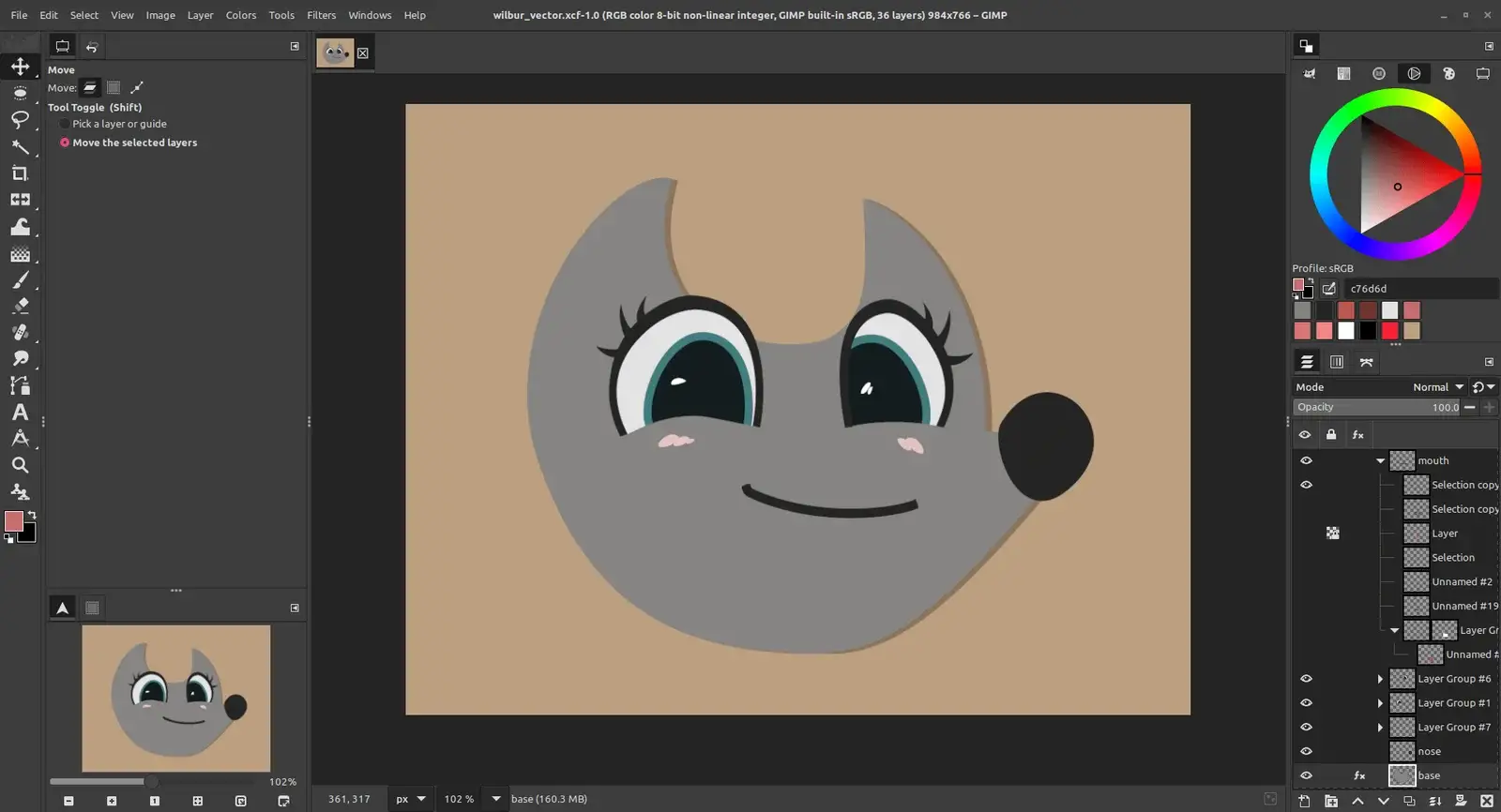
GIMP 3.0 brought non-destructive editing to GIMP. Its release notes introduce non-destructive filters: most GEGL filters, such as Curves, stay editable on the layer after you apply them, and you can show, hide, reorder, delete or merge them from the layer's fx menu. GIMP's help calls these layer effects and notes that they are saved in XCF files. GIMP 3.0 also lets you select several layers at once, adds wider color management with soft-proofing, and Python 3 scripting.
GIMP 3.2 added link layers, which embed an outside image that updates when that file changes, and vector layers drawn with the Path tool, whose stroke and fill stay editable and which you can rotate, scale and transform non-destructively. Filters can now run on channels, and an empty layer group set to Pass through with a filter on it works like an adjustment layer for everything below.
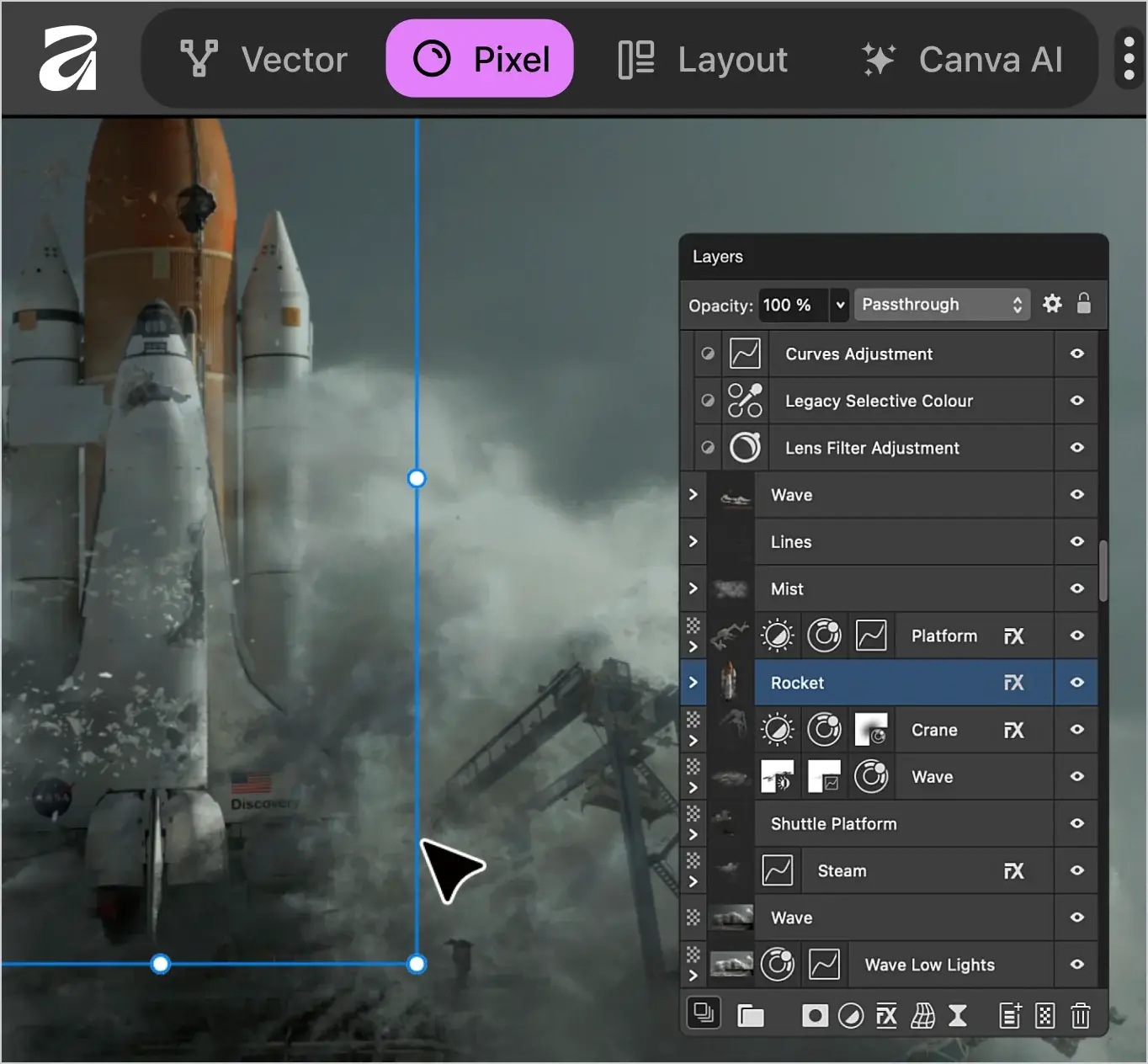
Affinity's Pixel studio
Affinity's photo editing page says editing is non-destructive by default, with "non-destructive adjustment layers and live filter layers" such as Curves, Levels, Color Balance and Selective Color. It lists RAW Develop with lens profiles and noise reduction, channel, luminosity and depth masks, clipping masks, spot healing, inpainting and clone tools, Liquify and mesh warp, frequency separation, HDR Merge, Focus Merge and astrophotography stacking, plus macros and batch processing. You can also save your undo history inside the file.
Affinity's September 2026 update added nine color, sharpening and detail adjustments, editable RAW looks saved as presets, and in-app scripting that runs across the three studios.
On color modes, GIMP's FAQ says CMYK as a core image mode is on its roadmap with no timeline; it imports and exports CMYK JPEG, TIFF, PSD and JPEG XL files. Affinity's photo page mentions a high-bit-depth workflow with ICC profiles, and its layout page promises press-ready PDF with bleed and crop marks; the pages we checked don't spell out its document color modes. Our guide to layer masks explains the masking technique both editors share.
PSD support: what each keeps
Neither app uses PSD as its own format: each saves its work in its own file type. Both open Photoshop files, with limits.
GIMP reads and writes PSD through a plug-in. Its help on saving and exporting says XCF is the only format that stores everything about an image, and its layer effects are merged when you export, even to PSD. GIMP 3.0 added CMYK PSD import and export and a PSD export dialog for clipping paths, CMYK profiles and metadata; GIMP 3.2 added PSB export and imports more layer styles, such as Drop Shadow, Inner Shadow and Outer Glow.
Affinity's FAQ says you can open layered PSDs "including masks, groups, and adjustments in most cases", while "smart objects and advanced filters may flatten". For the way back, it says you can export designs "as clean PDFs or PNGs that open in Photoshop, however, this does not preserve editability". Its photo page lists JPEG, PNG, TIFF, WebP and PDF as export formats and doesn't describe a layered PSD export. Affinity also imports Illustrator files saved with PDF compatibility, InDesign IDML and, since September 2026, INDD files.
So if you trade layered PSD files with Photoshop users in both directions, GIMP's own pages describe the round trip more fully, with the effects caveat. Either way, open a copy of an important file and check each layer. If you only need to view or flatten a PSD, our guide on opening a PSD without Photoshop covers the options.
AI features in GIMP and Affinity
GIMP's release notes for 3.0 and 3.2 list no generative AI features, and gimp.org doesn't describe any built-in AI tools. Its help documents classic tools for the same jobs done by hand, such as Foreground Select, Heal and Clone.
Affinity's photo page lists Generative Fill, Generative Expand, Smart Selections, Depth-Aware Masking, Portrait Blur, Colorize and Super Resolve, all through the Canva AI Studio inside the app and all for Canva premium plans only: its FAQ answers "Can I access AI tools without a Canva Pro or other premium plan?" with "No". The September 2026 update names further AI features, including Scene Decomposition, Mixed Light Correction, Motion Blur Reduction, Generative Upscale and SDR to HDR, and says Affinity doesn't use your work to train its AI features.
If AI edits matter to you, Affinity is the only one of the two with them, and you will pay Canva for them. If you want AI tools without either app, the Pixuvia AI photo editor and the pages for removing objects and extending images run in the browser.
Raster, vector and layout: Affinity's studios
This is where the two apps differ most. GIMP is a raster editor first: it edits pixels, and since 3.2 its vector layers let you draw editable shapes inside a raster image. It has no page layout features and no multi-page documents.
Affinity is three apps in one. A switcher at the top of the window moves between the Pixel studio (the old Affinity Photo), the Vector studio (the old Designer) and the Layout studio (the old Publisher), in the same window. Its graphic design page describes vector tools for logos and illustration and exports PDF, SVG, PNG, JPEG, TIFF and WebP. Its page layout page lists master pages, shared text styles and PDF with bleed and crop marks. If you make posters, brochures, books or logos as well as edit photos, Affinity covers work that GIMP doesn't try to.
Learning curve
Neither maker publishes a measure of how hard its app is to learn, so we won't guess. Two things are worth knowing. GIMP's FAQ says the project isn't building a Photoshop replacement and prefers its own design to copying other programs, so Photoshop habits and menu names won't always carry over, and older tutorials may show a different interface than GIMP 3. Affinity's FAQ says it supports workflows similar to Photoshop's, such as retouching, RAW development and compositing, and the app includes lessons, which need an internet connection.
Who should choose GIMP, and who should choose Affinity
Choose GIMP if you:
- work on Linux, or want the same editor on Linux, Windows and macOS
- prefer open-source software you can download and use without any account
- want to script or extend your editor in Python, Script-Fu or C
- export layered PSD files back to Photoshop users and can live without layer effects
Choose Affinity if you:
- want adjustment layers, live filter layers and RAW development at no charge
- also design logos, illustrations or multi-page layouts and want one app for all of it
- edit on an iPad as well as on Windows or a Mac
- already pay for a Canva premium plan and want generative AI tools inside your editor
A third option: Pixuvia
If you want layers, masks and PSD files without installing anything, Pixuvia runs in the browser on Windows, macOS, Linux, Android, iPhone and iPad. Its Editor follows Photoshop's tools and menus, and its Studio is built around one-job AI tools.
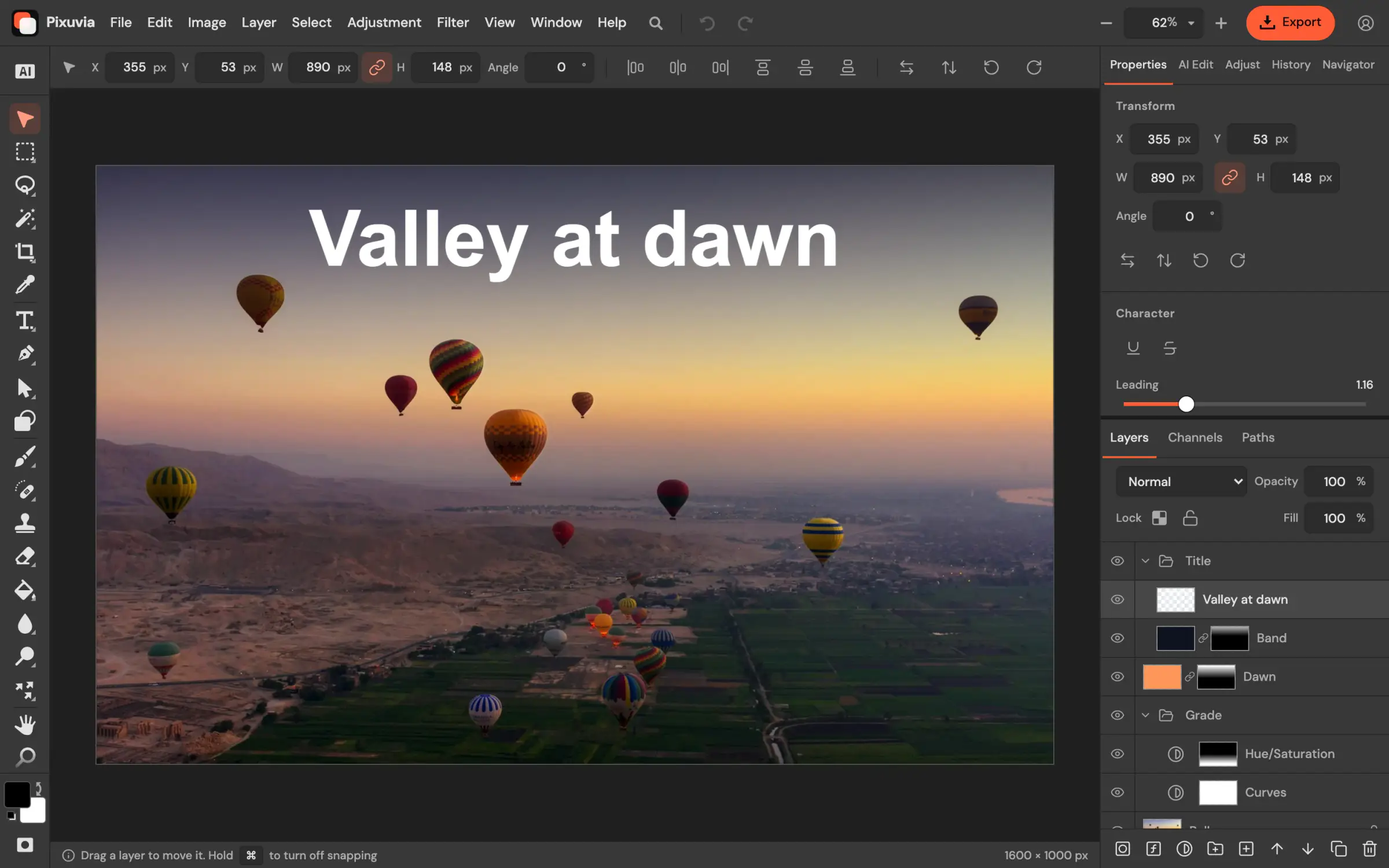
- Opens PSD files up to 60 MB with layers, groups, masks, editable text and shapes, and saves PSD, PNG, JPG, WebP, GIF, SVG, PDF and TIFF
- 18 kinds of adjustment layers, each with its own mask, plus smart objects with smart filters and 10 layer styles
- AI tools (remove background, erase objects, generative fill, expand, upscale, relight, edit by prompt) that need a sign-in and use credits; see pricing. The background remover's Standard method uses no credits.
It is not a desktop design suite: Pixuvia has shape and text layers but no vector illustration studio or page layout for multi-page documents, so for brochures or books Affinity is the better tool. It also works in 8-bit RGB with no CMYK mode, doesn't open PSB files, and opens warped or linked smart objects and text on a path as pixels. For photo edits and PSD files on any device, try your own file in the online PSD editor, or compare GIMP with Photoshop in GIMP vs Photoshop and with a browser editor in GIMP vs Pixlr.
Questions
Is Affinity better than GIMP?
For most photo and design work, Affinity offers more in one app: adjustment layers and live filter layers, RAW development, vector design and page layout, with optional AI tools for Canva premium plans. GIMP is the better pick if you work on Linux, want open-source software, or want to script and extend your editor without an account. Both cost nothing for individuals.
Is Affinity really at no charge now?
Yes, for individuals. Since Canva relaunched Affinity on 30 October 2025, its FAQ says individuals can use every tool in the Pixel, Vector and Layout studios with no payment, and that the app gets updates at no charge. You need a Canva account to download and activate it. The Canva AI tools inside Affinity need a premium Canva plan (Pro, Business, Enterprise or Education).
Does Affinity run on Linux?
Affinity's FAQ lists Windows, macOS and iPadOS, and Linux is not listed on its site. GIMP has official builds for Linux, Windows and macOS, including Flatpak, Snap and AppImage packages.
Can GIMP and Affinity open PSD files?
Both import layered PSD files. Affinity says masks, groups and adjustments come through in most cases, while smart objects and advanced filters may flatten. GIMP imports and exports PSD, including CMYK PSD, but merges its layer effects when it exports. Affinity's FAQ says files you send to Photoshop as PDF or PNG don't stay editable.
Do I need a Canva account to use Affinity?
Yes. Affinity's FAQ says you sign in with a Canva account (a basic one costs nothing) to download it and to activate the license, after which you can work offline. Online-only features include help, lessons, stock libraries and the Canva AI tools. GIMP needs no account of any kind.
What happens to Affinity Photo 2 and the other V2 apps?
Affinity's FAQ says V2 licenses stay valid and Serif keeps the activation servers online, but the V2 apps won't receive future updates. It recommends the new Affinity app and notes that files saved in the new app can't be opened in V2.
Sources
- GIMP: home page (platforms, license, latest version)
- GIMP: Frequently asked questions (commercial use, CMYK, Photoshop)
- GIMP 3.0 release notes
- GIMP 3.2 release notes (link and vector layers)
- GIMP 3.2.8 released (official builds)
- GIMP Help: Saving and exporting images (XCF)
- GIMP Help: Layer effects
- Affinity: home page (platforms, studios, file import)
- Affinity: Get Affinity and FAQ (Canva account, offline use, V2 apps, AI plans)
- Affinity: Photo editing software and FAQ (Pixel studio, PSD, AI tools)
- Affinity: Graphic design software (Vector studio)
- Affinity: Page layout software (Layout studio)
- Affinity: Affinity for iPad
- Affinity: September 2026 update
- AppleInsider: Affinity's entire suite in one app (30 October 2025)
- MacRumors: Canva relaunches Affinity (31 October 2025)
- CG Channel: Canva launches Affinity for iPad (2 November 2026)