Pixlr vs Canva: photo editor or design app?
By Pixuvia ·
Pixlr vs Canva is a photo editor against a design app. Pixlr is built to change the pixels of a photo: Pixlr Editor has layers, masks and selections, Pixlr Express does quick fixes, and a long list of AI tools runs on credits. Canva is built to arrange a finished piece, such as a social post, a presentation or a flyer, from templates, with photo edits as one feature among many and the strongest team tools of the two. If your work starts with a photo, pick Pixlr; if it starts with a template, pick Canva.
A note before the details: we make Pixuvia, a browser photo editor, and we cover it briefly near the end as a third option. Every fact about Pixlr and Canva below comes from their own websites, help centers and newsrooms, or from the news reporting we link, checked in November 2026, with links in the sources. Where we opened a file ourselves, we say so.
On this page
- Pixlr vs Canva at a glance
- What each one is built for
- Templates and design
- Photo editing tools: layers, masks and selections
- AI features and how they are paid for
- PSD support: what happens to a layered file
- Collaboration and teams
- Platforms and apps
- Pixlr or Canva: who should choose which
- A third option: Pixuvia
- Questions
- Sources
Pixlr vs Canva at a glance
| Question | Pixlr | Canva |
|---|---|---|
| What it is | A photo editor in two apps: Pixlr Editor (layers) and Pixlr Express (quick edits) | A design app for social posts, presentations, video, documents, websites and print |
| Starts from | A photo you open, or a blank canvas | A template, a blank design, or a prompt to Canva AI |
| Layers and masks | Layers, masks, adjustments and selections in Pixlr Editor | A Layers list for ordering design elements; layer masks not mentioned on its pages |
| Templates | A library of fonts, templates and elements from the Premium plan up | Millions of templates on every plan, more on paid plans, plus brand kits |
| AI tools | Generative fill and expand, object and background removal, upscaling, an image, video and audio generator | Magic Edit, Magic Eraser, background remover and generator, Magic Media and Canva AI |
| How you pay | Plus, Premium or Ultra subscription with monthly AI credits; credit packs | A plan at no cost, then Pro, Business and Enterprise, with a shared monthly AI allowance; AI Pass add-on |
| Working together | No real-time collaboration, says its FAQ | Real-time editing, comments, team admin tools and approvals |
| PSD | Opens layered PSD; in our test groups, masks and adjustment layers were lost | Imports PSD as an editable design (beta, desktop browser); some elements may be rasterized |
| Saves as | JPEG, PNG and WebP, and its own .PXZ project | JPG, PNG, WebP, SVG, PDF, PPTX, GIF and MP4 |
| Best for | Retouching, cutouts and AI edits of photos | Posts, decks and print built from templates, often by a team |
What each one is built for
Pixlr calls Pixlr Editor an "advanced online photo editor" and Pixlr Express a "modern AI powered photo editor for quick and professional edits". Both open on the same choice: open an image, create a new canvas, or make a collage. The site's menus add an AI image generator, a video generator, an audio generator, face swap and a background remover, and its home page names the outside models behind them, such as Flux, Kling, Recraft and Google Veo. The center of Pixlr is still a photo on a canvas that you change pixel by pixel.
Canva starts from the other end. Its pricing page describes a drag-and-drop editor with more than a thousand design types, and its download formats show the range: presentations go out as PowerPoint files, documents as Word files, sheets as Excel files and videos as MP4. Photos are an ingredient. Canva's photo editor page says "every image is now fully designable": you click a subject, its background or the text in a photo and adjust, move or replace it as you would an element in a template.
Canva has also grown well beyond one app. Its newsroom announced the all-new Affinity in October 2025, a professional photo, vector and layout app for Mac and Windows that is now part of Canva and costs nothing, and Canva bought the AI image company Leonardo.Ai in 2024, as TechCrunch reported. So if a Canva user needs deeper photo editing, Canva's own answer is Affinity rather than more tools inside Canva.
Templates and design
This is Canva's home ground. Its pricing page lists more than a million templates on the plan at no cost and several million on Pro and above, alongside a large stock library of photos, videos, graphics and audio. Paid plans add Magic Resize, which turns one design into the sizes of other platforms, a social content planner and scheduler, and brand kits: one kit with three colors on the plan at no cost, five on Pro and up to a hundred on Business, with approvals.
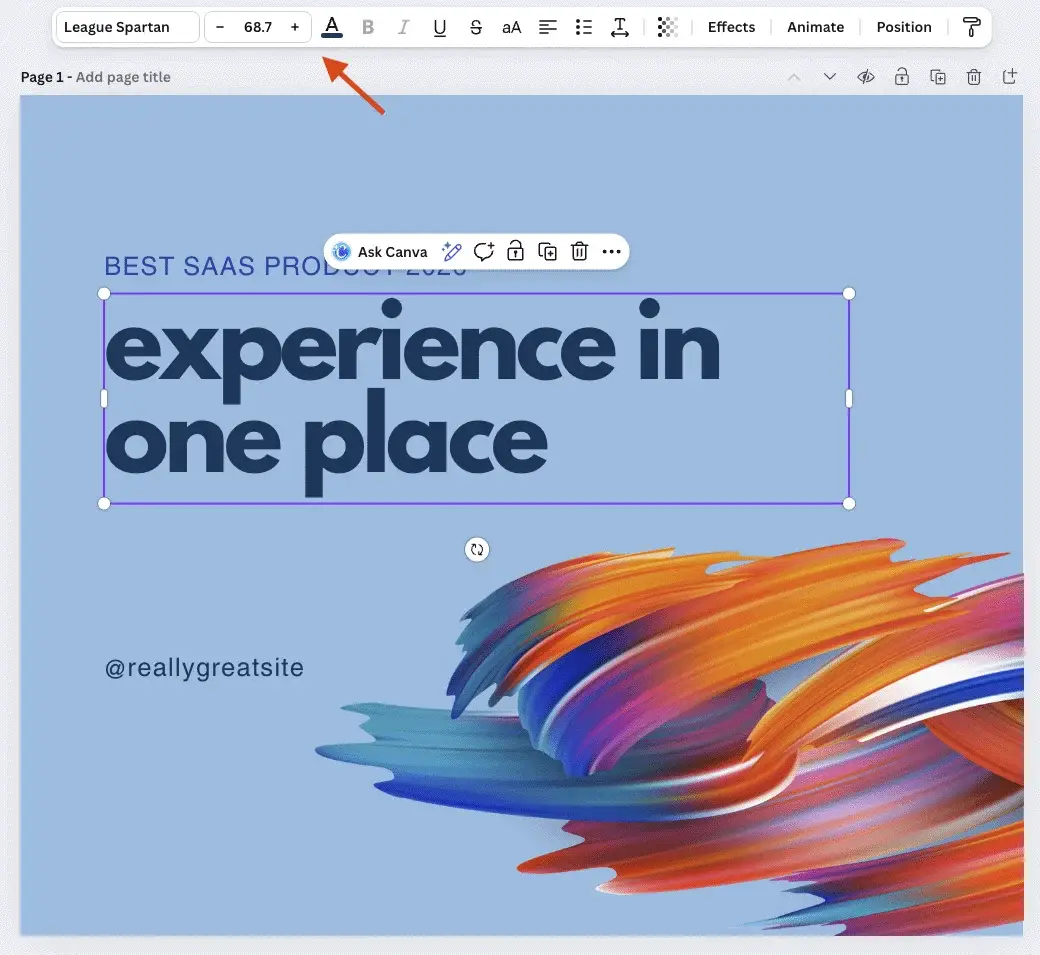
Pixlr has templates too, but they are a side door. Its pricing page lists a "big library of fonts, templates, elements, animations and more" from the Premium plan up, and the Pixlr Suite page says the library opens from an Assets panel inside the editor. There are no brand kits, design types or a content planner on the pages we checked. If you make a dozen posts a week in the same brand colors, Canva saves real time; if you make one image and spend your time on the photo inside it, Pixlr's templates are enough.
Our guide to resizing images for social media covers the exact sizes each platform wants, whichever app you use.
Photo editing tools: layers, masks and selections
Pixlr Editor works like a classic layered editor. Its pages describe layers you can add, duplicate, merge and arrange, with opacity; masks, including AI Auto Mask; an Adjustment menu with Curves, Levels and Hue and saturation; brushes, a clone stamp, liquify and filters; and marquee, lasso and magic wand selections plus Select subject. Pixlr Express keeps the quick jobs on one screen: crop presets, cutouts, effects and filters, retouching, text and drawing. If you have used Photoshop, Pixlr Editor's menus from File to View will feel familiar.
Canva edits a photo with sliders and one-click tools. The photo editor page lists adjustments for white balance, light, color and texture, applied to the whole image, the foreground or the background; Auto-adjust; filters and effects; crop to preset ratios with Smart Crop; perspective correction; focus and blur; Magic Eraser and a Pixel Eraser for removing things; and a color inverter. Canva's help center describes a Layers tab under Position that lists the elements on a page so you can select and reorder them.
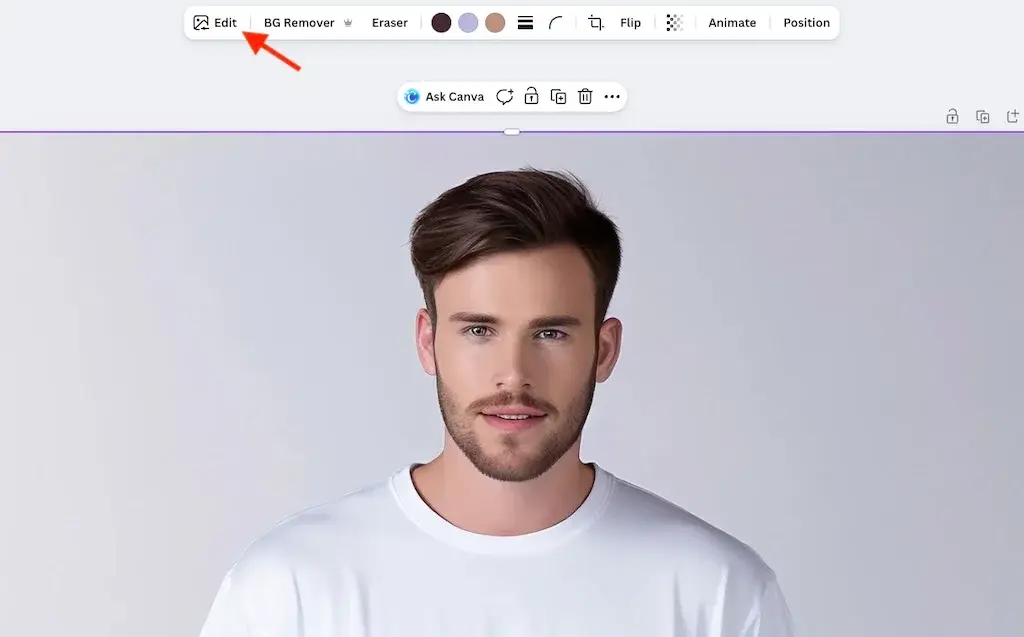
Canva's Layers list orders the elements on a page, and none of the Canva pages we checked mention layer masks, adjustment layers, Curves or Levels. So for a composite, a careful skin retouch or a color grade you can come back to, Pixlr Editor is the stronger tool. For a quick brighten, a blurred background or an object wiped out of a product shot, both are fast, and Canva keeps you in the design where the photo will be used. Our guide to using layer masks shows what masks add if you have not used them before.
AI features and how they are paid for
Pixlr puts AI front and center. Across Editor and Express it lists generative fill, generative expand, generative transform, object remover, background remover, super scale, remove noise, super sharp, colorize, face swap and an AI assistant that edits from a typed instruction, plus generators for images, video and audio. Its pricing page sells three subscription tiers, Plus, Premium and Ultra (with an Ultra MAX upgrade), monthly or yearly. Each tier comes with a monthly allowance of AI credits and a cap on generations running at once, and credit packs bought separately never expire. Two terms from its FAQ: subscription credits reset to zero when you cancel, and Pixlr does not process refunds once a payment has gone through. It also says AI availability is not guaranteed and may vary with demand.
Canva's photo AI covers the same everyday jobs. Its photo editor page lists Magic Edit, which adds, replaces or edits part of an image from a short prompt; Magic Eraser; a one-click background remover; a background generator; and Magic Media for generating images and video. On April 16, 2026 Canva announced Canva AI 2.0, which it calls its most significant product change since launch: you describe a design in conversation and it generates a fully layered, editable result, with connectors to tools such as Slack, Google Drive and Notion. It launched as a research preview, and the pricing page now lists "the new Canva AI" on every plan.
The billing models differ in shape. Canva's pricing page says its Standard, Premium and Ultra AI tools share a monthly allowance that varies by plan, that harder tasks use more of it, and that Standard AI on paid plans doesn't count against it. The plan at no cost gets limited access; Pro gets ten times as much AI as that plan and Business twenty times; and an AI Pass add-on (and, on Business, top-ups) buys more. Pixlr counts credits per run, with its plan cards estimating how many images, edits and videos a month each tier covers.
Canva is also taking over remove.bg's background removal. The remove.bg home page now says that its background removal "is moving to Canva" and that the standalone website will no longer be available from December 1, 2026. If you relied on it, our list of remove.bg alternatives compares the options.
PSD support: what happens to a layered file
Neither app is a PSD editor in the full sense, but they fail in different ways. Pixlr's Suite page says it supports layered PSD files and lists JPEG, PNG and WebP for export; to keep layers between sessions it saves its own .PXZ project. We built a small layered PSD for this page, a flower shop window titled Open on Sunday, with two groups, a Curves and a Hue/Saturation adjustment layer, a dark Shade layer faded in by a layer mask, and a text layer. We opened it in Pixlr Editor, signed out.
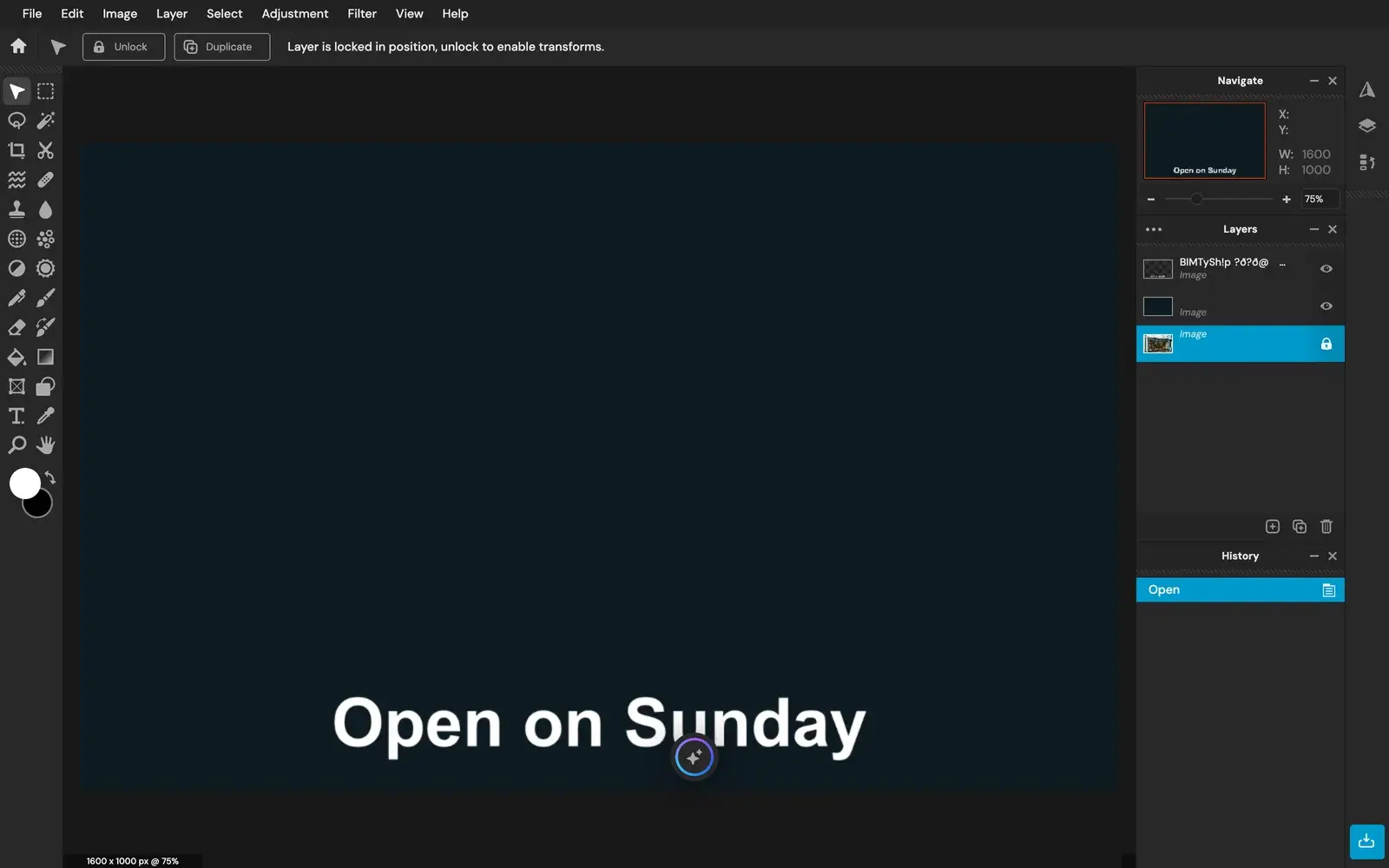
The result matched what we saw on our Photopea vs Pixlr page with a different file. Pixlr kept the pixel layers but lost the mask, so the dark Shade layer covered the whole photo; both groups and both adjustment layers were gone; and the title arrived as an image layer with a garbled name instead of editable text.
Canva converts a PSD into a Canva design. Its help center says Photoshop import is "an early version (beta release)", only on canva.com in a desktop browser, for PSD files up to 300 MB, and that "designs with layers, gradients, and masks are supported, but some elements might be rasterized". It tries to match fonts but warns that text may look different. We could not test it, because the import needs a Canva account, and our Photoshop alternatives page found that Canva's photo editor turned a PSD away signed out. Canva's download formats include JPG, PNG, WebP, SVG, PDF and PPTX, but not PSD, so a design cannot go back to Photoshop with its layers.
If PSD files are a regular part of your work, neither is the right tool. Our list of Photoshop alternatives covers editors that open and save PSD, and the third option below is one of them.
Collaboration and teams
Canva is built for teams. Its photo editor page describes real-time collaboration with comments and mentions, and its Business plan adds collaboration and team admin tools, a hundred brand kits and approvals; Enterprise adds SSO, SCIM provisioning and tiered approvals. The pricing page explains that Pro is for one person, while Business is for individuals and small teams.
Pixlr is a one-person tool. Its Suite FAQ says plainly that it "does not currently support real-time collaboration"; you share work by saving a file and sending it. A subscription covers one Pixlr account on web, desktop and mobile.
Canva's team plans have a recent history worth knowing. In September 2024, PetaPixel, citing The Verge, reported that Canva emailed Teams subscribers about a large price increase, which drew angry responses from users, and that Canva said the change reflected its expanded product. Canva's pricing FAQ now says Canva Teams is closed to new sign-ups and upgrades, existing Teams plans continue, and Canva Business is the plan it offers to teams. Check the price for your team size on Canva's own page before committing.
Platforms and apps
Both run in a browser tab and both have apps. Pixlr's Suite FAQ lists the web app, desktop apps for Windows and Mac, and mobile apps for iOS and Android, and its pricing FAQ says one subscription covers web, desktop and mobile. Canva's download page lists apps for Mac, Windows, iOS, Android and Chromebook, and its pricing table includes Canva Offline.
Where your work is kept differs. Canva saves designs to your account, with 5 GB of cloud storage on the plan at no cost and more on paid plans. Pixlr's Editor and Express pages say history is only saved temporarily in the browser cache, so save a .PXZ file if you want to come back to a layered project.
Pixlr or Canva: who should choose which
Choose Pixlr if you:
- mostly edit photos: retouching, cutouts, color work and composites with layers and masks
- want many AI image tools and generators, and are happy to pay for them in credits
- work alone and export JPEG, PNG or WebP
- want Photoshop-style menus without Photoshop
Choose Canva if you:
- make social posts, presentations, videos or print from templates
- need brand kits, resizing for several platforms and scheduling in one place
- work with a team that comments, edits together and approves designs
- want AI that builds a whole design, not only edits a photo
In practice, many people who weigh Canva vs Pixlr end up using both, a photo editor to fix the picture and then Canva to lay out the post. If that is you, the question is which photo editor to pair with Canva, and our comparisons of GIMP vs Pixlr and Pixlr vs Photoshop help with that half.
A third option: Pixuvia
Pixuvia is on Pixlr's side of this comparison: it is a photo editor, not a design app, and it has no library of design templates for posts, presentations or print. If templates are the reason you are looking, Canva is the better choice. Where Pixuvia fits is the photo half of the job. Its Editor is a Photoshop-style layered editor, and its Studio is built around one-job AI tools, plus adjustments, filters, text styles, frames and collages. Both run in the browser on Windows, macOS, Linux, Android, iPhone and iPad.
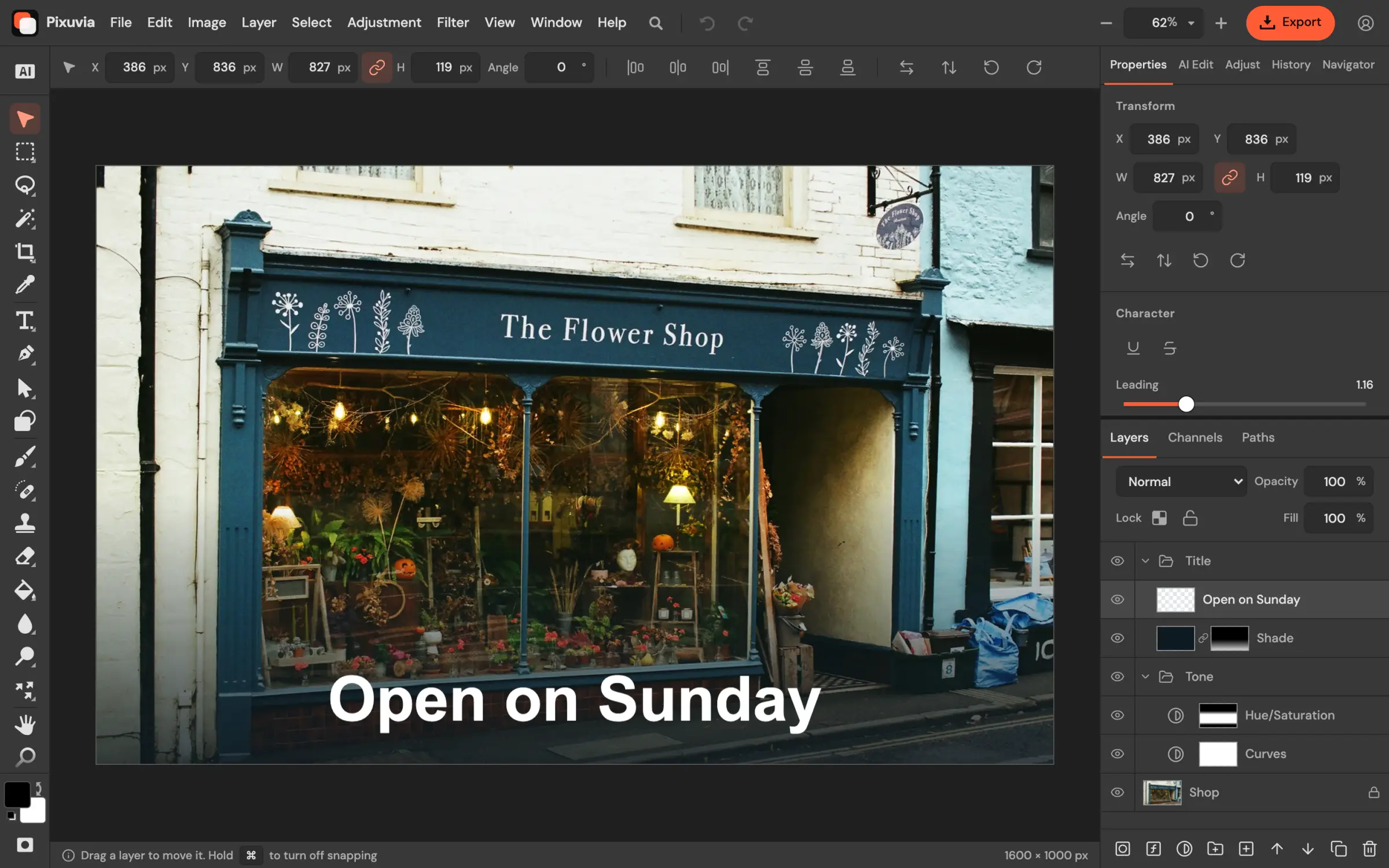
- Opens PSD files up to 60 MB with layers, groups, masks, adjustment layers and editable text, as in the capture above, and saves PSD, PNG, JPG, WebP, GIF, SVG, PDF and TIFF
- About 50 tools in the Editor, 18 kinds of adjustment layers, layer and vector masks, layer styles and Photoshop blend modes
- AI tools in both the Editor and the Studio: the background remover, object remover, generative fill, the image extender, the image upscaler, relight and editing by prompt
- AI tools need a sign-in and use credits (see pricing); the background remover's Standard method uses no credits
The limits matter too. Beyond templates, Pixuvia has no real-time collaboration, brand kits or scheduling. Its PSD export is 8-bit RGB without alpha channels or masks and effects on groups, and PSB files don't open. If you edit the photo in Pixuvia and lay out the post in Canva, export a PNG and upload it there.
Questions
Is Pixlr better than Canva?
For editing photos, usually yes: Pixlr Editor has layers, masks, selections and an Adjustment menu with Curves and Levels, and Pixlr Express handles quick fixes. For designs such as social posts, presentations, videos and print, Canva is the better fit, with a far larger template library, brand kits and real-time collaboration.
Pixlr or Canva for social media posts?
Canva, if the post starts from a template, needs your brand colors and fonts, or is made by a team. Pixlr, if the post is mostly one photo that needs retouching, a cutout or an AI edit before you add a line of text.
Can Canva edit photos like Pixlr?
For common jobs, yes. Canva has adjustment sliders, filters, crop, blur, background removal, Magic Eraser and Magic Edit. Its layers are a list of design elements you can reorder, though, and its pages do not mention layer masks, Curves or Levels. Pixlr Editor is the closer match for layer-based photo work.
Can Pixlr or Canva open PSD files?
Both take them in, neither saves them. Pixlr says it supports layered PSD files; in our test Pixlr Editor opened the pixel layers but dropped the groups, layer mask and adjustment layers and turned the text into an image. Canva imports PSD files up to 300 MB as editable designs in a beta on canva.com in a desktop browser, and says some elements may be rasterized. Neither lists PSD among its export formats.
How do Pixlr and Canva charge for AI?
Pixlr sells Plus, Premium and Ultra subscriptions, each with a monthly allowance of AI credits, plus credit packs that do not expire. Canva has a plan at no cost plus Pro, Business and Enterprise plans; its Standard, Premium and Ultra AI tools share a monthly allowance that grows with the plan, and an AI Pass add-on buys more.
Can I use Pixlr and Canva on a phone?
Yes. Pixlr runs in the browser and has desktop apps for Windows and Mac and mobile apps for iOS and Android, with one subscription across them. Canva runs in the browser and has apps for Windows, Mac, iOS, Android and Chromebook.
Sources
- Pixlr: Pricing and FAQ
- Pixlr: Pixlr Editor
- Pixlr: Pixlr Express
- Pixlr: Pixlr Suite (file formats, platforms, collaboration)
- Pixlr: home page (AI tools and models)
- Canva: Pricing, plan comparison and FAQ
- Canva: Photo editor
- Canva Help Center: Finding and arranging layers in your design
- Canva Help Center: Import Adobe Illustrator or Photoshop files
- Canva Help Center: Choose the right download file type
- Canva: Download the desktop and mobile apps
- Canva Newsroom: Introducing Canva AI 2.0 (April 16, 2026)
- Canva Newsroom: The all-new Affinity (October 30, 2025)
- TechCrunch: Canva acquires Leonardo.Ai (July 29, 2024)
- PetaPixel: report on Canva Teams price changes (September 3, 2024)
- remove.bg: home page notice about the move to Canva
- Style Factory: Canva review (screenshots)