Which image format should I use? JPG, PNG, WebP, AVIF, HEIC and TIFF
By Pixuvia · · Updated
Which image format should you use? JPG for photos you share, print or upload; PNG for screenshots, logos and anything with a transparent background; WebP or AVIF for images on your own website, where they make the smallest files; SVG for vector logos and icons; and TIFF or PSD for print masters and work you will keep editing. Convert iPhone HEIC photos to JPG when something cannot open them.
The table below matches common jobs to a format. After it, each format gets a short section with a link to a deeper comparison, plus file sizes we measured by saving the same photo and the same graphic in four formats.
On this page
Which image format is best for each job?
| Job | Use | Why |
|---|---|---|
| Photos on a website | WebP or AVIF (JPG as a fallback) | Much smaller than JPG at similar quality, shown by all current major browsers |
| Graphics and logos on a website | SVG, otherwise PNG or lossless WebP | Sharp edges and flat colors stay exact; SVG scales to any size |
| Transparent background | PNG (WebP or AVIF on the web) | PNG keeps transparency and opens everywhere; JPG cannot store it |
| High-quality JPG, or TIFF if the printer asks | Print services accept JPG almost universally; TIFF is lossless | |
| Archiving and editing | The original file, PSD for layered work, TIFF or PNG for flat copies | Lossless, so later saves add no damage; PSD keeps layers |
| Sharing from a phone | JPG | Opens on every device and in every upload form; iPhone HEIC does not |
| Screenshots | PNG | Text and interface edges stay crisp, and the file is often smaller than a JPG |
| Animation | Animated WebP or AVIF on the web, GIF where nothing else is accepted | Far smaller files than GIF, with full color |
How big is the same image in each format?
To make the trade-offs concrete, we saved two images in four formats with sharp, the Node.js image library: a 1600 × 1067 pixel harbor photo and a 1600 × 900 pixel bar chart with text, rendered for this test. Settings were JPG at quality 85, PNG at maximum compression, WebP at quality 80 and AVIF at quality 50, which are common defaults for each.
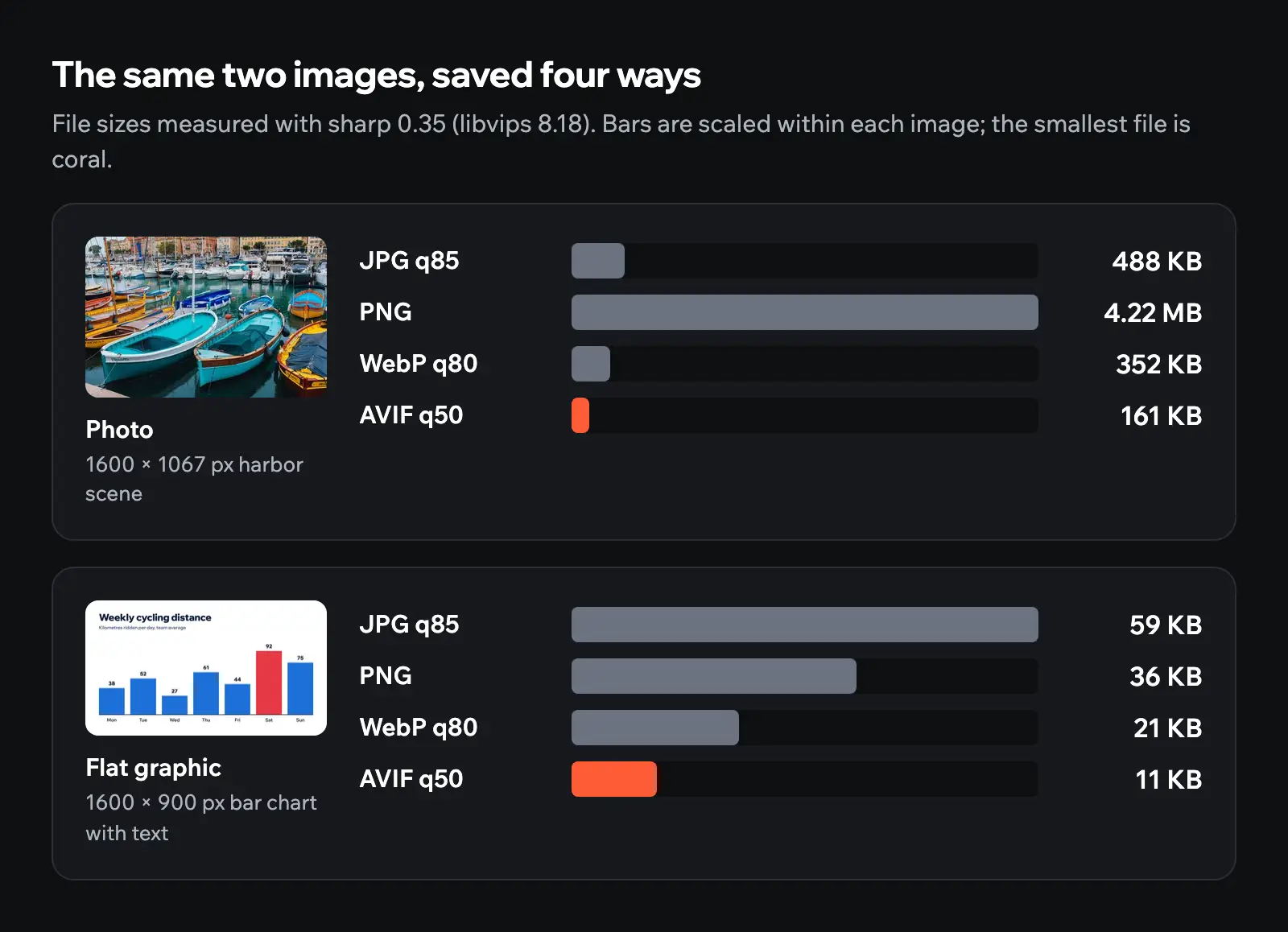
Two things stand out. For the photo, PNG is the wrong tool: 4.22 MB against 488 KB for the JPG, because a lossless format has to keep every grain of noise in the water and sky. For the flat graphic it is the other way round: the PNG (36 KB) beats the JPG (59 KB), since large areas of one color compress very well without loss. WebP and AVIF were smallest in both cases. Saved as lossless WebP, the chart came to 14 KB and the photo to 2.46 MB, both well under the PNG.
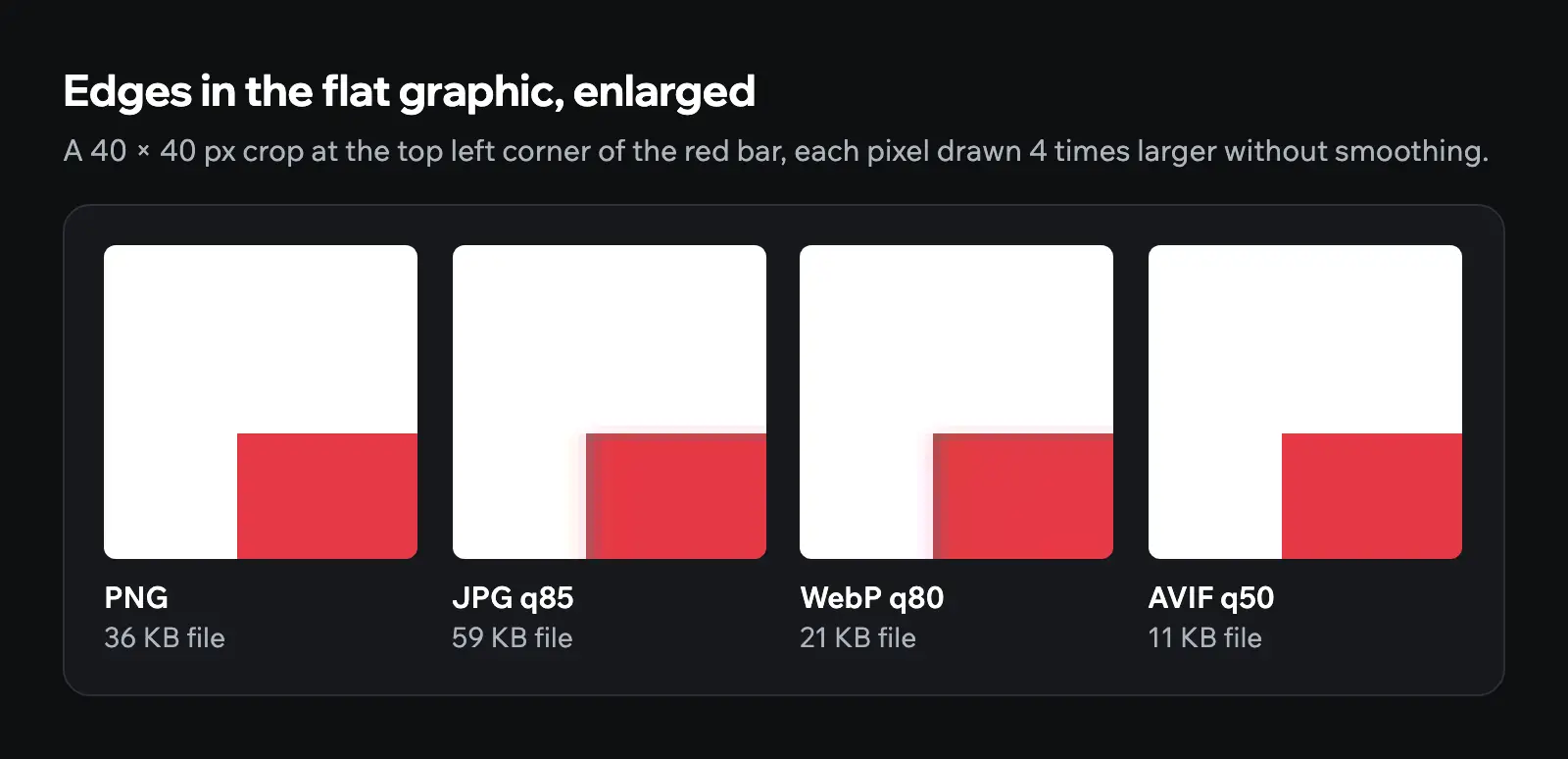
Size is only half of it. Lossy formats change pixels, and on a graphic the changes sit right on the edges:
What is each image format for?
JPG (JPEG)
The default for photos since 1992, and the one format every device, browser, app, upload form and print shop accepts. It is lossy, holds 8 bits per channel, has no transparency and blurs sharp edges. Use it for sharing and printing photos. Compared in detail: PNG vs JPG and WebP vs JPG. Converters: PNG to JPG, WebP to JPG.
PNG
Lossless, with full transparency, and shown by every browser. MDN recommends it over JPEG when you need exact reproduction or transparency. That makes it the format for screenshots, logos, diagrams and cutouts, and the safe choice for an image you will edit again. It is a poor fit for photos you send, which come out several times larger than a JPG. Converters: JPG to PNG, PNG to WebP.
WebP
Google's format for the web, with lossy and lossless modes, transparency and animation. Google says lossless WebP files are 26% smaller than PNGs and lossy ones 25% to 34% smaller than comparable JPEGs. It is shown by Chrome since version 32, Edge since 18, Firefox since 65 and Safari since 16, according to Can I use. Outside the browser support is patchier, which is why a saved WebP sometimes will not open. More in WebP vs JPG. Converters: WebP to JPG, JPG to WebP.
AVIF
An image format based on the AV1 video codec. It usually makes the smallest files of all, as it did in our test, and supports transparency, animation and high dynamic range. Browser support arrived later: Chrome 85, Firefox 93, Safari 16.4 and Edge 121, per Can I use, and many desktop apps still cannot open it. How it stacks up against WebP: AVIF vs WebP. Converter: AVIF to JPG.
HEIC
What an iPhone saves photos as by default: the HEIF container with HEVC compression, which Apple says keeps the same visual quality as JPEG in less storage. Among browsers only Safari 17 and later display it, per Can I use, and Windows needs extensions. Keep it on the phone, convert it for sharing. Full comparison: HEIC vs JPG. Converters: HEIC to JPG, HEIC to PNG.
TIFF
A flexible, usually lossless format long used in print, scanning and photo archives. MDN calls it a good choice for images meant for print and lists it among formats to avoid on the web: of the major browsers only Safari shows it. Use it when a printer or archive asks for it. TIFF next to Photoshop's own format: PSD vs TIFF. Converter: TIFF to JPG.
SVG
Not pixels at all but a text description of shapes, so it stays sharp at every size and is often tiny. MDN recommends it for icons, diagrams and interface elements that must be drawn accurately at different sizes. It is the right format for a logo that exists as a vector drawing, and the wrong one for photos.
GIF
The old animation format: at most 256 colors per frame and only one fully transparent color, so photos come out banded and edges jagged. MDN suggests PNG for still images. Its remaining job is short animations in places that accept nothing newer; on your own site, animated WebP or AVIF, or a short video, makes far smaller files.
PSD
Photoshop's working format. It keeps layers, masks, text and effects so you can keep editing, and Adobe's specification allows up to 30,000 pixels per side (its PSB variant goes to 300,000). It is an editing file, not one to send: few apps outside image editors open it. PSD alongside TIFF: PSD vs TIFF. Converters: PSD to PNG, PSD to JPG.
Which format for transparency, print and screenshots?
Three jobs trip people up more than the rest. Transparency: JPG has none, so a cutout saved as JPG gets a solid background. Save cutouts as PNG for use anywhere (the background remover saves one from a photo), or WebP and AVIF on the web; transparent image formats covers how each one stores it.
Print: what matters most is enough pixels for the print size (DPI vs PPI has a print-size table), then the format the service lists. A JPG saved at high quality prints as well as a lossless file at normal viewing distance, and some services also take TIFF, PNG or PDF. Avoid sending a JPG you have already re-saved several times.
Screenshots: a Mac saves them as PNG, according to Apple, and that is the right call. Text and interface edges stay crisp, and because screens are full of flat color the PNG is often the smaller file.
Which image formats do browsers support? (November 2026)
| Format | Chrome | Edge | Firefox | Safari |
|---|---|---|---|---|
| JPG, PNG, GIF, SVG | Yes | Yes | Yes | Yes |
| WebP | 32+ | 18+ | 65+ | 16+ (partly 14+) |
| AVIF | 85+ | 121+ | 93+ | 16.4+ |
| JPEG XL | 155+ | No | 158+ | 17+ (still images) |
| HEIC | No | No | No | 17+ |
| TIFF | No | No | No | Yes |
| PSD | No | No | No | No |
Versions are from Can I use and the TIFF row from MDN's image format guide. Browser support says nothing about other software: a WebP or AVIF that displays on a web page can still be refused by an older photo viewer, an office program or an upload form. JPEG XL is the newest row: Chrome 155 and Firefox 158 switched it on by default in October 2026, per their release notes, and Chrome now opens JPEG XL explains what that means for your photos.
How to open and convert any image format
The Pixuvia online photo editor opens JPG, PNG, WebP, AVIF, GIF, BMP, SVG, TIFF, HEIC and layered PSD files, and saves as PNG, JPG, WebP, GIF, SVG, PDF, TIFF or PSD. For a straight format change without editing, the image converters turn a single file or a batch into JPG, PNG or WebP.
Questions
What is the best image format for a website?
For photos, WebP or AVIF: both are shown by every current major browser and make smaller files than JPG. In our test the same photo was 488 KB as JPG, 352 KB as WebP and 161 KB as AVIF. For logos and icons, use SVG when you have a vector version, otherwise PNG or lossless WebP.
What is the best image format for printing?
The one your print service asks for, at full resolution. That is usually a high-quality JPG for photo prints, and often TIFF or PDF for professional print work. PNG prints fine too but makes large files for photos.
Which image format has the best quality?
Lossless formats keep every pixel exactly: PNG, TIFF, lossless WebP and PSD. Lossy formats (JPG, lossy WebP, AVIF, HEIC) discard detail you mostly cannot see to make much smaller files. At high quality settings the difference is hard to spot at normal viewing size.
Is PNG or JPG better for logos?
PNG. Logos have flat colors and sharp edges, which JPG blurs with faint halos and cannot make transparent. An SVG is better still when the logo exists as a vector file, since it stays sharp at any size.
Which image formats support transparency?
PNG, WebP, AVIF, GIF (one fully transparent color only), SVG, TIFF, HEIC and PSD can all store transparency. JPG cannot: transparent areas are filled with a solid color when you save one.
Sources
- MDN: Image file type and format guide
- Can I use: WebP image format
- Can I use: AVIF image format
- Can I use: HEIF/HEIC image format
- Can I use: JPEG XL image format
- Chrome Platform Status: JPEG XL decoding support (image/jxl) in blink
- Firefox 158.0 release notes
- Google for Developers: An image format for the Web (WebP)
- Apple: Using HEIF or HEVC media on Apple devices
- Apple: Take screenshots or screen recordings on Mac
- Adobe: Photoshop File Formats Specification
- JPEG committee: Overview of JPEG 1
- sharp: High performance Node.js image processing (used for our measurements)