PSD vs TIFF: which should you save your layered work in?
By Pixuvia · · Updated
PSD vs TIFF comes down to layers: save work in progress you will edit again as PSD, and send finished images as TIFF. PSD keeps every layer, mask, adjustment and text layer editable in Photoshop. TIFF is the flat, lossless file that nearly every image, layout and print app opens. When a file will be edited again and also delivered, save both: the PSD as your master, a TIFF for the people who receive it.
Below, the two formats compared on layers, compression and size limits, print, and compatibility, with file sizes we measured from one layered image saved both ways.
On this page
PSD vs TIFF at a glance
| Feature | PSD | TIFF |
|---|---|---|
| What it is | Photoshop's own document format | A general bitmap format for exchanging images between apps |
| Layers | Yes: layers, groups, masks, adjustments, text, effects | Flat image; Photoshop can add its layers in a private block other apps ignore |
| Compression | Lossless (raw, RLE or ZIP in the specification) | None, LZW, ZIP (lossless) or JPEG (lossy), your choice |
| Size limit | 2 GB and 30,000 px a side; PSB beyond that | 4 GB; Photoshop's BigTIFF option goes beyond |
| Bit depth | 8, 16 or 32 bits per channel | 8, 16 or 32 bits per channel |
| CMYK | Yes | Yes |
| Transparency | Per layer | As an extra channel; not every app reads it |
| Opens in | Photoshop, other Adobe apps and editors with PSD import | Nearly all image, layout and print software |
| Best for | Your editable master file | Handing a finished, lossless image to someone else |
Which keeps layers, PSD or TIFF?
PSD keeps every layer; outside Photoshop, a TIFF is a flat picture. A PSD is Photoshop's working file. Adobe calls it the only format besides PSB that keeps all of Photoshop's features: layers, masks, adjustment layers, text, smart objects and effects. Open it again and everything is still editable, which is what non-destructive editing relies on.
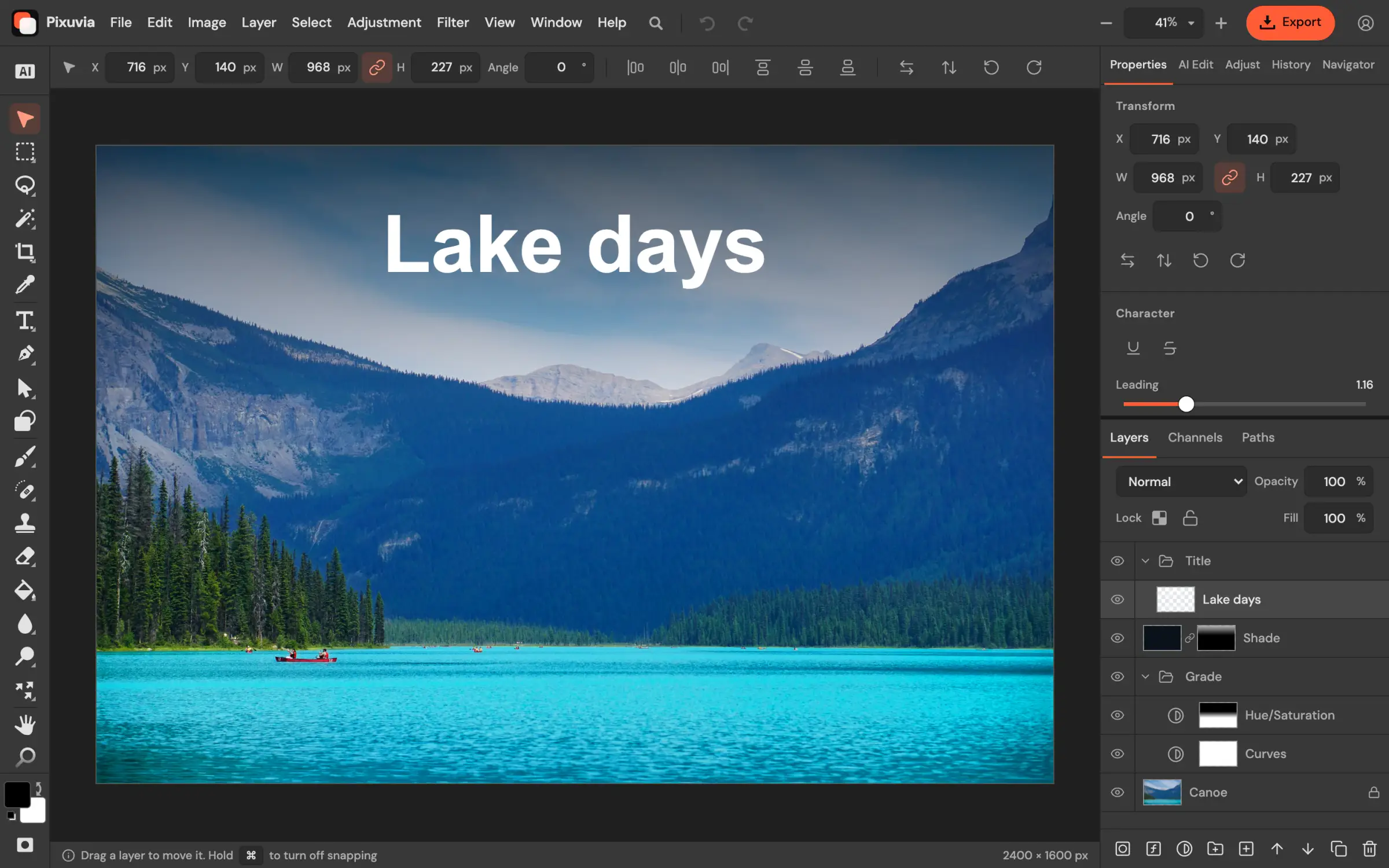
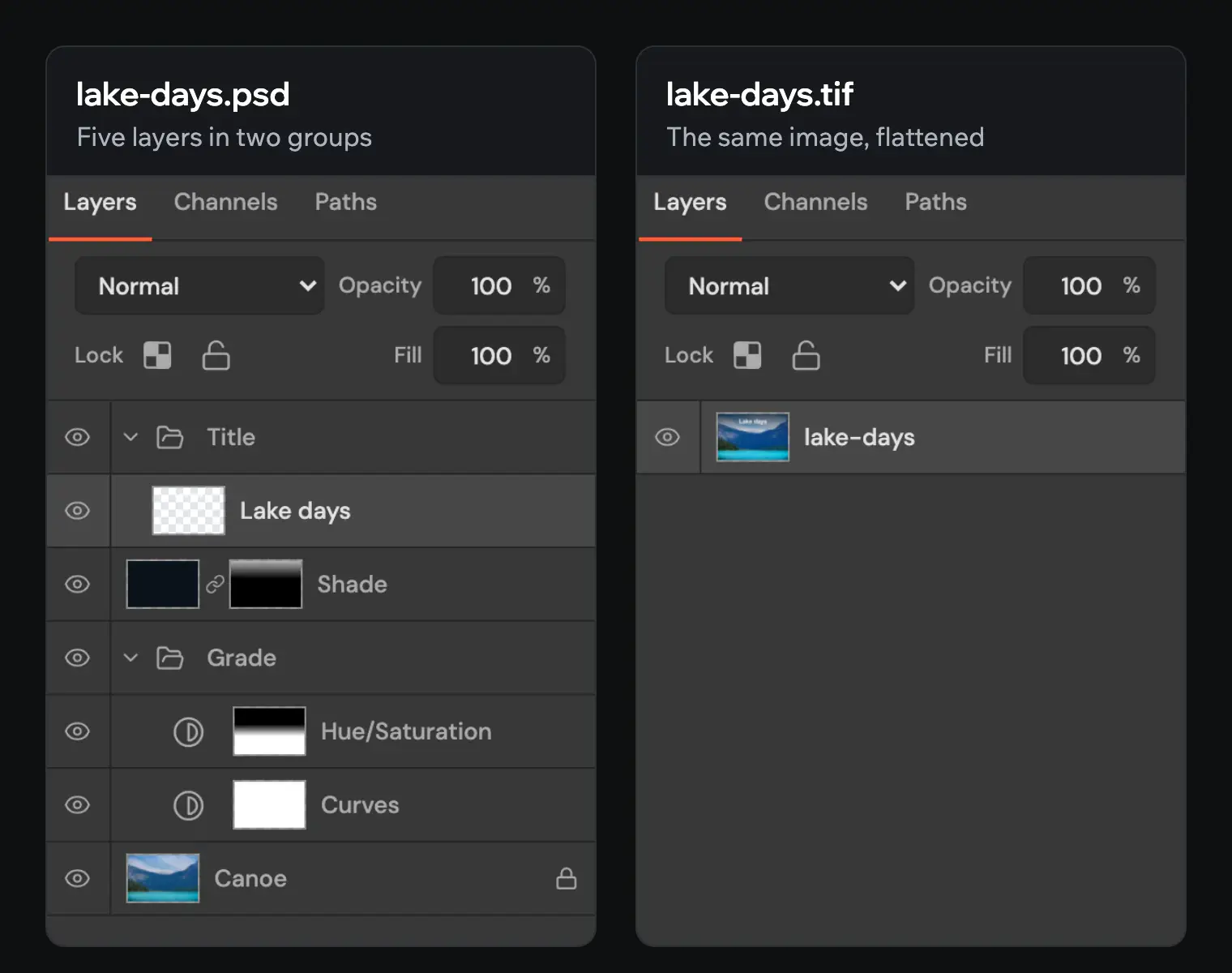
A TIFF stores a picture, usually one flat image. Photoshop can also save layers into a TIFF: the Photoshop file format specification defines a private TIFF tag for it, which holds "Adobe Photoshop Document Data" next to the normal flattened image. Photoshop reads the layers back. Almost everything else reads only the flattened image, so a layered TIFF looks like a flat file the moment it leaves Photoshop, and saving it from another app drops the layers for good.
The Pixuvia Editor behaves that way too: it opens the first image of a TIFF, which in a Photoshop layered TIFF is the flattened one. To show the difference, we exported our test PSD flat from the Editor, saved that as a TIFF and opened both.
Is PSD or TIFF smaller? What we measured
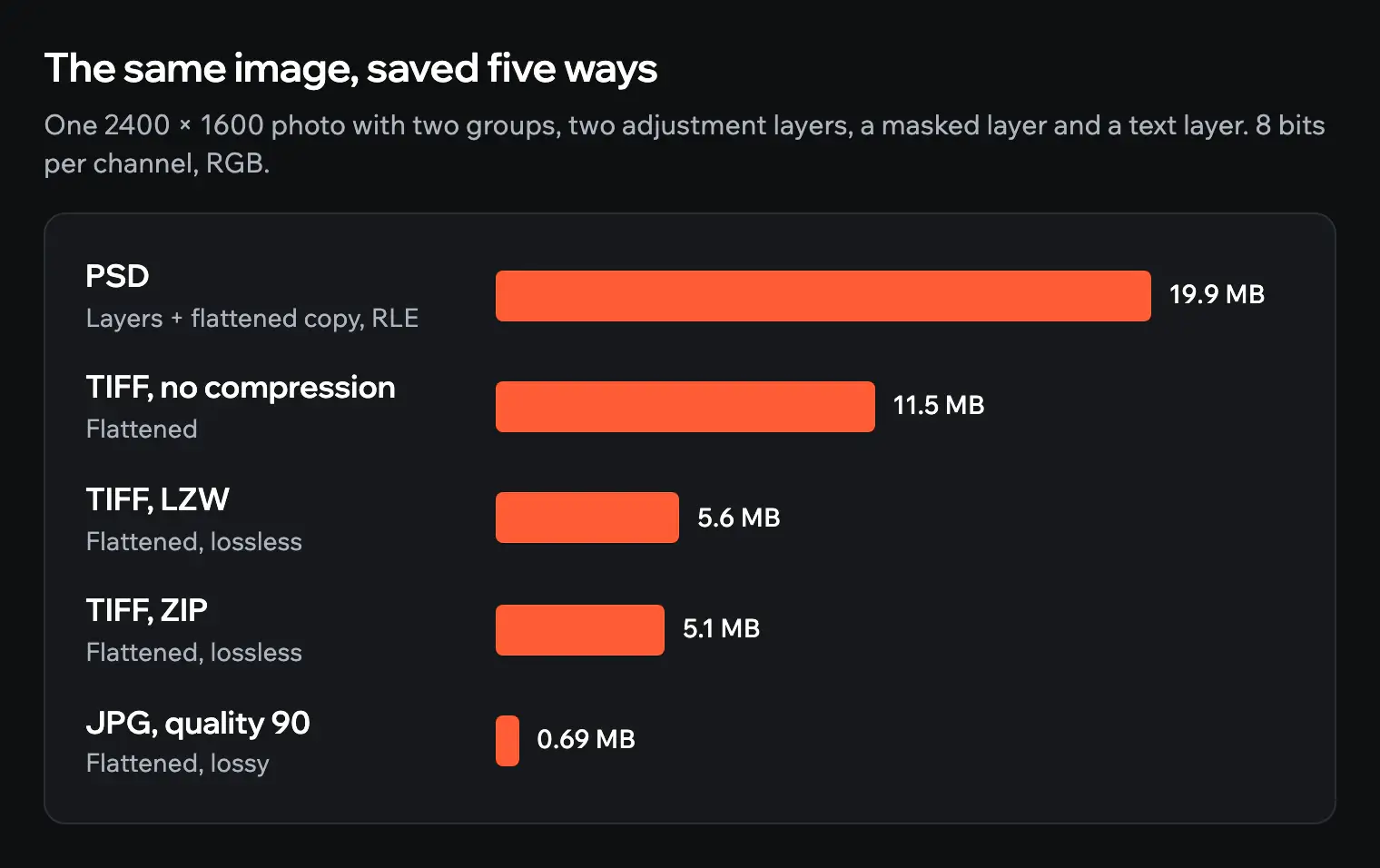
A flat TIFF is much smaller: in our test, the ZIP TIFF was about a quarter of the size of the layered PSD. TIFF lets you pick the compression. Adobe describes LZW and ZIP as lossless, keeping all image data while reducing file size, and JPEG as lossy. PSD uses lossless compression too, but it also stores every layer plus a flattened copy of the whole image (Adobe's "composite", saved so other apps and older versions can open the file), so it is usually the largest file.
To see by how much, we built a 2,400 × 1,600 pixel PSD with ag-psd (the canoe photo, a Curves and a Hue/Saturation adjustment in a group, a dark layer with a gradient mask and a text layer), with its flattened copy and RLE compression, one of the methods the PSD specification defines. We then saved the flattened image as TIFF with sharp (libtiff 4.7) and as JPG. Photoshop's own files would differ a little in size, but not in the pattern.
| Saved as | Size | What is inside |
|---|---|---|
| PSD | 19.9 MB | Every layer and mask, plus the flattened copy |
| TIFF, no compression | 11.5 MB | The flat image, 3 bytes per pixel |
| TIFF, LZW | 5.6 MB | The same pixels, lossless |
| TIFF, ZIP | 5.1 MB | The same pixels, lossless |
| JPG, quality 90 | 0.69 MB | The flat image, lossy |
Two things follow. A flat TIFF with LZW or ZIP is about a quarter of the layered PSD here, with identical pixels, which is why Adobe's Lightroom documentation calls TIFF the format with "greater compression and industry compatibility than Photoshop format". And a layered TIFF is not a way to shrink a PSD: it carries the same layer data plus the flat image, so it lands in the same range.
What are the size limits of PSD and TIFF?
PSD stops at 2 GB and classic TIFF at 4 GB; beyond those, Photoshop offers PSB and BigTIFF. Adobe gives PSD a limit of 2 GB, and the PSD specification caps width and height at 30,000 pixels. Above that, Photoshop saves in the Large Document Format, PSB, which supports up to 300,000 pixels in width or height and keeps every Photoshop feature. The catch, in Adobe's words: most other apps and older versions cannot open files over 2 GB, so PSB works best with the latest Photoshop.
Classic TIFF stops at 4 GB because it uses 32-bit offsets, as the LibTIFF project's BigTIFF page explains. Adobe now lists a BigTIFF option in Photoshop for saving TIFF files larger than 4 GB. Before you rely on it for a delivery, check that the app on the other end opens BigTIFF files, since it is a separate variant of the format.
For most photos and layouts none of this matters: a full 8-bit RGB layer of a 24-megapixel photo is about 72 MB before compression, so even several layers stay well under 2 GB. The limits come into play with large-format prints, panoramas and 16-bit files with many layers.
Which is better for print, PSD or TIFF?
Usually TIFF, or PDF. Both formats store CMYK, and both store 8, 16 and 32 bits per channel, according to Adobe. Adobe's advice for print is direct: for work that needs CMYK, choose a format that supports it, "such as PSD, TIFF, or PDF", and for sharing with users of other applications, consider "standard formats like TIFF, JPEG, or PDF". That is why TIFF and PDF are the usual deliverables for print: they are flat, lossless and readable by prepress software, while a PSD depends on the receiving app reading Photoshop's layers correctly.
Every print shop publishes its own list of accepted files, color settings and resolution, so check it before you export; DPI vs PPI explains the resolution numbers. If a shop accepts PSD, a flattened PSD avoids surprises with fonts, effects and blend modes that another app might render differently.
Which apps open PSD and TIFF files?
Nearly every app opens TIFF; PSD support outside Photoshop varies. Adobe describes TIFF as "a flexible bitmap format supported by nearly all paint, image-editing, and layout apps", and scanners commonly save it. Other Adobe apps such as Illustrator, InDesign, Premiere and After Effects read it; Lightroom needs the Maximize PSD and PSB File Compatibility preference turned on in Photoshop to import a layered PSD. Third-party editors import PSD layers with different levels of fidelity; viewers and office apps often show only the flattened copy, or nothing if the file was saved without it.
What the Pixuvia online PSD editor does with each, checked in its code:
- PSD: opens with layers, groups, masks, adjustment layers and text, and saves layered PSDs (8-bit RGB). See how to open a PSD without Photoshop.
- PSB: not opened. Save the document as PSD in the app that made it first.
- TIFF: opens the first image of the file, so a Photoshop layered TIFF arrives flattened. 16-bit, CMYK and Lab TIFFs open converted to 8-bit RGB.
- Saving TIFF: a flat file with None, LZW or ZIP compression, keeping transparency as an alpha channel.
- Limits: files up to 60 MB; images over 8,192 pixels on a side are scaled down when opened (4,096 on phones and tablets).
For a quick flat copy without opening the Editor, the converters turn PSD into PNG, PSD into JPG and TIFF into JPG.
When to save as PSD, TIFF or both
- Work you will edit again: PSD. It is the only format here that keeps everything editable.
- A finished image for a client, an agency or another app: TIFF with LZW or ZIP, flattened.
- Print: what the print shop asks for, most often PDF or TIFF in the color mode they specify.
- Exchanging files between Lightroom and Photoshop: TIFF, which Adobe recommends for that round trip.
- Documents over 2 GB or 30,000 pixels: PSB for the master, and expect only recent Adobe apps to open it.
- Archiving a project: both. The PSD keeps the edits; the TIFF keeps a lossless picture that should open in software that does not exist yet.
- The web, email or a phone: neither. Export a JPG, PNG or WebP; which image format to use explains the choice.
Questions
Can a TIFF file have layers?
Yes, when Photoshop saves it: Photoshop stores its layers in a private block inside the TIFF, next to a normal flattened image. Photoshop reopens the layers; almost every other app reads only the flattened image, so to them a layered TIFF is a flat picture.
Is TIFF better quality than PSD?
No. Both are lossless when you use None, LZW or ZIP compression, so the pixels are identical. The difference is what else is kept: PSD keeps editable layers and effects for Photoshop, TIFF keeps a flat image that nearly every app can open.
Should I use LZW or ZIP compression for TIFF?
Both are lossless, so the pixels are identical either way. In our test ZIP made a slightly smaller file (5.1 MB against 5.6 MB). If the app or print shop receiving the file names one of them, use that one.
What is a PSB file?
PSB is Photoshop's Large Document Format: the same as PSD, but for documents over 2 GB or wider or taller than 30,000 pixels, up to 300,000 pixels on a side. Adobe notes that most other apps cannot open files over 2 GB.
Can I open a PSD or TIFF without Photoshop?
Yes. Pixuvia's Editor opens PSD files with their layers and TIFF files as flat images, in the browser, and saves them again as PSD, TIFF, PNG or JPG. It does not open PSB files.