Which image formats keep a transparent background?
By Pixuvia · · Updated
The image formats that support transparency are PNG, WebP, AVIF, GIF, TIFF, PSD, SVG and HEIC. JPG does not. For a cutout you will share or edit, use PNG; for a cutout on a website, WebP or AVIF holds the same soft edges in a much smaller file. GIF also keeps transparency, but only as on or off, so soft edges come out jagged.
Below: the formats side by side, what an alpha channel is, what happens to a cutout saved as JPG, why a downloaded "transparent PNG" so often shows a checkerboard, and what we measured when we saved one cutout in every format.
On this page
- Which image formats support transparency?
- What is an alpha channel?
- How does each format store transparency?
- How big is a transparent image in each format?
- What happens when you save a transparent image as JPG?
- Why does my transparent PNG show a checkerboard?
- Which format should you use for a transparent image?
- Questions
- Sources
Which image formats support transparency?
| Format | Transparency | Good for |
|---|---|---|
| PNG | Yes, an alpha channel (8 or 16 bits), soft edges | Cutouts, logos, screenshots; opens almost everywhere |
| WebP | Yes, 8-bit alpha in lossless and lossy files | Cutouts on websites, at a fraction of PNG's size |
| AVIF | Yes, an alpha image stored with the picture | The smallest transparent files for the web |
| GIF | On or off only: one palette color is transparent | Simple graphics and old-style animations |
| TIFF | Yes, as an extra channel | Print and archives; not every app reads the alpha |
| PSD | Yes, per layer | Layered work in Photoshop and compatible editors |
| SVG | Yes: only drawn shapes are visible | Logos and icons as vector shapes |
| HEIC | Possible (an alpha plane), rarely used | Apple photos; cutouts are usually shared as PNG instead |
| JPG | No | Photos without transparency |
What is an alpha channel?
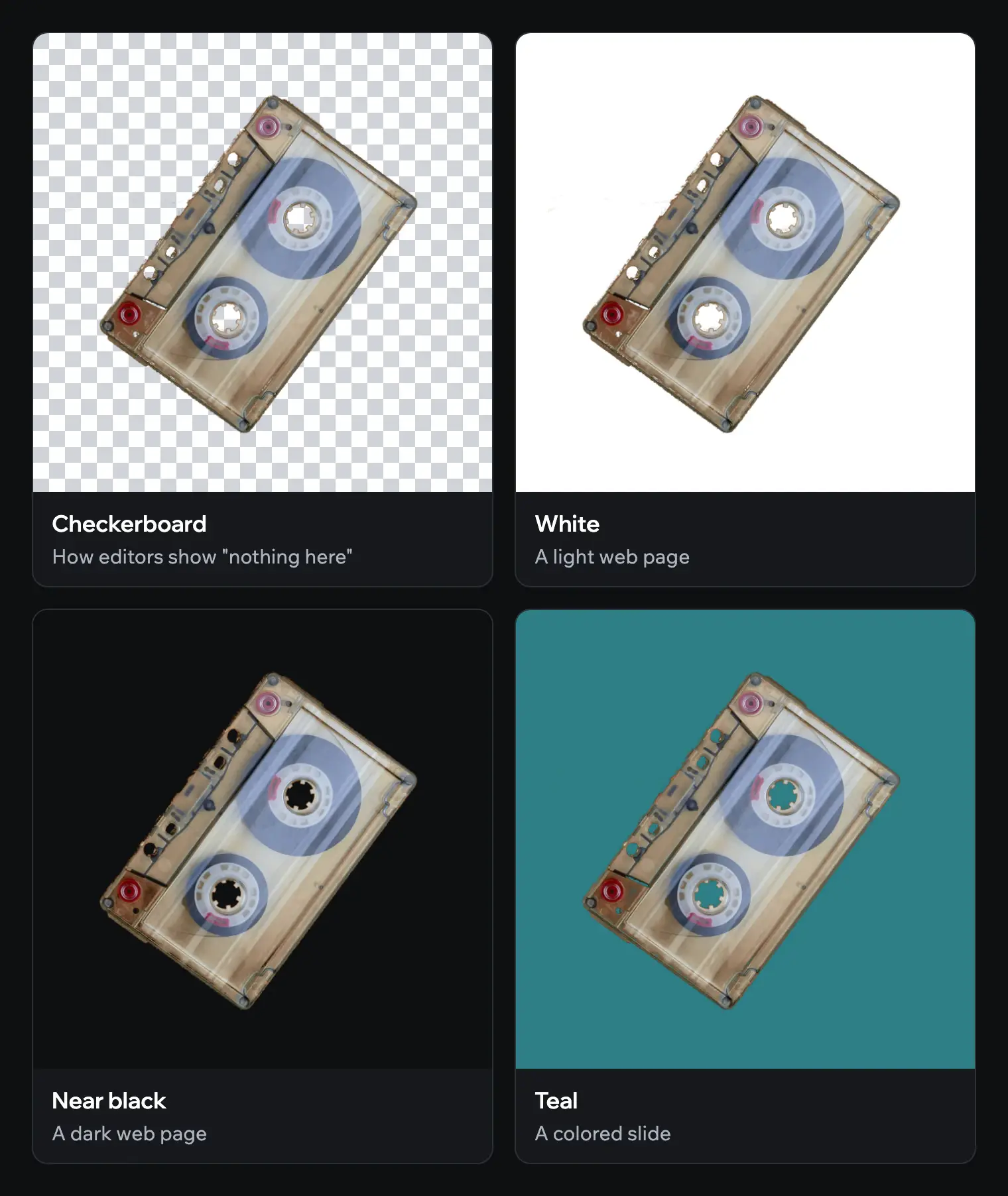
A color photo stores three numbers per pixel: red, green and blue. A format with an alpha channel stores a fourth number that says how opaque the pixel is. In the PNG standard, alpha 0 is fully transparent and the maximum value is fully opaque; with 8 bits that gives 256 steps, so an edge can fade from solid to see-through over a few pixels. That is what makes hair, shadows, glass and anti-aliased text sit cleanly on any background.
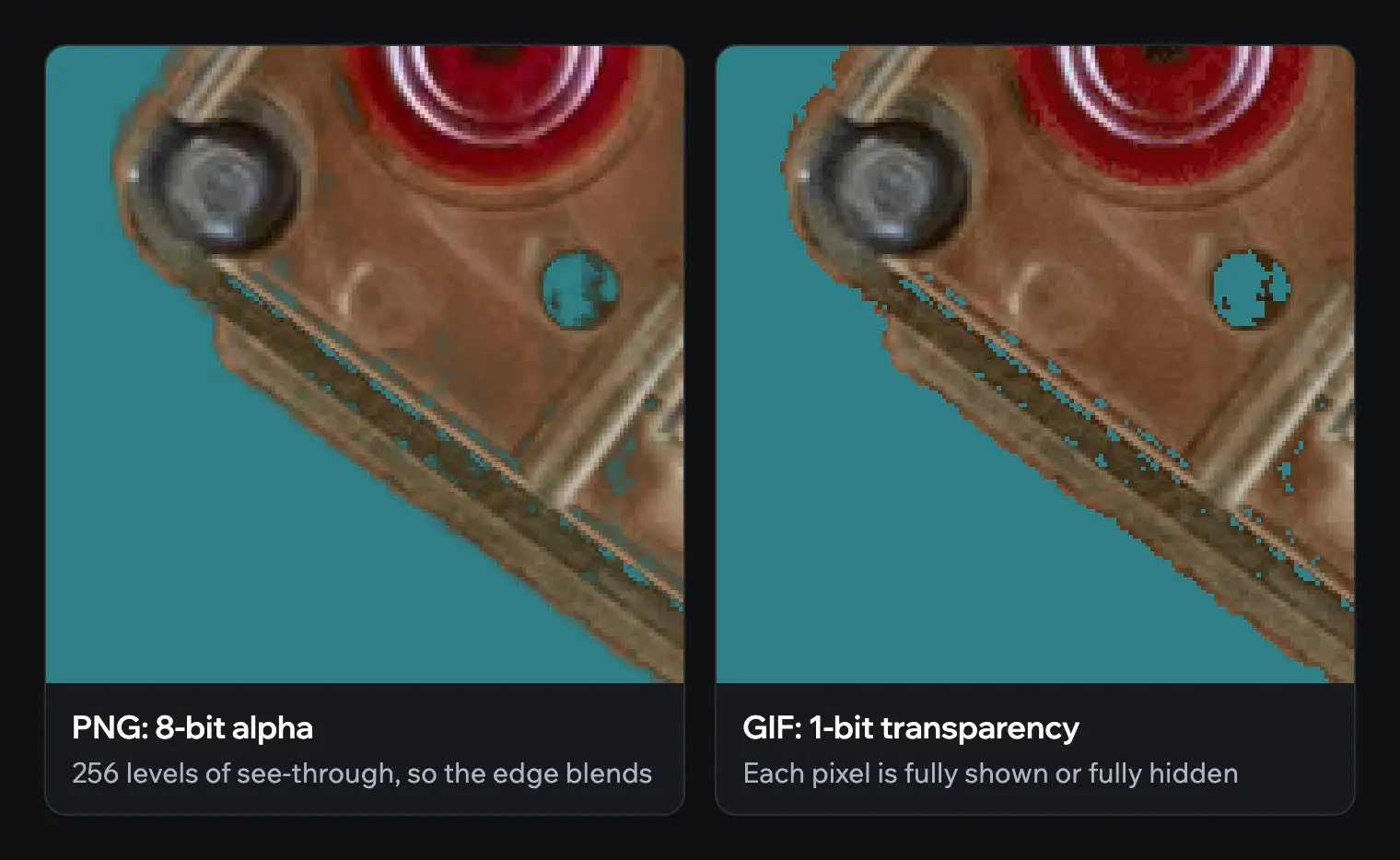
GIF works differently. Its pictures use a palette of up to 256 colors, and the format lets one palette entry be marked as transparent. A pixel either has that color and disappears, or it does not and is fully shown. MDN describes exactly this: pixels are opaque unless their color index is the one designated as transparent. There is nothing in between, which is why a GIF cutout looks jagged next to a PNG.
How does each format store transparency?
PNG
The default for transparent images. PNG stores an alpha channel in its "truecolor with alpha" and "greyscale with alpha" types, at 8 or 16 bits, and it is lossless, so the cutout you save is exactly the cutout you made. The cost is size: a photographic cutout makes a large PNG. PNG opens in every browser, office suite and editor, which is why print shops, slide decks and marketplaces ask for it.
WebP and AVIF
Google says lossless WebP supports transparency "at a cost of just 22% additional bytes", and lossy WebP with transparency is "typically" three times smaller than a PNG. AVIF stores the alpha as a second, monochrome AV1 image next to the picture, according to the AVIF specification. Both keep 8-bit soft edges, and both are read by every current major browser. They are the right choice for cutouts on a web page; AVIF vs WebP compares the two.
GIF
Transparency is a single palette color, and the palette itself stops at 256 colors. Fine for a flat icon; poor for a cutout photo.
TIFF and PSD
TIFF can carry alpha as an extra sample per pixel, but MDN warns that alpha channels are "rarely used in TIFF files and may be unsupported" by the software that opens them. PSD keeps transparency per layer, as Photoshop works, and the flattened copy inside the file shows the layers combined. Both suit work in progress and print more than sharing; PSD vs TIFF compares them in depth.
SVG
An SVG is drawn from shapes, so anything outside the shapes is simply not painted and stays see-through. Shapes and groups can also carry an opacity. That makes SVG ideal for logos and icons, but it is a vector format: a photo cutout inside an SVG is an embedded bitmap, usually a PNG.
HEIC
HEIF, the container behind HEIC, can store an alpha plane next to the main image, as Nokia's HEIF documentation shows. A photo straight from the camera fills the whole frame, though, and Windows needs extensions to open HEIC at all, so cutouts are rarely shared this way. The full story is in HEIC vs JPG.
How big is a transparent image in each format?
We cut a cassette out of a photo taken on a plain yellow card, with a color key in sharp rather than an AI tool, giving a 1,200 × 1,200 pixel image with soft edges and a see-through plastic case. Then we saved it in each format with sharp's settings and measured the files. Every file below is shown over a checkerboard, so you can see which ones kept the transparency.
| Saved as | File size | Transparency kept |
|---|---|---|
| PNG | 1,385 kB | Yes, 8-bit |
| WebP lossless | 602 kB | Yes, 8-bit |
| WebP, quality 90 | 131 kB | Yes, 8-bit |
| AVIF, quality 60 | 66 kB | Yes |
| GIF | 347 kB | On or off only, 256 colors |
| JPG, quality 90 | 118 kB | No: filled with white |
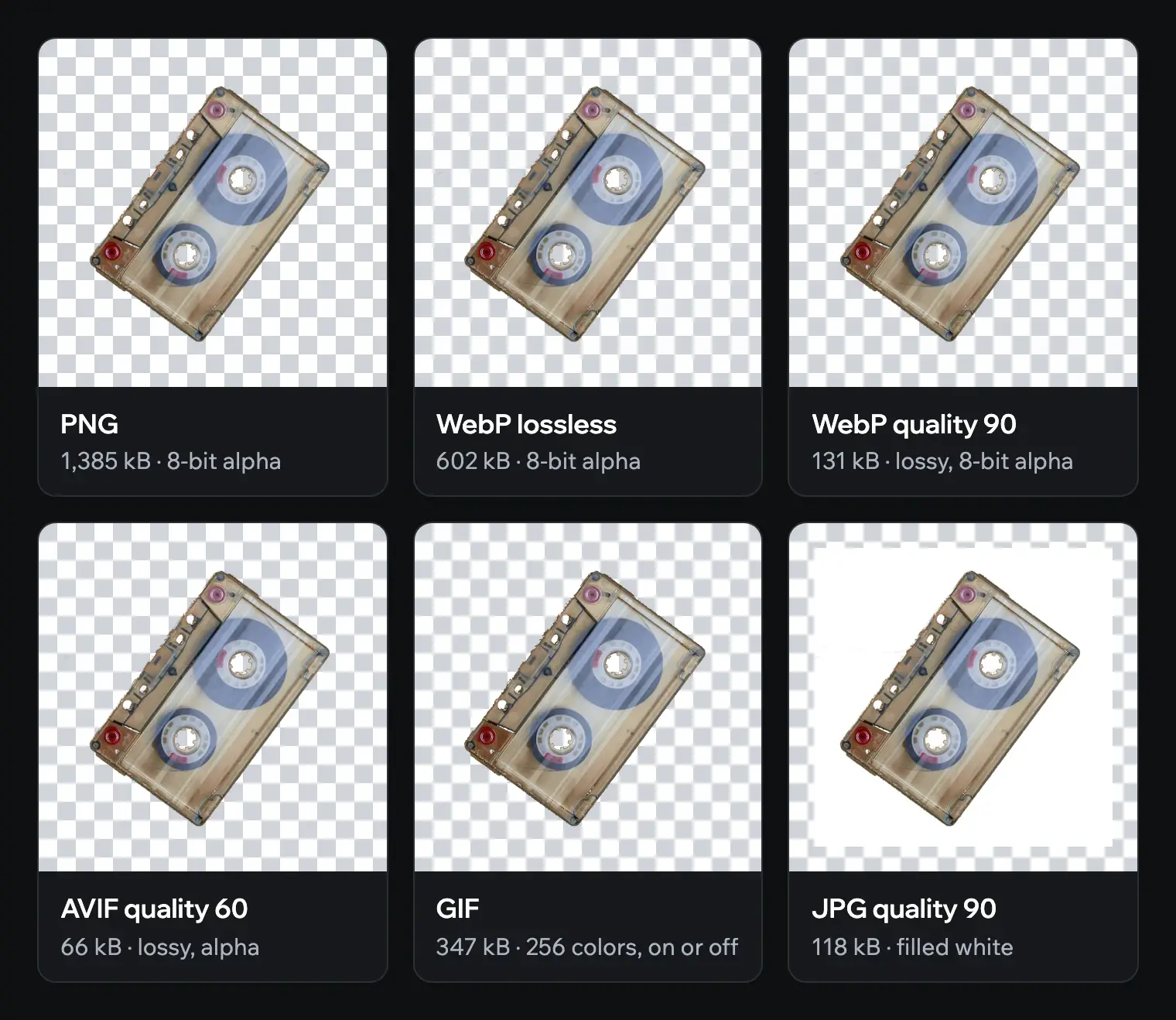
The lossless WebP was 57% smaller than the PNG with identical pixels. The lossy WebP and the AVIF were smaller still and look the same at normal size; zoomed in, they have the faint softening of any lossy format. One photo is not a benchmark, and a flat logo compresses very differently, but the order is typical: PNG largest, then lossless WebP, then lossy WebP and AVIF.
What happens when you save a transparent image as JPG?
A JPG has no alpha channel, so something has to fill the transparent area, and you do not get to see it until the file is saved. Most editors flatten the image onto white first. A web page that draws a cutout onto a canvas and saves it as JPEG without filling it gets black instead: we checked this in Chromium and WebKit, and both turned every transparent pixel black. Some apps let you pick the color, which is useful when you know the final background.
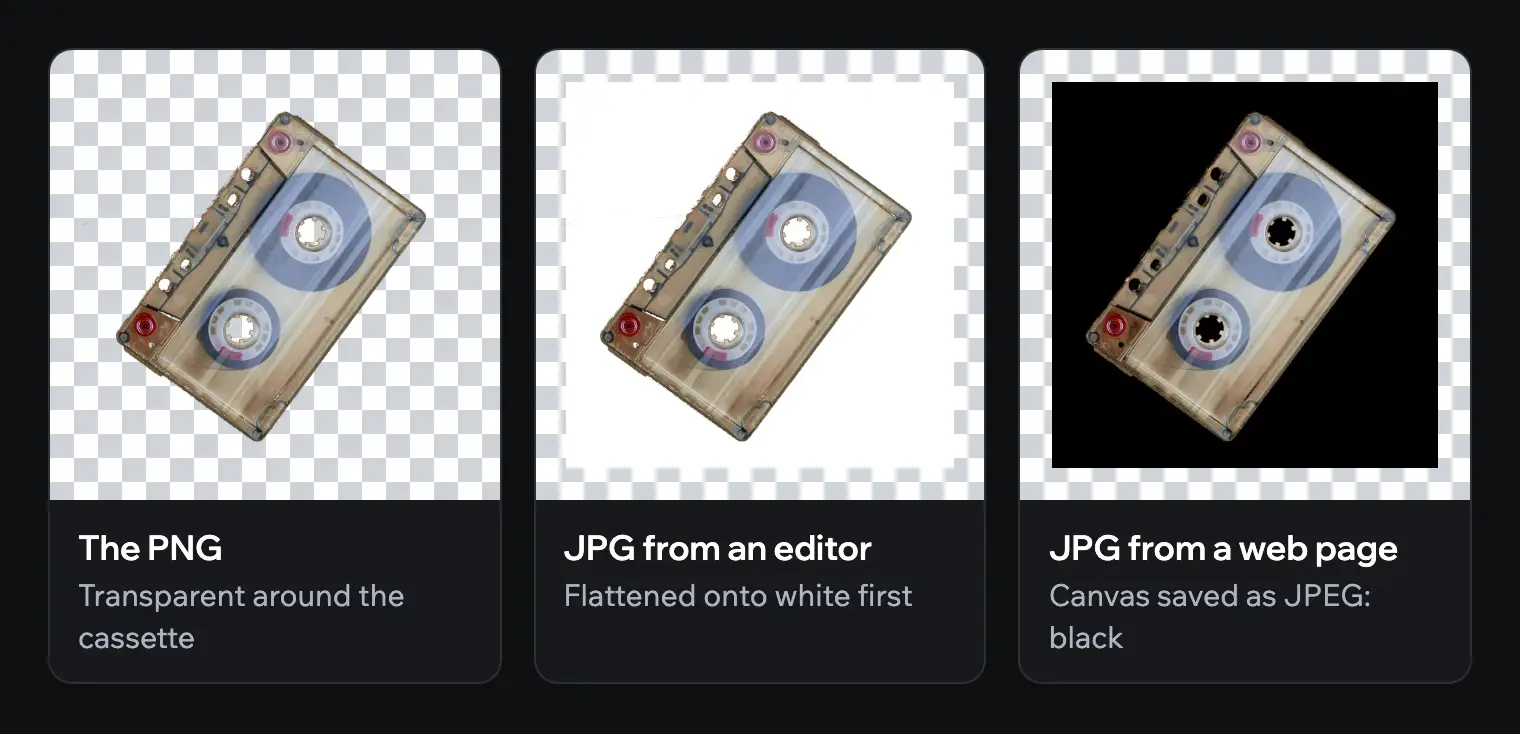
In Pixuvia, the Editor's JPEG export fills transparent areas with white, the Studio does the same and suggests PNG when an image has transparency, and the image converters keep transparency in PNG and WebP and fill it with white for JPG. If you need the transparency later, keep a PNG or WebP copy; once a JPG is saved, the cutout cannot be recovered from it.
Why does my transparent PNG show a checkerboard?
Real transparency has no color. Editors draw a gray and white checkerboard behind it only so you can see where it is, and that checkerboard is never saved. Many images found through image search and on clipart sites are labelled "transparent PNG" but are ordinary pictures of a cutout on that checkerboard: the squares are part of the pixels. Drop one on a colored slide and the checkerboard comes with it.
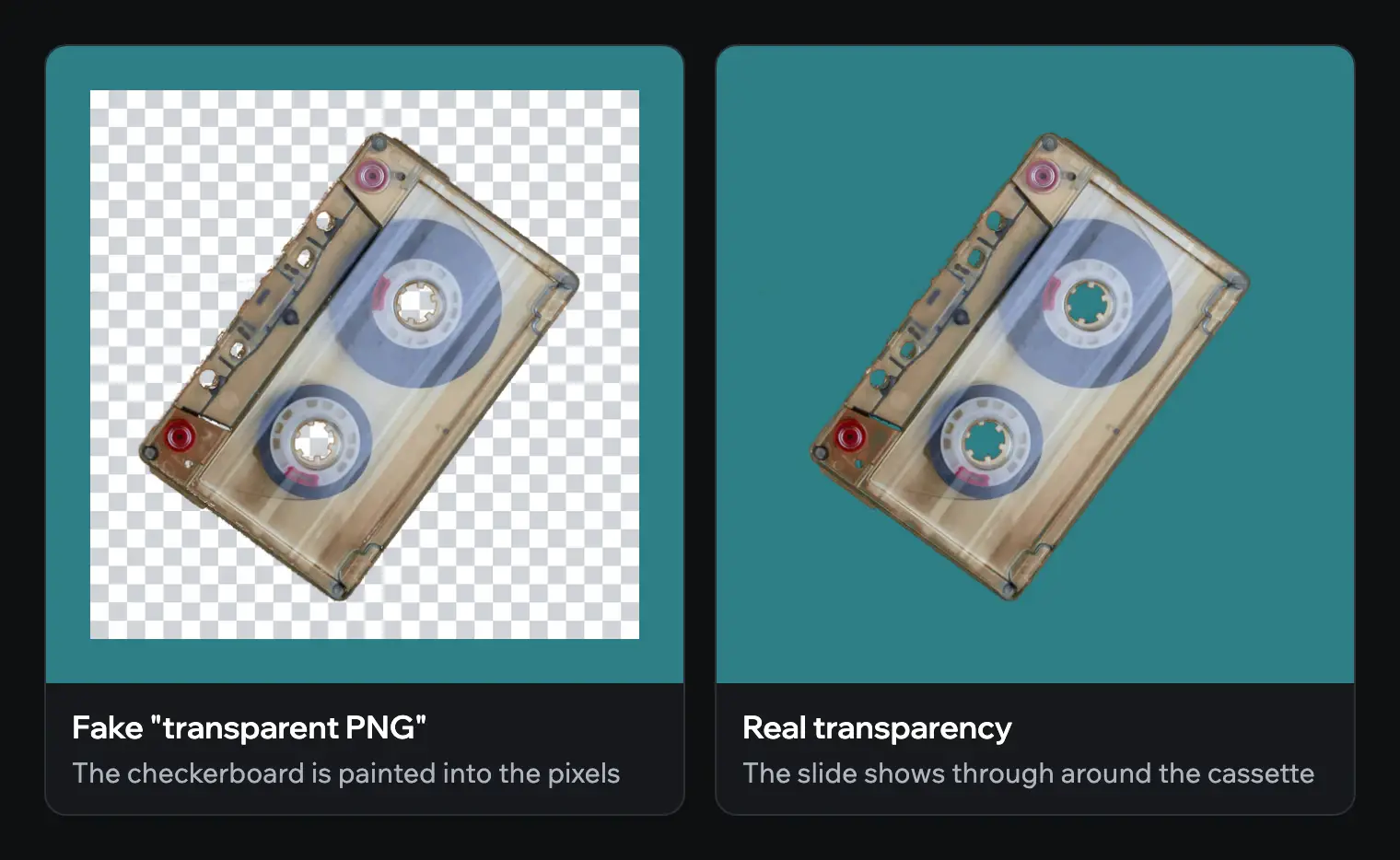
Two quick checks:
- Put it on a color: drop the image on a colored slide or document. A real cutout sits on the color; a fake brings its squares.
- Zoom in an editor: most editors draw their checkerboard at a fixed size on screen, so it stays the same as you zoom. Squares that grow with the picture are painted in.
If you already have a fake, the fix is to remove the background again: the background remover saves the subject as a real transparent PNG, and the tutorial how to remove the background from a photo shows the steps in the Editor and the Studio.
Which format should you use for a transparent image?
- Sending a cutout to someone, a print shop or a marketplace: PNG. Everyone can open it.
- A cutout or logo on your own website: WebP or AVIF, with a PNG fallback only if you must support very old browsers. PNG to WebP converts in the browser and keeps the transparency.
- An app that rejects WebP: WebP to PNG turns it back into a PNG with the transparency intact.
- A logo or icon you will resize: SVG, if you have the vector original.
- Work you will keep editing: PSD, which keeps the cutout on its own layer with a mask (the layer masks tutorial shows how masks work).
- A photo with no transparency: JPG is fine; see PNG vs JPG. For everything else, which image format to use walks through the choices.
Questions
Does JPG support transparency?
No. A JPG has no alpha channel, so every pixel is a solid color. When you save a cutout as JPG, the transparent area is filled: most editors fill it with white, and a web page that saves a canvas as JPEG without filling it first gets black.
Is PNG or WebP better for a transparent image?
Both keep full 8-bit transparency. PNG opens in nearly every app and is the safe choice for files you send to other people. WebP is much smaller (our lossless WebP of a cutout was 57% smaller than the PNG, and a lossy WebP about 90% smaller), which makes it the better choice on a website.
Why does my transparent PNG have a checkerboard background?
The checkerboard was saved into the picture. Real transparency has no color at all; editors show it as a gray and white checkerboard. Many images sold or shared as "transparent PNG" are ordinary pictures of that checkerboard. Remove the background again to get a real cutout.
Can a GIF have a transparent background?
Yes, but only on or off. One color of the GIF palette can be marked transparent, so each pixel is either fully visible or fully hidden. Soft edges, shadows and glass turn jagged or get a halo of the old background color.
Do iPhone HEIC photos have transparency?
The HEIF format can store an alpha plane, but a photo straight from the camera fills the whole frame, so it has no transparent areas. To share a cutout, PNG is the format every app can open.
Sources
- W3C: Portable Network Graphics (PNG) Specification, Third Edition
- W3C: GIF89a specification (Graphic Control Extension)
- MDN: Image file type and format guide
- Google for Developers: An image format for the Web (WebP)
- Alliance for Open Media: AV1 Image File Format (AVIF)
- Nokia Technologies: HEIF technical information
- MDN: SVG opacity attribute
- Adobe: Photoshop File Formats Specification