Chrome now opens JPEG XL: what it means for your photos
By Pixuvia · · Updated

Chrome supports JPEG XL again. Chrome 155, released to everyone on October 6, 2026, shows .jxl files on web pages and on their own without any flag, nearly four years after Chrome dropped its first experiment with the format. Firefox switched JPEG XL on a week later, and Safari has shown JPEG XL still images since version 17, so for the first time the three main browser engines all display it.
That makes .jxl files far easier to open, but it does not yet make JPEG XL the right format to send to everyone. Below: what changed, which browsers and apps support it as of November 2026, how much smaller it really is in our own test, and what to do when a .jxl file will not open.
On this page
How Chrome dropped JPEG XL and brought it back
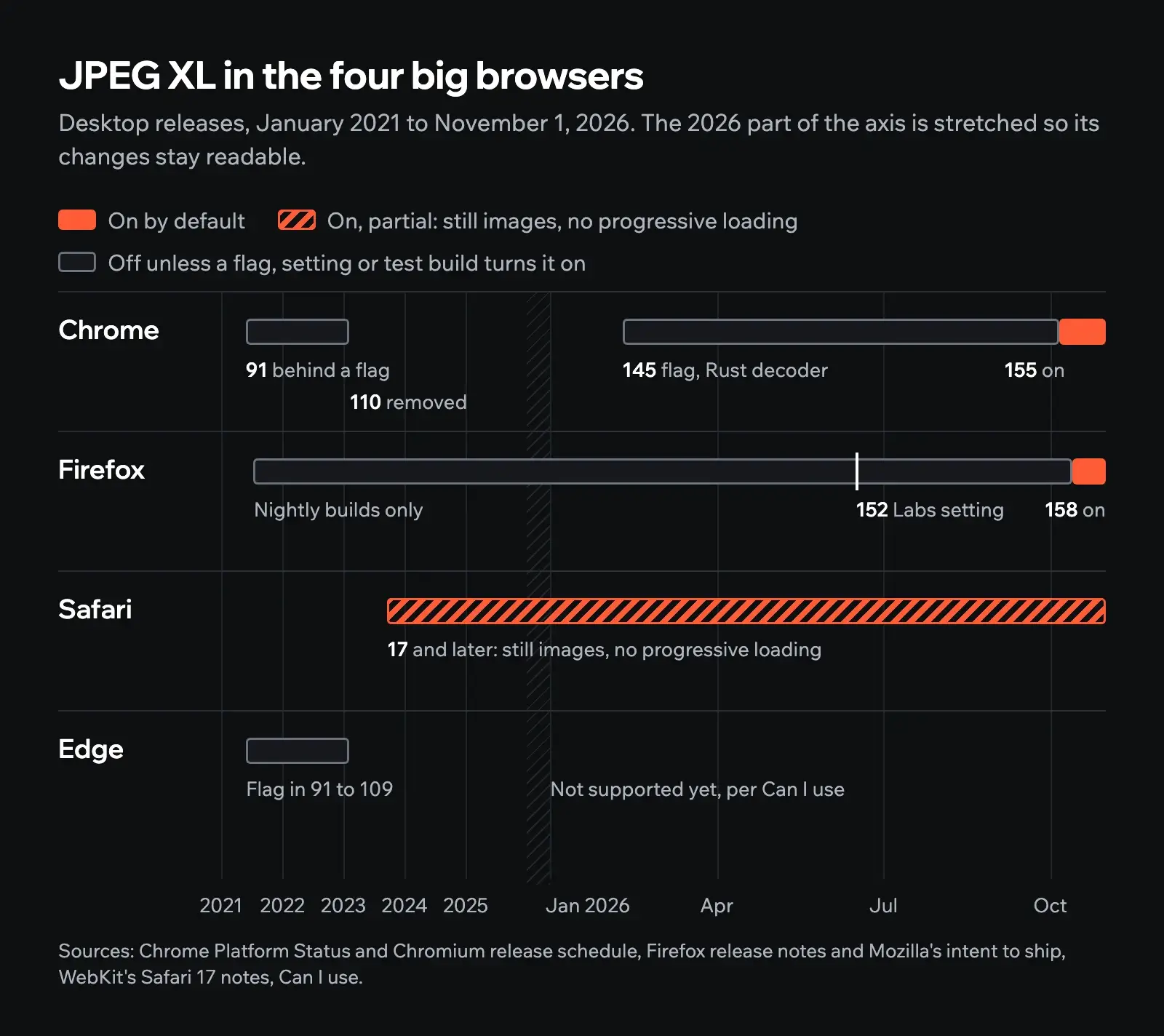
Chrome first added JPEG XL in version 91 in 2021, behind a flag that users had to turn on themselves. In October 2022 the Chromium team decided to remove that experiment, and Chrome 110 (February 2023) shipped without it. The format stayed in Safari, image editors and photo apps while Chrome users saw a broken image.
The return came in two steps. Chrome 145 (February 2026) brought JPEG XL back behind a flag (chrome://flags/#enable-jxl-image-format), now decoded by jxl-rs, a decoder written in the memory-safe language Rust. On October 6, 2026, Google's Chrome team wrote that Chrome is "shipping decoding support for the JPEG XL (.jxl) image format starting from Chrome 155", the release that reached the stable channel the same day.
Some reports doubt whether it is really on by default, because Google's post never says so in those words. The primary sources settle it: the Intent to Ship on Chromium's developer list says the feature "will ship enabled for all users", and Chrome Platform Status lists Chrome 155 as the shipping release for desktop and Android. In short, a current Chrome needs no flag. Chrome only reads JPEG XL; it does not save it.
Which browsers support JPEG XL?
| Browser | JPEG XL, as of November 2026 | Since |
|---|---|---|
| Chrome | On by default | Chrome 155, October 6, 2026 (behind a flag from 145) |
| Firefox | On by default | Firefox 158, October 13, 2026 (a Firefox Labs setting from 152) |
| Safari | Still images; no animation or progressive loading | Safari 17, September 2023, on macOS, iOS and iPadOS |
| Edge | Not supported | Only an experimental flag in Edge 91 to 109 |
Firefox planned to ship in version 157, then moved to 158 because some of the remaining work took longer; its release notes for 158 say "Firefox now supports the JPEG XL image format". Chrome and Firefox both use jxl-rs. The Safari limits and the Edge status come from Can I use.
What is JPEG XL?
JPEG XL is the JPEG committee's newer image format, standardized as ISO/IEC 18181, with the extension .jxl. Despite the name it is a different format from the familiar JPEG, and an app that opens JPGs cannot open .jxl files unless it adds support. What it brings:
- Lossless JPEG recompression: an existing JPG can be repacked as a smaller .jxl, and the exact original JPG can be rebuilt from it. WebP and AVIF have no such mode.
- Lossy and lossless in one format: it can replace JPG for photos and PNG for files where every pixel must stay (the trade-off between those two is in PNG vs JPG).
- HDR and high bit depth: wide color gamut, high dynamic range and more than 8 bits per channel.
- Transparency, animation and layers: alpha channels, animated sequences and layers are part of the standard. Our guide to transparent image formats compares the others.
- Progressive loading: a blurry preview appears first and sharpens as more of the file arrives.
How much smaller is JPEG XL than JPEG?
About 31% smaller in our test of one photo, which fits Google's claim that JPEG XL "offers 30-50% better compression than JPEG". The photo: a 2400 × 1807 picture of a harbor, saved as JPEG at quality 85, and as WebP, AVIF and JPEG XL each at the lowest quality that scored at least the same on SSIM, a common measure of visual similarity.
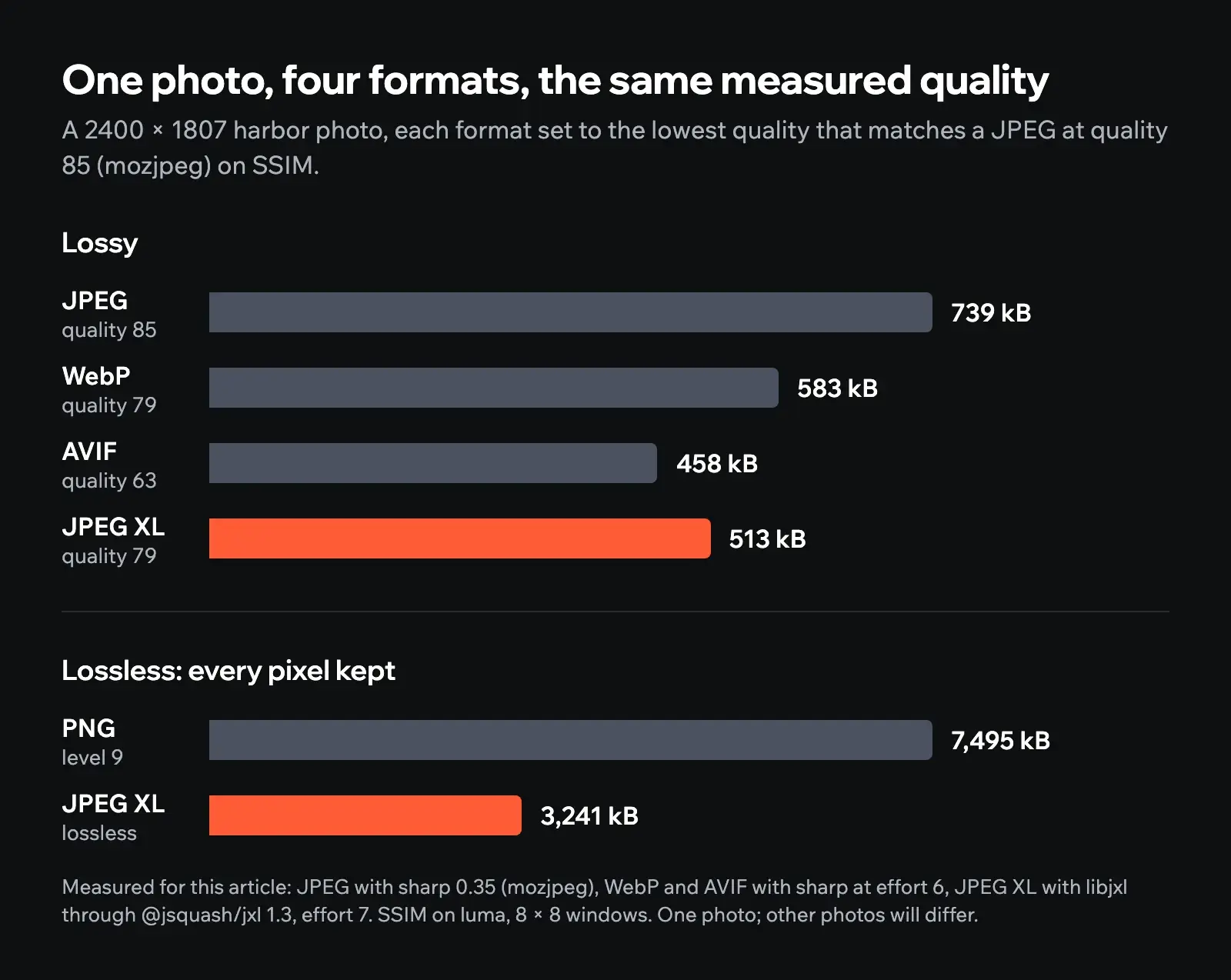
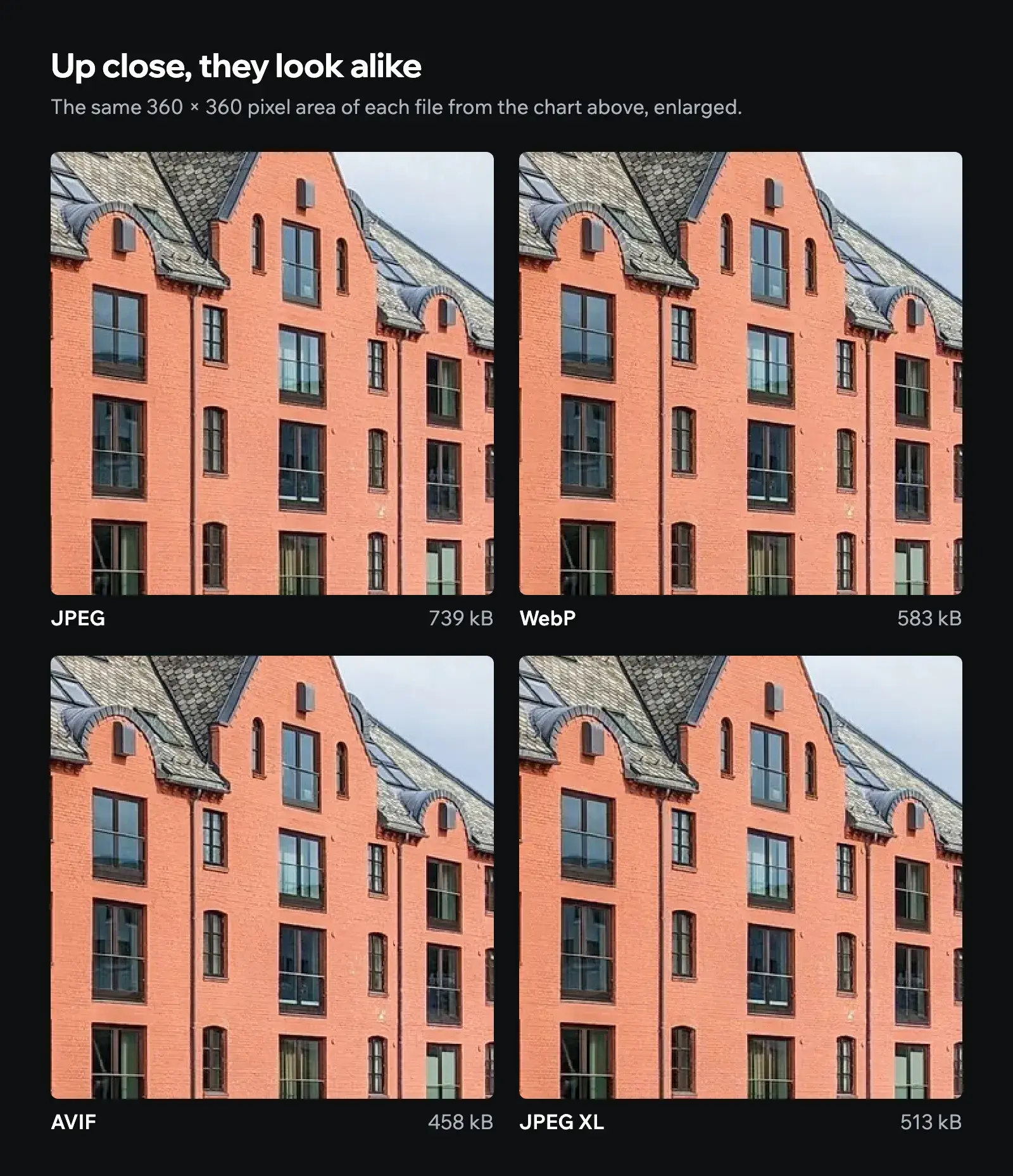
AVIF was smaller still on this photo, and WebP landed in between. The gap is widest without loss: lossless JPEG XL was 57% smaller than a PNG of the same pixels, and decoding it back gave every pixel unchanged. Up close, the four lossy files are hard to tell apart.
Which apps open .jxl files?
- Browsers: Chrome 155 or later, Firefox 158 or later and Safari 17 or later, as in the table above.
- Apple devices: WebKit lists JPEG XL for Safari on iOS 17, iPadOS 17 and macOS Monterey and later. On a Mac running macOS 26, the system image framework that Preview uses lists JPEG XL as a format it reads (but not one it writes).
- Windows 11: Microsoft's JPEG XL Image Extension in the Microsoft Store adds support to Windows apps that use the system's image decoders.
- Image editors: Photoshop opens, edits and saves JPEG XL since its June 2025 release, according to Adobe. GIMP 3.0 lists JPEG XL among its import and export formats.
The Pixuvia online photo editor does not open or save JPEG XL yet, and there is no .jxl converter on this site. It opens PNG, JPEG, WebP, GIF, AVIF, TIFF, HEIC, SVG and PSD files.
Should you save photos as JPEG XL now?
- Sharing with people: not yet. Edge, many upload forms, messaging apps and older devices still cannot show it. JPG remains the safe choice.
- Your own website: it can make sense with a fallback. Serve .jxl inside a
<picture>element with a JPG, WebP or AVIF version for browsers without support. For which of those to pick, see AVIF vs WebP and WebP vs JPG. - Archiving JPG collections: lossless recompression saves space and keeps the originals recoverable, if your photo app reads .jxl.
- Lossless masters: a strong replacement for PNG or TIFF in workflows whose apps already support it.
For the broader picture of which format suits which job, see which image format to use.
What to do when a .jxl file won't open
- Update your browser to Chrome 155, Firefox 158 or Safari 17 or later, then drag the file into a tab.
- On a Mac, iPhone or iPad, open it in Safari, or in Preview on a Mac.
- On Windows 11, install the JPEG XL Image Extension from the Microsoft Store.
- Need a JPG or PNG? Open the file in an editor that reads JPEG XL, such as Photoshop or GIMP, and export it. Then it opens everywhere, including in our Editor and converters.
- Sending one to someone else? Send a JPG instead, or ask them to update their browser first.
Questions
Is JPEG XL on by default in Chrome?
Yes, from Chrome 155, which reached the stable channel on October 6, 2026. The Intent to Ship says it ships enabled for all users, and Chrome Platform Status lists 155 for desktop and Android. In Chrome 145 to 154 it was behind the chrome://flags/#enable-jxl-image-format flag.
Can Chrome save images as JPEG XL?
No. Chrome 155 adds decoding: it shows .jxl images on web pages and opens .jxl files. Saving or converting to JPEG XL still needs another app, such as Photoshop, GIMP or the libjxl command-line tools.
Is JPEG XL better than AVIF?
It depends on the job. In our test on one photo, AVIF was the smallest lossy file at the same measured quality and JPEG XL came second, both well under JPEG and WebP. JPEG XL stands out for lossless files and for recompressing existing JPEGs without loss, which AVIF cannot do.
Does Microsoft Edge show JPEG XL?
Not yet, according to Can I use as of November 2026, even though Edge is built on Chromium. Edge had the same experimental flag as Chrome from version 91 to 109.
Can I convert a JPG to JPEG XL without losing quality?
Yes. The JPEG committee says existing JPEG files can be losslessly transcoded to JPEG XL, which makes them smaller, and the original JPEG can be rebuilt from the .jxl file. Use a tool that offers this mode, such as cjxl from libjxl.
Sources
- Chrome for Developers: Shipping JPEG XL in Chrome (October 6, 2026)
- Chrome Platform Status: JPEG XL decoding support (image/jxl) in blink
- blink-dev: JPEG XL decoding support intents
- Chromium Dash: Chrome release schedule
- Chromium issue 1178058: JPEG XL support
- Firefox 158.0 release notes
- Mozilla dev-platform: Intent to ship: JPEG XL
- WebKit: WebKit features in Safari 17.0
- Can I use: JPEG XL image format
- JPEG committee: Overview of JPEG XL
- Adobe: Photoshop desktop feature summary (June 2025 release)
- GIMP 3.0 release notes
- Microsoft Store: JPEG XL Image Extension
- jxl-rs: JPEG XL decoder in Rust