AVIF vs WebP: which modern image format should you use?
By Pixuvia · · Updated

AVIF vs WebP in short: AVIF makes smaller files at the same quality and handles HDR and 10- or 12-bit color, which WebP cannot. WebP encodes many times faster and is read by a few more older apps. For photos on a website, serve AVIF with a WebP or JPG fallback; for images you need quickly, or that must open in older software, WebP is the easier choice.
We measured both on the same photo: file sizes at matched quality, encode times and 1:1 crops. Below are the results, what each format supports, where they open today, and what to do when an AVIF file will not open.
On this page
- AVIF vs WebP at a glance
- What are AVIF and WebP?
- Is AVIF smaller than WebP? What we measured
- Do AVIF and WebP support HDR and transparency?
- Is AVIF slower to encode than WebP?
- Which browsers and apps support AVIF? (November 2026)
- How do I open an AVIF file?
- What about JPEG XL?
- AVIF or WebP: which should you use?
- Questions
- Sources
AVIF vs WebP at a glance
| Feature | AVIF | WebP |
|---|---|---|
| Based on | AV1 video codec in a HEIF container (Alliance for Open Media) | VP8 video codec (lossy) and its own lossless codec (Google) |
| File size, our test | About 17% smaller than WebP at low and medium quality, 2% at high | 21 to 23% smaller than JPG at low and medium quality |
| Bit depth | 8, 10 or 12 bits per channel | 8 bits per channel |
| HDR and wide gamut | Yes | No |
| Transparency | Yes | Yes, lossy and lossless |
| Animation | Yes (image sequences) | Yes |
| Encode speed, our test | 3 to 11 seconds | 0.2 to 0.3 seconds |
| Progressive loading | No: the file must download fully | No |
| Browsers | All current major browsers (Edge since 121, Safari since 16.4) | All current major browsers (Safari since 14, fully since 16) |
| Outside browsers | Growing; Windows needs an extension | Wide: most editors and operating systems |
What are AVIF and WebP?
WebP is Google's image format. Its lossy mode is built on the VP8 video codec and stores color as 8-bit YCbCr with half-resolution color (4:2:0), according to MDN; its lossless mode is a separate codec. Google says lossy WebP files are 25 to 34% smaller than comparable JPEGs at equal SSIM quality, and lossless WebP 26% smaller than PNG.
AVIF, the AV1 Image File Format, stores frames of the AV1 video codec in a HEIF container, the same kind of container an iPhone uses for HEIC (see HEIC vs JPG). It is published by the Alliance for Open Media, and MDN notes that no royalties are due for using it. The current specification, version 1.2.0, describes support for high dynamic range and wide color gamut, alpha, image sequences and bit depths of 8, 10 and 12.
Is AVIF smaller than WebP? What we measured
Size claims only mean something at equal quality, so we measured it. We took one detailed photo (a clownfish in an anemone, resized to 2,400 × 1,548 pixels) and saved it as WebP at quality 50, 75 and 90 with sharp 0.35. For each WebP file we then found the lowest AVIF and JPG settings we tried whose SSIM score (a common measure of how close a picture is to the original, here on brightness) matched or beat it, and compared file sizes.
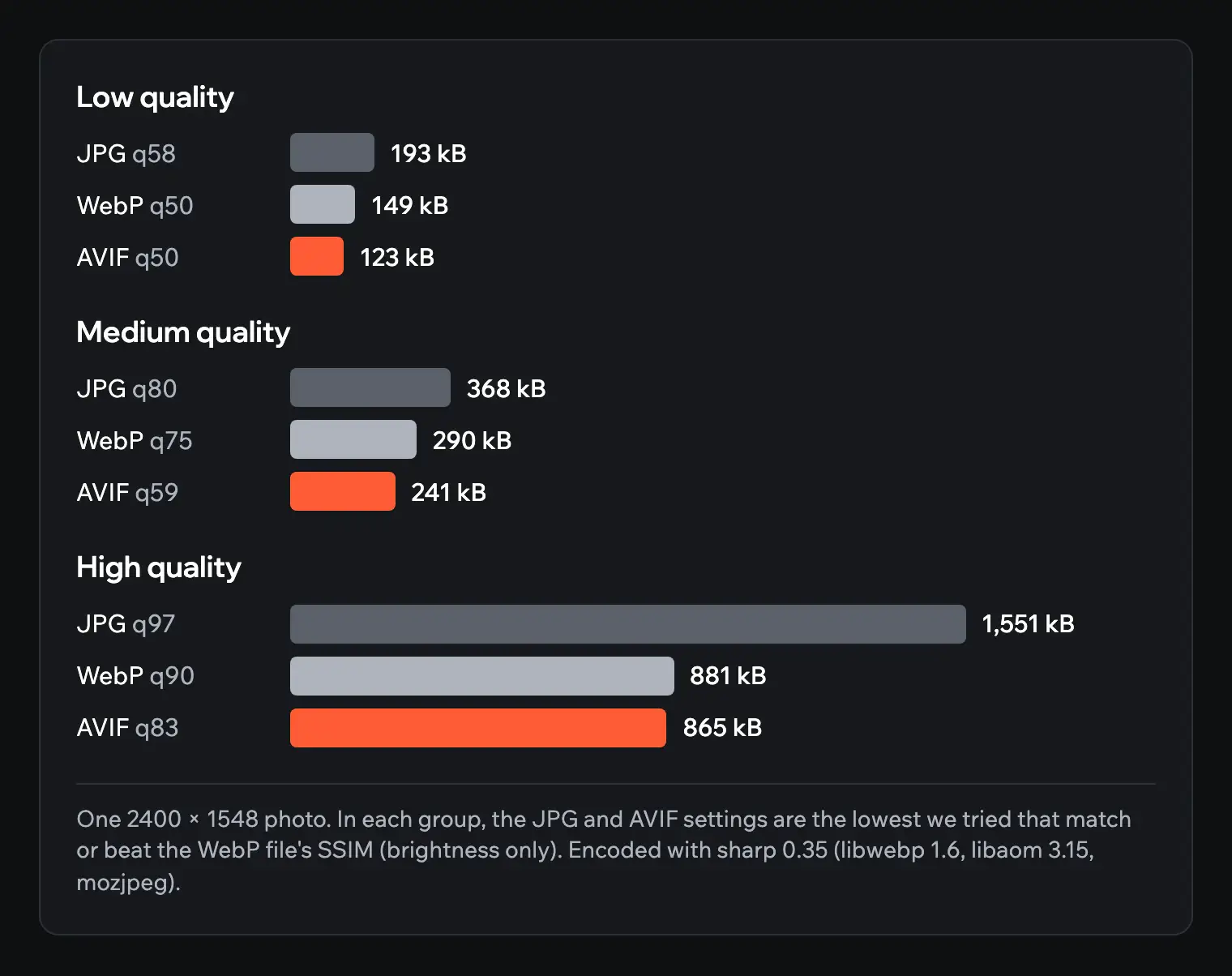
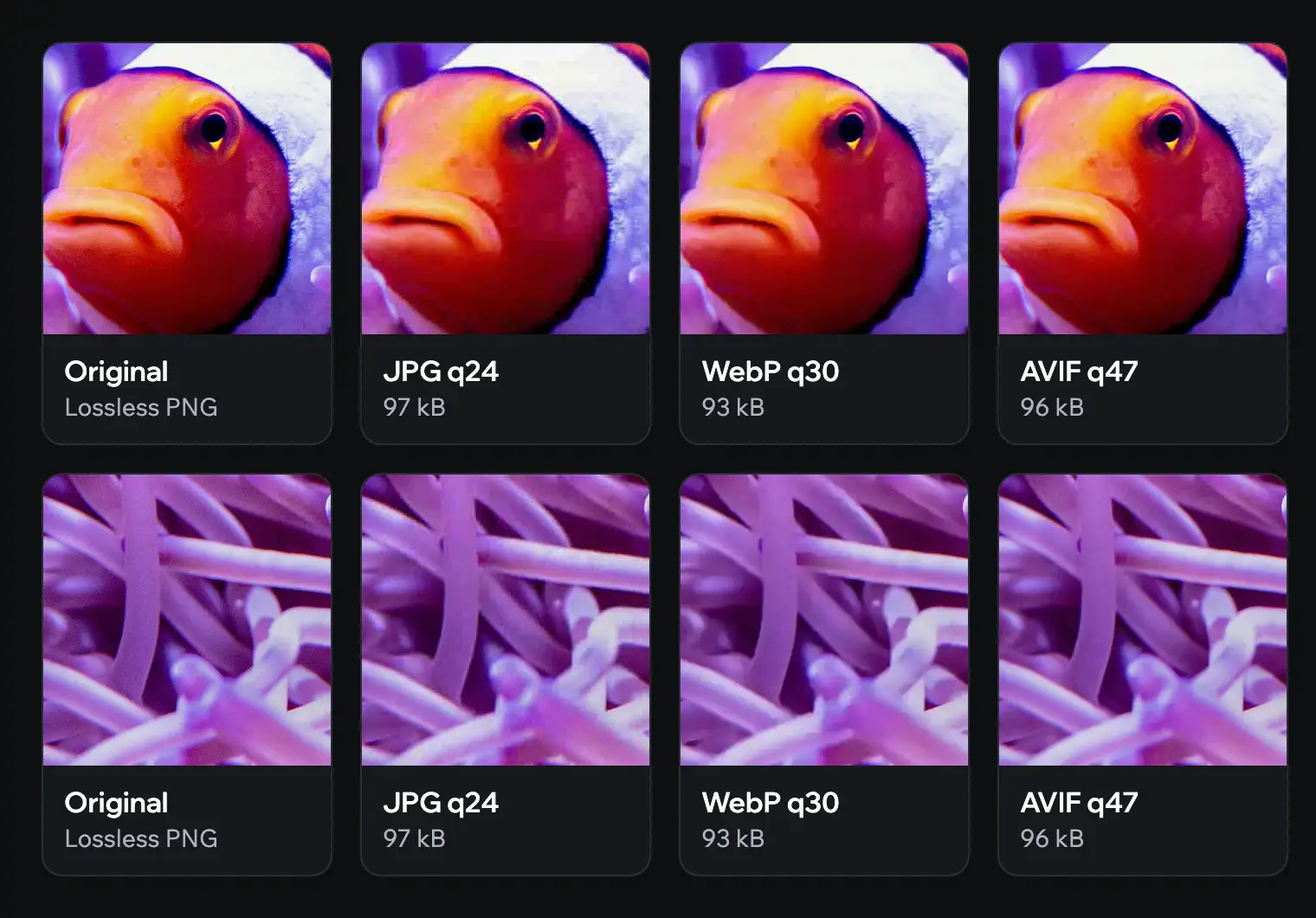
At low and medium quality, AVIF was about 17% smaller than WebP and about 35% smaller than JPG. At high quality it was only 2% smaller than WebP, though both were far smaller than JPG. Published figures are usually bigger: MDN cites a median saving of 50% for AVIF against 30% for WebP on the same JPG set. Treat ours as one honest data point, not a benchmark: one photo, one quality measure, and the defaults of one library. Fine detail like these anemone tentacles is hard for every codec, and other photos will give other numbers.
The bigger difference shows when files get small. At about 95 kB each, the crops below show what each format gives up.
Do AVIF and WebP support HDR and transparency?
Both store transparency, but only AVIF handles HDR, and this is where it clearly leads. Lossy WebP is limited to 8 bits per channel, which is fine for ordinary photos but can show banding in smooth skies and cannot hold HDR. AVIF can store 10 or 12 bits, the color descriptions used for HDR video (PQ and HLG with Rec. 2020 or P3 primaries, as MDN lists them) and metadata for mastering displays. Phones and cameras that capture HDR photos can keep that range in AVIF; in WebP it is lost.
Both formats store transparency with soft 8-bit edges, AVIF as a separate monochrome alpha image, WebP in both its lossy and lossless modes, and both make transparent files far smaller than PNG, as our test in image formats that support transparency shows. Both also animate; Google and MDN both describe the results as much smaller than animated GIFs.
One limit to know: a single AVIF image in the common Baseline profile is capped at 8,192 × 4,352 pixels; larger pictures are stored as a grid of tiles.
Is AVIF slower to encode than WebP?
Yes, much slower. AVIF's compression costs time. We timed each encode of the 2,400 × 1,548 photo on a desktop with an Intel Core i7-13700K, with sharp limited to one thread and its default effort settings, taking the best of three runs.
| Quality level | JPG | WebP | AVIF |
|---|---|---|---|
| Low | 0.13 s (q58) | 0.21 s (q50) | 3.5 s (q50) |
| Medium | 0.19 s (q80) | 0.23 s (q75) | 4.8 s (q59) |
| High | 0.61 s (q97) | 0.30 s (q90) | 11.0 s (q83) |
AVIF took 17 to 36 times as long as WebP. The exact seconds depend on the machine, the encoder version, the effort setting and the number of threads, so do not compare them with numbers from another computer; the ratio is the useful part. For a website that encodes each image once, the wait hardly matters. For a phone app saving photos on the spot, or a server resizing thousands of uploads, it can.
Which browsers and apps support AVIF? (November 2026)
In browsers the race is over. According to Can I use, AVIF works in Chrome since version 85, Firefox since 93, Safari since 16.4 on Mac and 16.0 on iPhone and iPad, Edge since 121 and Samsung Internet since 14, about 97% of users worldwide. WebP is a little further along, with full support in Safari since version 16. The difference is the long tail of older devices: Edge only added AVIF in version 121.
Outside the browser, WebP is still ahead. Photoshop opens and saves WebP natively from version 23.2, and Adobe's current list of Photoshop formats includes AVIF too; Lightroom imports AVIF, including HDR AVIF for editing. Microsoft Office needs the AV1 Video Extension to insert AVIF files, Microsoft says. Many older viewers, upload forms, print services and messaging apps accept WebP or only JPG and PNG, and turn AVIF away.
On a website, you do not have to choose: the HTML <picture> element lets the browser take the AVIF if it can and fall back to WebP or JPG if it cannot, which is the pattern MDN recommends.
How do I open an AVIF file?
- On Windows: AVIF is decoded by Microsoft's AV1 codec, which Microsoft says may not be installed on every PC. Install the AV1 Video Extension from the Microsoft Store, then close and reopen the app you opened the file with. Microsoft names this extension for AVIF in Office.
- In an older app: many older image viewers, editors and upload forms cannot read AVIF at all. Update the app, or convert the file.
- Quick look: drag the file into a current Chrome, Edge, Firefox or Safari window. Every current major browser displays AVIF.
- Convert it: the AVIF to JPG converter turns one file or a batch into JPGs that open everywhere. Converting is lossy again, so keep the AVIF if it is your only copy of the photo.
- Edit it: the Pixuvia Editor opens AVIF in any browser that displays it, and saves your work as JPG, PNG, WebP, TIFF or PSD. It does not save AVIF.
What about JPEG XL?
JPEG XL is the third modern format in this race. The JPEG committee says existing JPG files can be losslessly transcoded to it, and it supports HDR, high bit depths and progressive coding. Safari has displayed it since version 17; Chrome support is new, and we cover what that changes in Chrome now opens JPEG XL. Until support is as broad as AVIF's, AVIF and WebP remain the safe modern pair for the web.
AVIF or WebP: which should you use?
- Photos on your own website: AVIF first with a WebP or JPG fallback in
<picture>. - HDR photos: AVIF. WebP cannot keep the extra range.
- Lots of images encoded on the fly: WebP, for speed.
- Sending to people, apps or print shops: neither; JPG or PNG open everywhere. WebP vs JPG explains why Chrome saves so many images as WebP.
- Transparent graphics on the web: either; both beat PNG on size.
- Not sure: which image format to use walks through every common case.
Questions
Is AVIF better than WebP?
For file size and color, usually yes: in our test AVIF was about 17% smaller than WebP at low and medium quality, and it supports 10- and 12-bit color and HDR, which WebP does not. WebP encodes many times faster and opens in a few more older apps. At high quality the size gap nearly disappeared.
Do all browsers support AVIF?
All current major browsers do: Chrome from version 85, Firefox from 93, Safari from 16.4 on Mac (16.0 on iPhone) and Edge from 121, according to Can I use. Older versions, especially Edge before 121 and Safari before 16, show nothing, so websites usually offer a WebP or JPG fallback.
Why can't I open an AVIF file on Windows?
Windows decodes AVIF through Microsoft's AV1 codec, which is not installed on every PC. Install the AV1 Video Extension from the Microsoft Store and restart the app you opened the file with. Or open the file in a browser, or convert it to JPG.
Is AVIF lossless?
It can be, but it rarely pays off. AVIF has a lossless mode, yet for photos lossless WebP or PNG is often similar in size and far more widely supported. AVIF is at its best as a lossy format.
Should I convert my WebP images to AVIF?
Only from the originals. Converting one lossy file into another adds a second round of compression loss. If you still have the original photos, encoding them to AVIF can save space; if WebP files are all you have, keeping them is usually the better trade.
Sources
- Alliance for Open Media: AV1 Image File Format (AVIF) v1.2.0
- MDN: Image file type and format guide
- Google for Developers: An image format for the Web (WebP)
- Can I use: AVIF image format
- Can I use: WebP image format
- Microsoft Learn: HEIF extension codec (AVIF and the AV1 codec)
- Microsoft Support: Office support for HEIF, AVIF, and WebP files
- Microsoft Store: AV1 Video Extension
- Adobe: Image file formats supported in Photoshop
- Adobe: Supported file formats in Lightroom Classic and Lightroom
- JPEG committee: JPEG XL overview
- sharp: output options (the encoder used for our measurements)