PNG vs JPG: when each format wins
By Pixuvia · · Updated
For PNG vs JPG, the rule of thumb is JPG for photos and PNG for everything with sharp edges or transparency. JPG compresses photos to a fraction of a PNG's size with no visible loss at normal viewing size. PNG keeps every pixel exactly, so text, screenshots, logos and cutouts stay crisp, and it can store a transparent background, which JPG cannot.
To show where the line falls, we saved the same photo and the same screenshot both ways, measured the files, enlarged the edges and re-saved a JPG 50 times to see what repeated saving really does.
On this page
PNG vs JPG at a glance
| Feature | PNG | JPG (JPEG) |
|---|---|---|
| Compression | Lossless: every pixel is kept | Lossy: fine detail is discarded, more at lower quality |
| Photo file size | Large (3.61 MB in our test) | Small (296 KB for the same photo) |
| Screenshot file size | Small (45 KB in our test) | Similar or larger (52 KB at quality 85) |
| Sharp edges and text | Exact | Halos and specks around edges |
| Transparency | Yes, with soft edges | No |
| Re-saving | No loss, ever | Some loss with each save |
| Where it opens | Everywhere | Everywhere |
| Best for | Screenshots, logos, graphics, cutouts, files you will edit | Photos to share, upload or print |
What is the difference between PNG and JPG?
The difference is lossy against lossless compression. PNG is lossless. It packs the pixels more tightly, the way a ZIP file packs text, and unpacks exactly the same pixels every time. The PNG specification describes it as lossless and adds an alpha channel for transparency. Lossless packing works best when neighboring pixels repeat, as in a screenshot's flat backgrounds, and worst on a photo's grain and texture.
JPG is lossy. It splits the image into 8 × 8 pixel blocks, describes each block as a mix of smooth patterns and rounds those descriptions off, dropping fine variations the eye barely notices in a photo. The quality setting decides how much is rounded away. Sharp edges are exactly what the rounding hurts, which is why MDN advises lossless formats for screenshots, diagrams and logos, where blurring and colored fringes around text are very visible.
Which is smaller, PNG or JPG?
We used a 1600 × 1058 pixel photo of a fruit stall and a 1040 × 760 pixel screenshot of a web page, and saved each as PNG at maximum compression and as JPG at quality 85 with sharp, the Node.js image library.
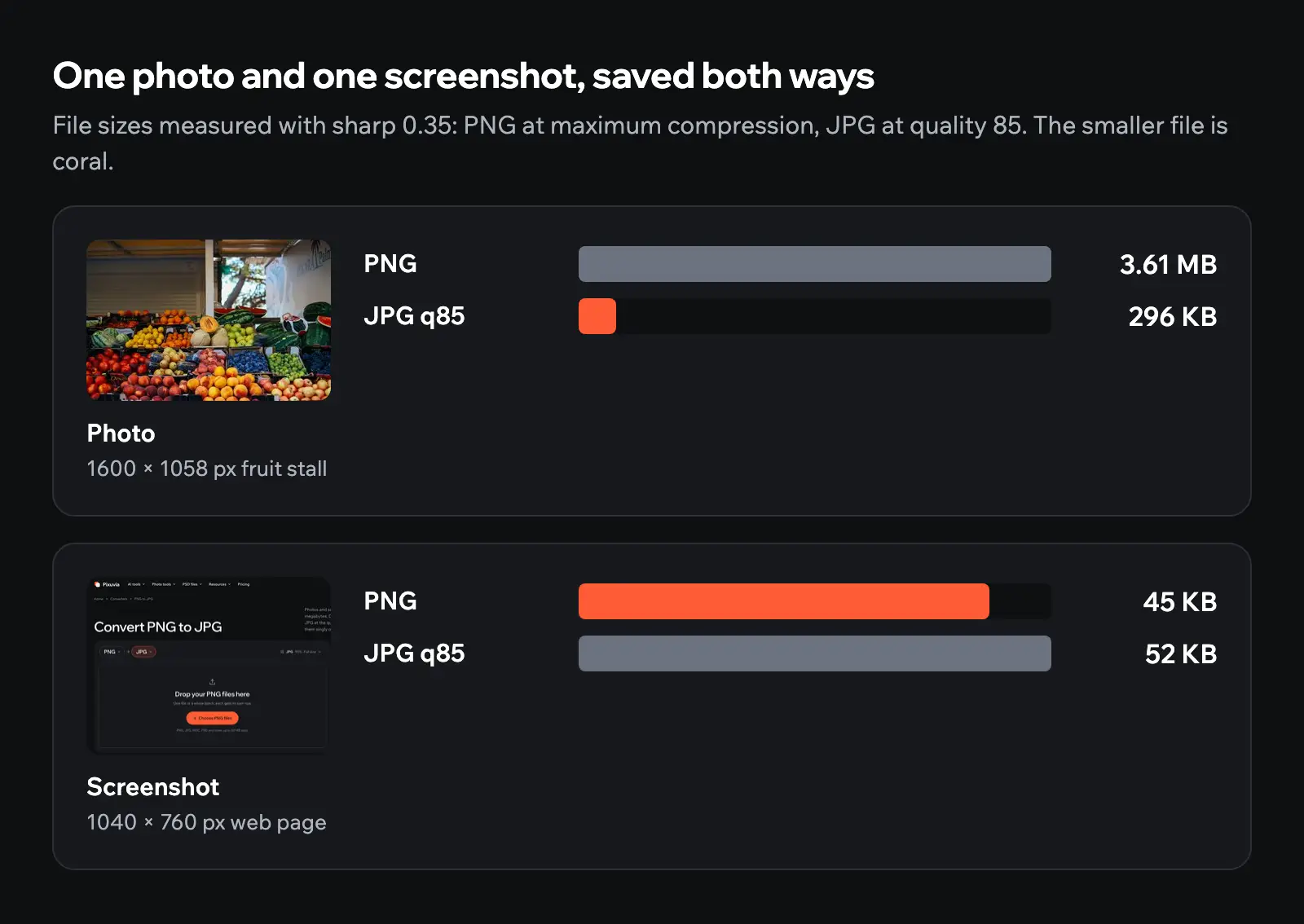
The photo makes the case for JPG on its own: 296 KB instead of 3.61 MB, and at normal size you cannot tell them apart. The screenshot turns it around. Its PNG is 45 KB and the JPG at quality 85 is 52 KB, bigger and worse. Only by dropping to quality 60 did the JPG get smaller than the PNG (35 KB), and that is where its damage becomes obvious:
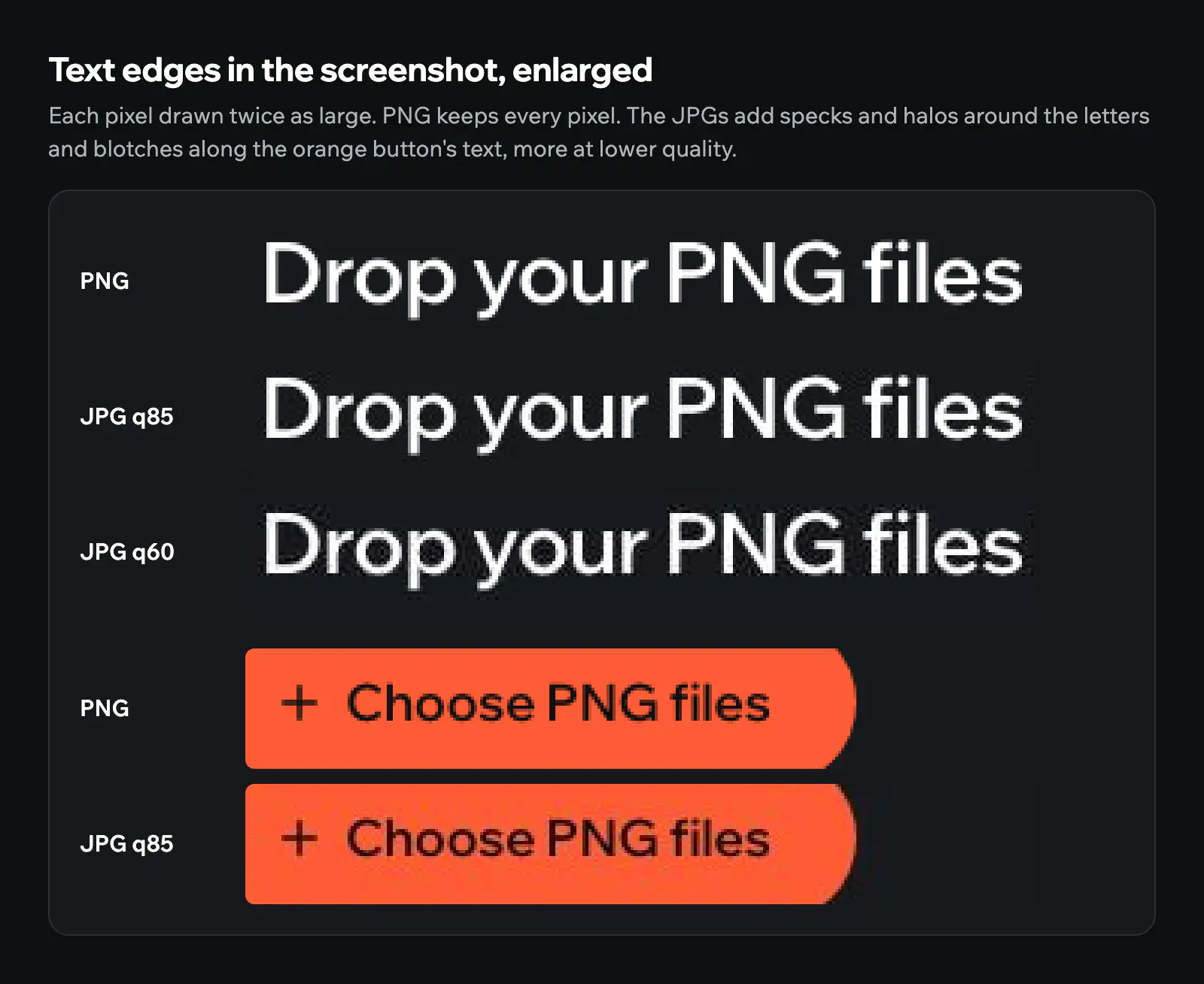
This ringing, the faint halo of noise that follows every sharp edge in a JPG, is the giveaway of a screenshot or logo saved in the wrong format. It also stacks up: crop, annotate and save such a screenshot again, and the halos get compressed into the next file too.
Does a JPG lose quality every time you save it?
The idea that a JPG loses quality every time it is opened is a myth: viewing changes nothing. Saving again does. To put numbers on it, we opened the fruit-stall photo and saved it as JPG 50 times in a row, comparing each generation with the lossless original using PSNR, a measure in decibels where higher means closer to the original.
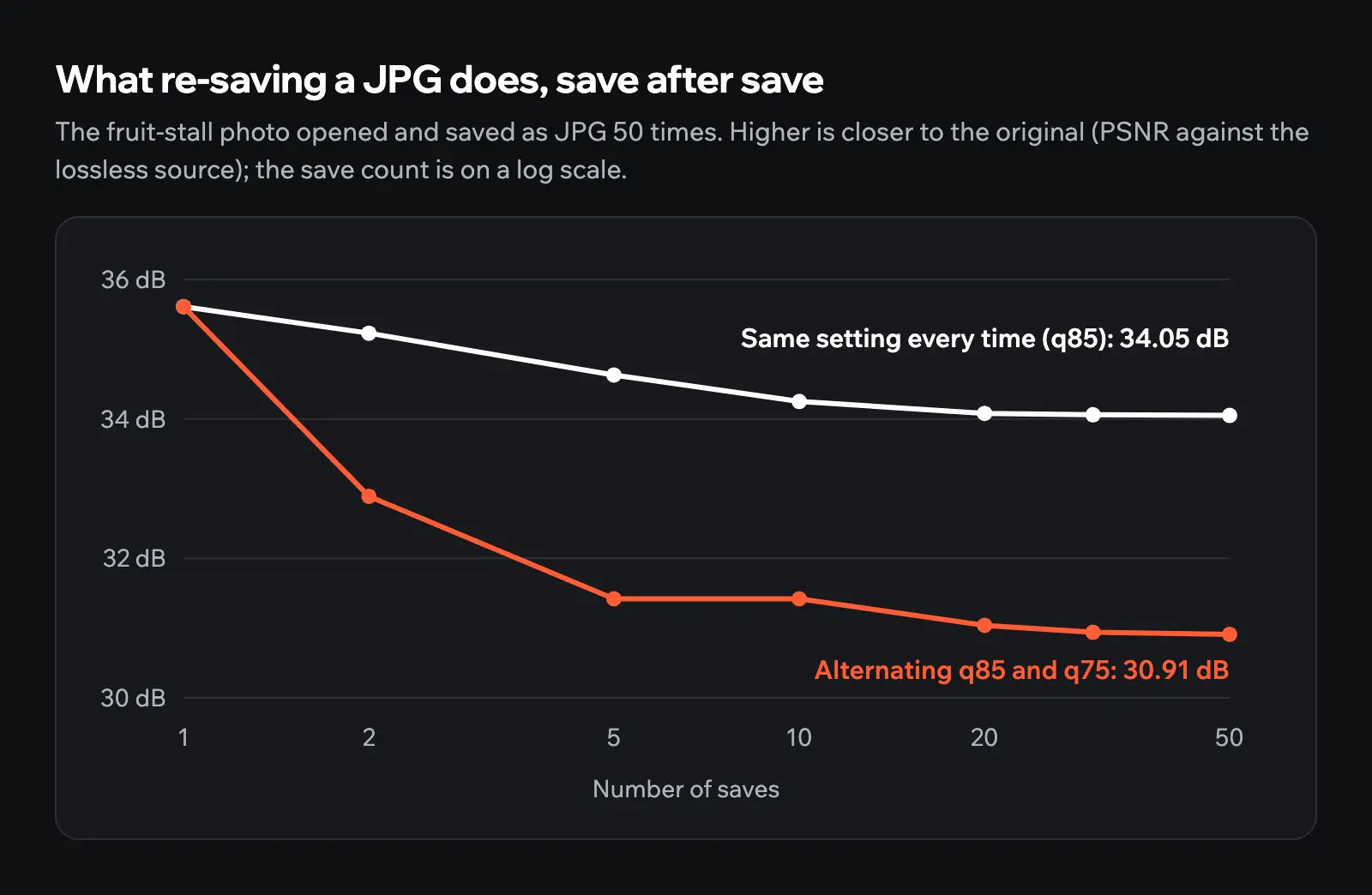
- Same setting every time (quality 85): 35.61 dB after the first save, 34.25 dB after ten, 34.05 dB after fifty. The file size barely moved (about 296 KB). The encoder keeps rounding the same blocks the same way, so the damage soon stops growing.
- Alternating quality 85 and 75, as happens when a photo passes through apps with different defaults: 32.89 dB after two saves and 30.91 dB after fifty. That is clearly worse than saving once at quality 75, which measured 34.19 dB.
In practice: re-saving now and then at the same setting does little harm, but a photo that is edited, saved, edited again in another app and saved again does degrade. Cropping or resizing between saves also realigns the 8 × 8 blocks, so each save starts its rounding afresh. Keep a lossless master (PNG, TIFF or PSD; PSD vs TIFF helps pick between the last two) while you work, and make the JPG once at the end.
Does JPG support transparency?
No, but PNG does. PNG stores a full alpha channel, so every pixel can be anywhere from opaque to fully see-through, which gives logos and cutouts soft, clean edges over any background. JPG has no transparency at all. When a transparent PNG is saved as JPG, the see-through parts have to be filled with a color; the PNG to JPG converter fills them with white or a color you pick. WebP and AVIF store transparency too, in smaller files for the web: transparent image formats compares them.
PNG or JPG: which to use for photos, screenshots, logos and print?
- Photos to share or upload: JPG, at quality 80 to 90.
- Photos you are still editing: PNG (or the editor's own format), then one JPG at the end.
- Screenshots: PNG; a Mac already saves them that way, according to Apple.
- Logos, icons and diagrams: PNG, or SVG when you have a vector file.
- Anything with a transparent background: PNG; the background remover saves a photo's subject as one.
- Print: JPG at high quality for photos, PNG for graphics with fine text; send whatever the print service lists, at full resolution (DPI vs PPI shows how large a photo prints).
- Photos on a website: neither, if you can: WebP or AVIF make smaller files.
For jobs beyond these two formats, see the guide which image format should I use.
How to convert between PNG and JPG
The PNG to JPG converter shrinks PNG photos and screenshots into JPGs at the quality you set, starting at 90%. The JPG to PNG converter goes the other way, which is worth doing before you edit a photo several times. Both take one file or a batch and download them singly or as one ZIP. To edit first, the Pixuvia online photo editor opens either format and saves to PNG, JPG, WebP, TIFF or PSD.
Questions
Is PNG better quality than JPG?
PNG is lossless, so it keeps every pixel exactly, while JPG throws some detail away to make a smaller file. For photos saved at a high JPG quality the difference is hard to see; for text, screenshots and logos the JPG's halos around edges are easy to spot.
Why is my PNG so much bigger than the JPG?
Because it is a photo. Lossless compression has to keep all the fine noise and texture in a photo, which does not compress well. In our test the same fruit-stall photo was 3.61 MB as PNG and 296 KB as JPG. For screenshots and flat graphics PNG is often the smaller file.
Does converting JPG to PNG improve quality?
No. Converting stores the JPG's pixels without further loss, but detail the JPG already discarded does not come back. It is still useful before editing, so later saves add no new compression damage, and when you need to add transparency.
Does a JPG lose quality every time you open it?
No. Opening and viewing a JPG changes nothing. Quality is lost when you save it again as a JPG, and most of that loss happens in the first few saves, more so when the quality setting changes between saves.
Should I save a logo as PNG or JPG?
PNG, or SVG if the logo exists as a vector file. A logo has sharp edges and flat color, which JPG smears with halos, and it often needs a transparent background, which JPG cannot store.
Which is better for printing, PNG or JPG?
Either prints well at full resolution. A JPG at high quality is the usual choice for photo prints because the file is far smaller; use PNG for graphics with text or sharp lines, and check which formats the service lists.