WebP vs JPG: which is better, and why Chrome saves images as WebP
By Pixuvia · · Updated

WebP vs JPG comes down to where the image goes. WebP makes smaller files than JPG at similar quality and adds transparency and animation, so it is the better format for photos on a website. JPG is the better format for a file you keep, send, upload or print, because it opens everywhere, while WebP still trips up older photo viewers, some Office versions and many upload forms.
Chrome saves images as WebP because that is what the site sent it: many sites serve WebP to browsers that accept it, even behind a .jpg address. If you need a JPG, convert the file after downloading it, or open it in an app that reads WebP and save it again as JPEG.
On this page
WebP vs JPG at a glance
| Feature | WebP | JPG (JPEG) |
|---|---|---|
| Made by | Joint Photographic Experts Group, 1992 | |
| Compression | Lossy or lossless | Lossy only |
| File size | Usually smaller at the same quality (Google says 25% to 34%) | Larger at the same quality |
| Transparency | Yes, in lossy and lossless files | No |
| Animation | Yes | No |
| Browsers | Chrome 32+, Edge 18+, Firefox 65+, Safari 16+ | All |
| Outside the browser | Patchy: older viewers, some Office versions and many forms refuse it | Practically everywhere |
| Best for | Images on websites | Sharing, uploading, printing, archiving copies |
Is WebP smaller than JPG at the same quality?
Google's WebP page claims lossy WebP files are 25% to 34% smaller than comparable JPEGs at the same SSIM, a common measure of how close a compressed image looks to the original. Its compression study got that range from standard test images and a crawl of web images, against the libjpeg 6b encoder. Those are Google's numbers, so we ran our own test.
We took two photos, scaled them to 1600 pixels wide and encoded each as JPG at qualities 50, 75, 85, 90 and 95 with Chrome's own encoders, the ones a web page uses to save images. For every JPG we then searched for the lowest WebP quality whose SSIM was at least as high, so both files look equally close to the original by that measure, and compared their sizes.
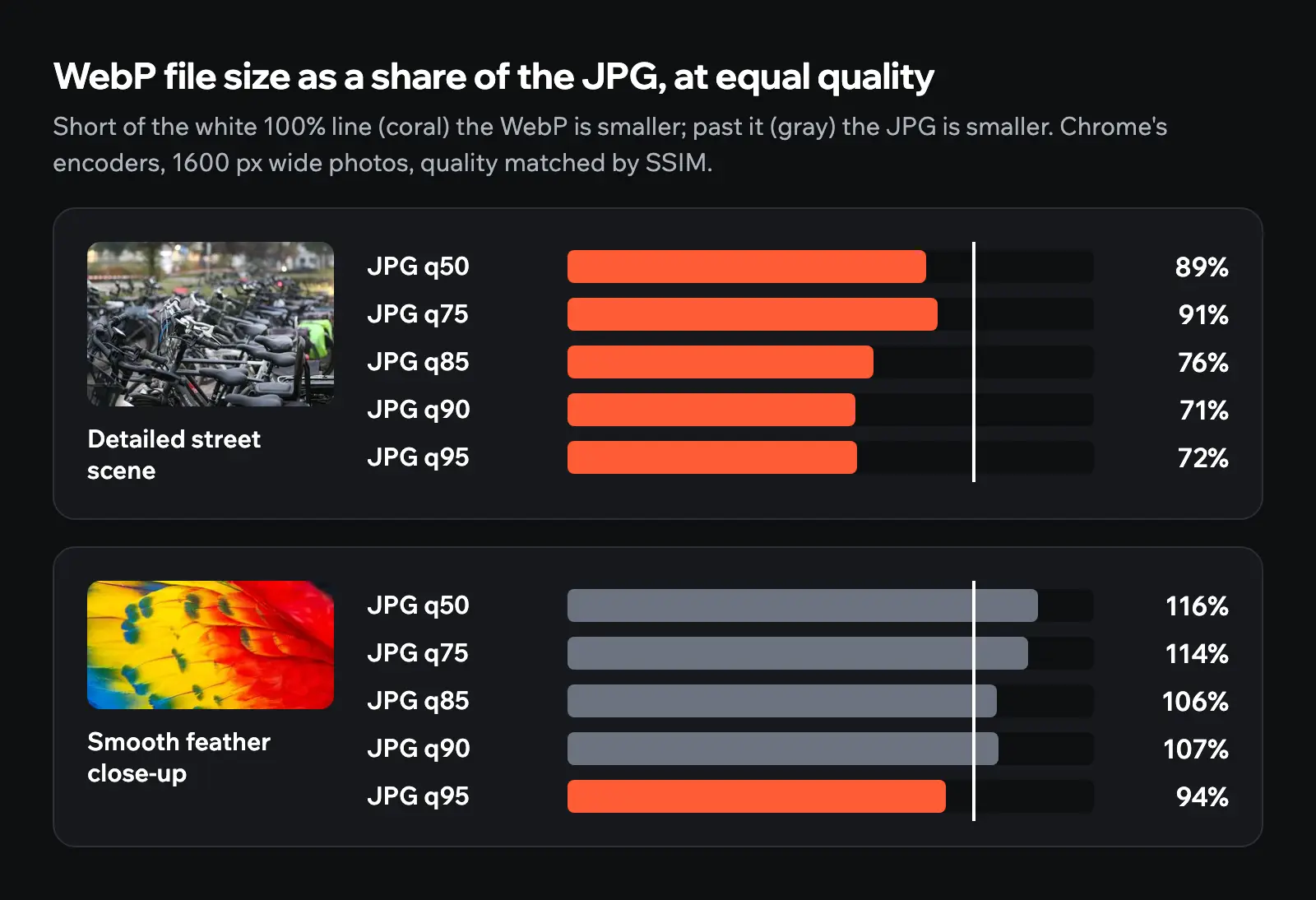
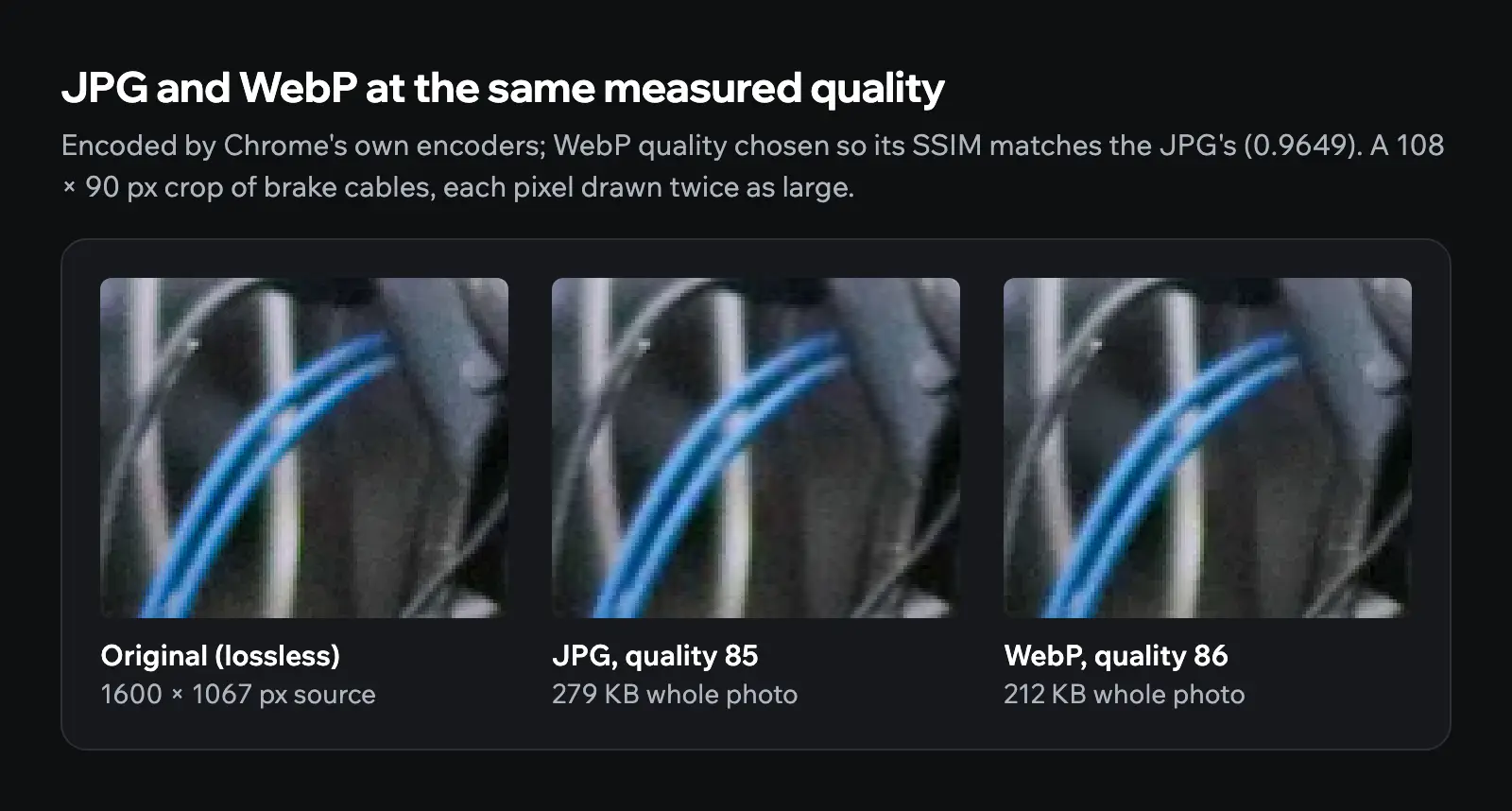
On the street scene of parked bicycles, full of edges and texture, WebP lived up to Google's figures at the qualities people actually use: at JPG quality 85 the JPG was 279 KB and the matching WebP 212 KB, 24% smaller. The feather close-up told a different story. It is mostly smooth color, which JPG already handles well, and the WebP needed 6% to 16% more bytes than the JPG to match it, except at quality 95.
So WebP is usually smaller, not always. The quality numbers do not line up across formats either: WebP quality 86 is not JPG quality 86. Compare the files you get, not the slider values.
At matched SSIM you should not see a difference, and in the street photo you don't. Enlarged, the cables in the JPG pick up faint blocky noise, while the WebP is slightly softer:
Does WebP support transparency and animation?
Yes, and here WebP simply does more. It can store a transparent background in both lossy and lossless files, and Google says lossless transparency costs only about 22% more bytes, while lossy WebP with transparency is typically three times smaller than a PNG. JPG has no transparency at all: save a cutout as JPG and its background is filled in.
WebP also animates, with smaller files than GIF according to Google. JPG holds one still image. How WebP compares with PNG and AVIF for cutouts is covered in transparent image formats.
Where do WebP and JPG files open?
Every major browser shows WebP: Chrome since version 32, Edge since 18, Firefox since 65 and Safari since 16, according to Can I use. Outside the browser the picture is mixed:
- Windows: Photos and File Explorer show WebP once the WebP Image Extension from the Microsoft Store is installed; Microsoft says it lets File Explorer, Photos and other Windows apps view WebP. On a PC without it, or in the older Windows Photo Viewer that some PCs still use, a WebP may not open at all.
- Mac: current macOS reads WebP without add-ons; on macOS 26 its built-in image tools opened and converted our test WebP directly.
- Office: Microsoft added WebP to Office in 2021, so older Office versions may refuse the file.
- Upload forms: many accept only JPG and PNG, and some check the file extension.
- Print shops: print services list the formats they accept; send a JPG unless WebP is on that list.
JPG has none of these problems, which is the whole case for keeping it.
Why does Chrome save images as WebP?
Chrome does not convert anything when you choose Save image as. It writes the exact file the website sent. What changed is what sites send: with every request for an image, Chrome lists the formats it can display in an Accept header, which according to MDN starts with image/avif,image/webp: AVIF and WebP first, then APNG and any other image type. A server or image service that sees WebP on that list can answer with a WebP, because a smaller file loads faster. Cloudflare's Polish, for example, serves WebP when the browser's Accept header includes it and the WebP is significantly smaller.
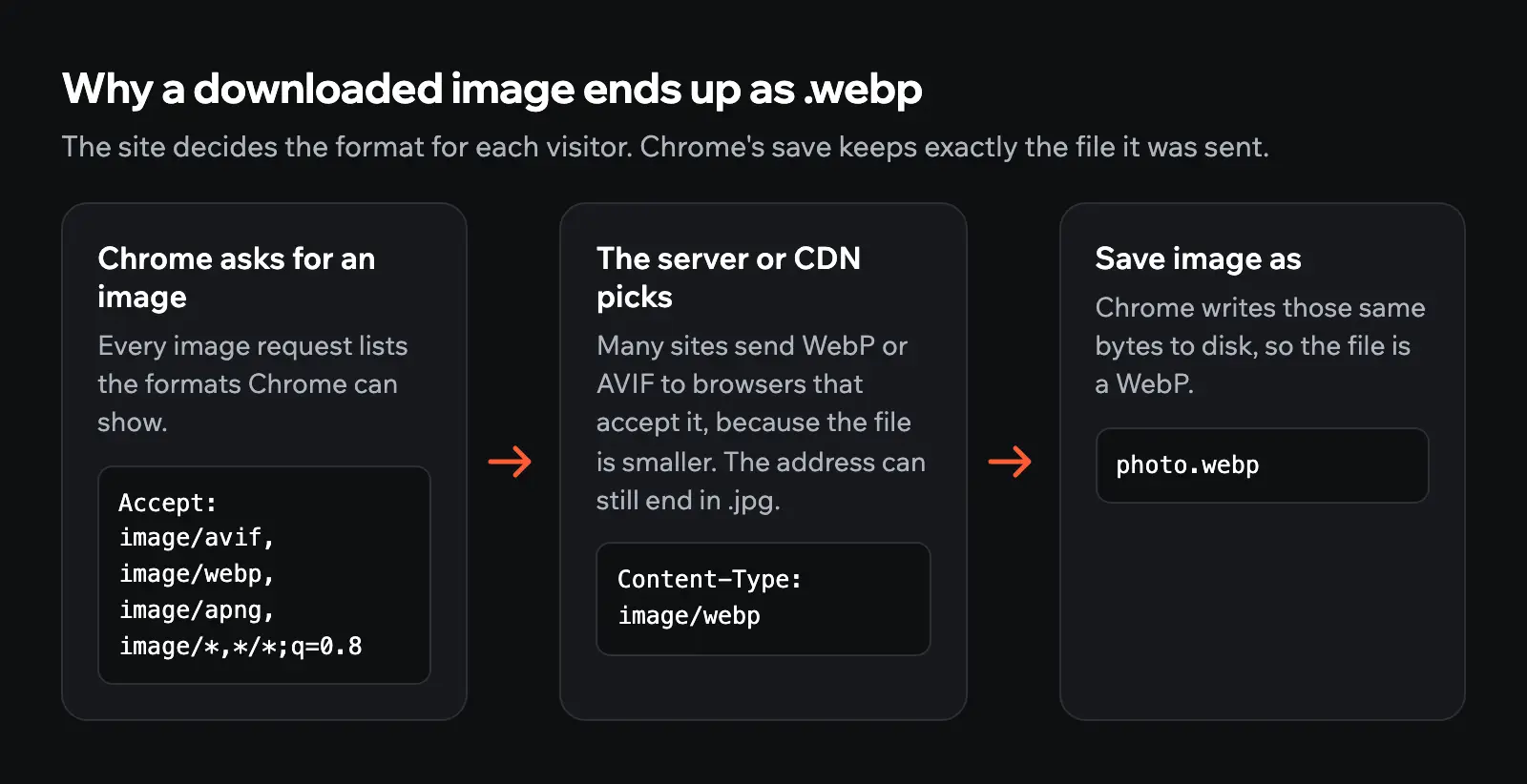
That is also why the same image can download as a JPG in one browser and a WebP in another, why the address can still end in .jpg, and why some downloads now arrive as AVIF (AVIF vs WebP explains that format). Nothing is wrong with the browser or the file.
How do I save a WebP image as a JPG?
- Convert after downloading: the WebP to JPG converter takes one file or a batch, saves at 90% quality by default and downloads them one by one or as a ZIP. A transparent WebP gets a solid background in JPG; use WebP to PNG to keep it.
- Re-save in Paint (Windows): with the WebP Image Extension installed, open the file in Paint and choose File > Save as > JPEG picture.
- Re-save in Preview (Mac): open the file, choose File > Export, pick JPEG in the Format menu and click Save, as Apple describes.
- Browser extensions that add a "save as JPG" menu exist too. They need permission to read the pages you visit, so check what an extension asks for before installing it.
Each route decodes the WebP and compresses it again as a JPG. That second lossy step costs a little detail and the JPG usually comes out larger, but at 90% quality it is very hard to see.
WebP or JPG: which should you use?
- Photos on your own website: WebP, or AVIF for even smaller files.
- Sending a photo by email or chat: JPG, so it opens with a double-click everywhere.
- Uploading to a form, shop or job portal: JPG, unless the form lists WebP.
- Printing: JPG at high quality, or whatever the print service lists, with enough pixels for the print size (see DPI vs PPI).
- Graphics with transparency: WebP on the web, PNG for files you send.
- Editing further: neither; keep a lossless copy, as covered in PNG vs JPG.
The Pixuvia online photo editor opens WebP and JPG alike and saves to either, plus PNG, TIFF and PSD. For other jobs, the broad guide which image format should I use has a table by task.
Questions
Is WebP better quality than JPG?
At the same file size WebP usually keeps a little more detail, which is the same thing as saying it makes smaller files at the same quality. Google puts the saving at 25% to 34%. In our test it was 24% for a detailed street photo at quality 85, but a smooth feather close-up came out 6% larger as WebP, so it depends on the picture.
Why does Chrome save images as WebP?
Chrome saves the file the website sent. Many sites send WebP (or AVIF) to browsers that accept it because it loads faster, even when the address ends in .jpg. To get a JPG, convert the downloaded file or open it in an app such as Paint or Preview and save it as JPEG.
Does converting WebP to JPG lose quality?
A little. The WebP is decoded and compressed again as a JPG, so some fine detail can go, and the JPG is usually larger. At a high quality setting such as 90% the difference is very hard to see.
Can WebP have a transparent background?
Yes. Both lossy and lossless WebP can store transparency, which JPG cannot. Converting a transparent WebP to JPG fills the see-through areas with a solid color, so convert it to PNG instead when you need to keep them.
Should I use WebP on my website?
For photos, yes, or AVIF: every current major browser shows WebP, and the files are usually smaller than JPGs. Keep the JPG or PNG originals for editing and for anyone who needs a file to download.
Sources
- Google for Developers: An image format for the Web (WebP)
- Google for Developers: WebP compression study
- Can I use: WebP image format
- MDN: Default Accept values
- Cloudflare: Polish compression options
- Microsoft Store: WebP Image Extension
- Microsoft 365 Insider: Add WebP images to Office creations
- Apple: Convert image file types using Preview on Mac