Fotor alternatives: online editors for quick fixes, layers and AI
By Pixuvia · · Updated

Fotor is an online photo editor, a design tool with templates and a set of AI tools for enhancing, removing and generating images, all paid for with plans and AI credits. The right Fotor alternative depends on which part you use. For quick fixes and AI tools on your own photos, look at the Pixuvia Studio, Pixlr Express or BeFunky. For editing with real layers, look at the Pixuvia Editor or Pixlr Editor. For templates, flyers and social posts, Canva or Adobe Express. For AI effects and generation aimed at social feeds, Picsart.
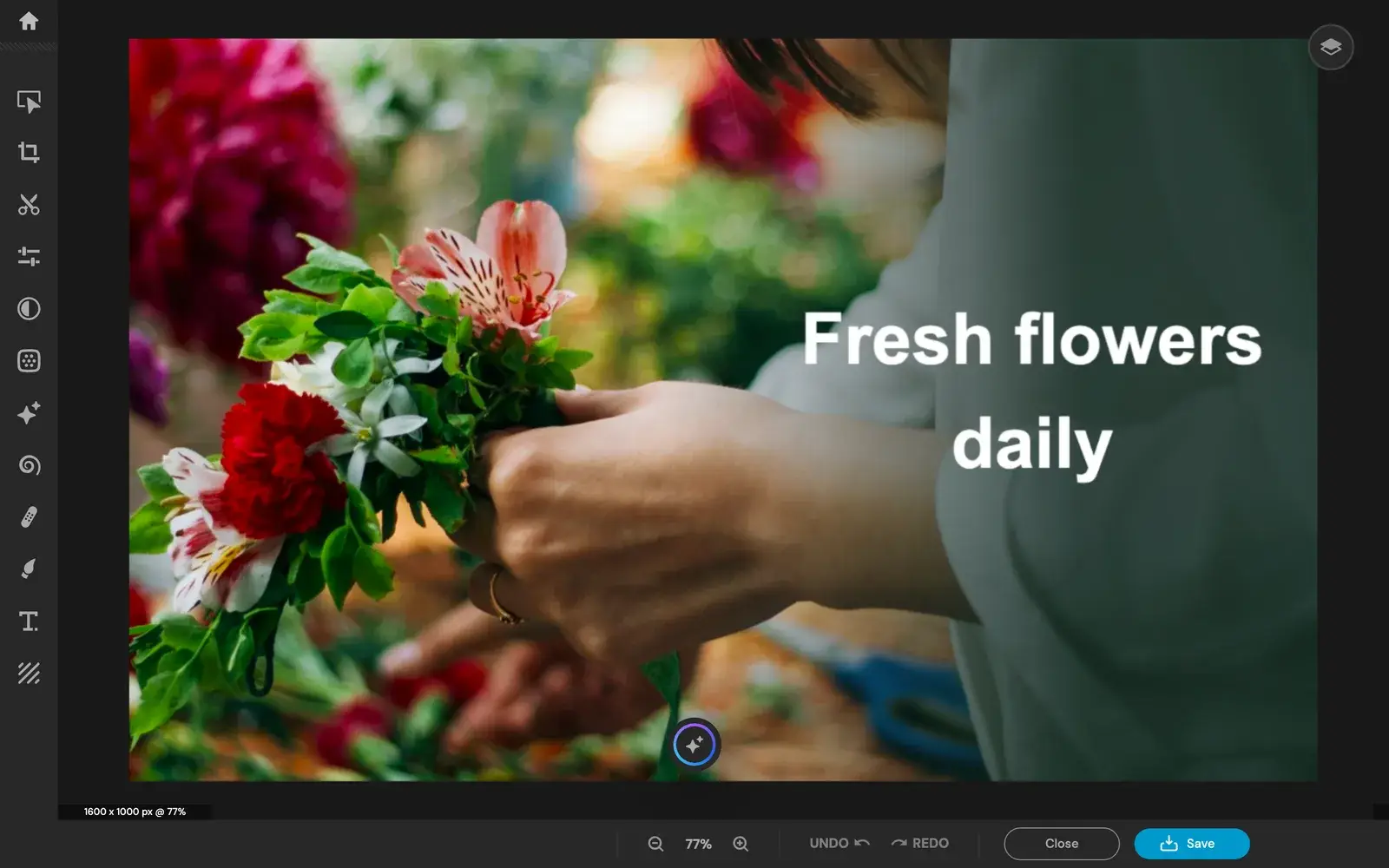
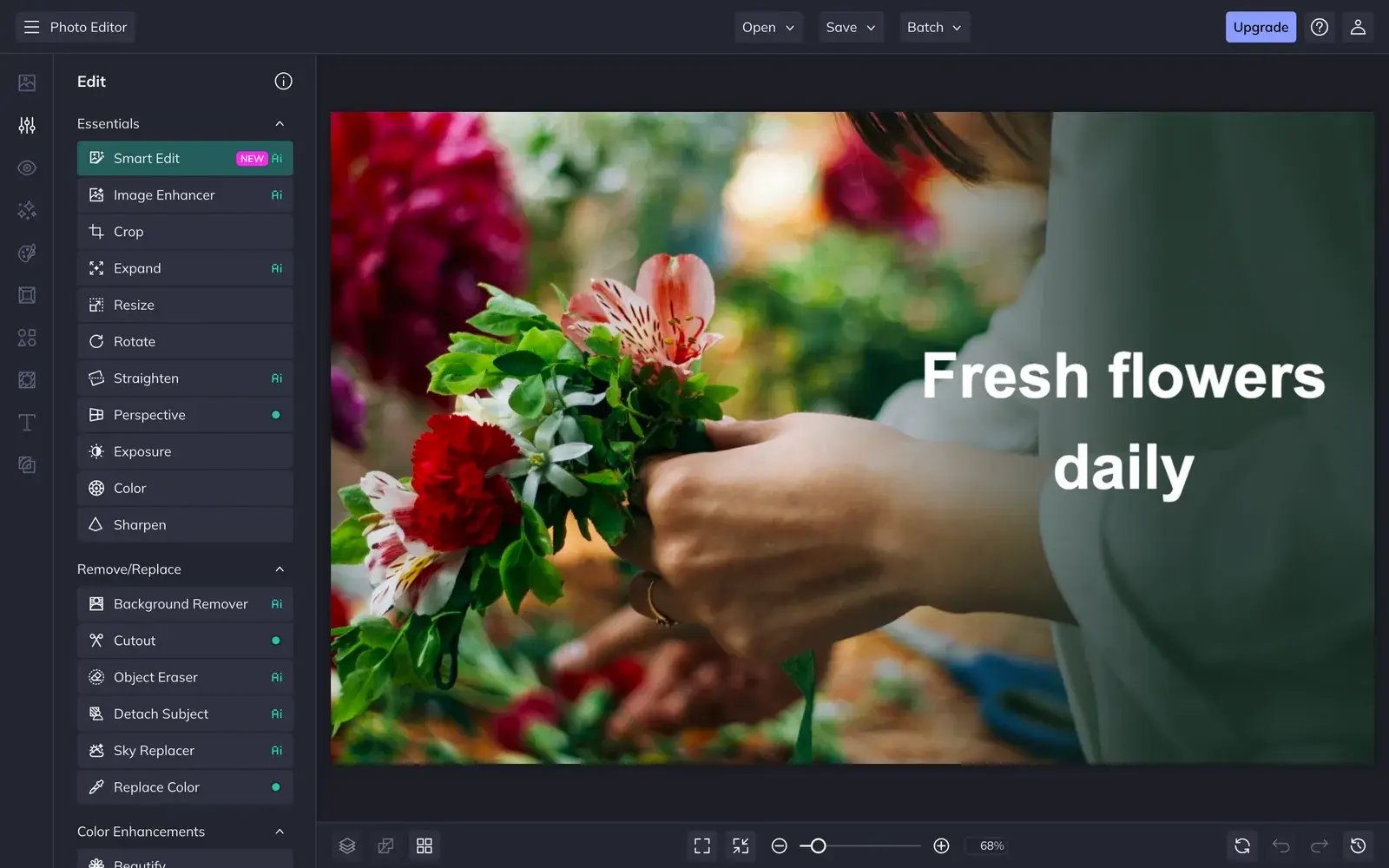
We make Pixuvia, and it appears in this list as one entry, with what it lacks. Every fact about Fotor and the other editors comes from their own websites, help pages and press releases, checked in November 2026, with links in the sources. Where we opened a file ourselves, we say so: each web editor got the same photo of a florist with the title "Fresh flowers daily", as a layered PSD where it would take one and as a PNG where it would not. We ran no AI tool in any of them.
On this page
- Why people look for a Fotor alternative
- What to look for in a Fotor alternative
- Fotor alternatives compared
- 1. Pixuvia: quick AI edits in the Studio, layers in the Editor
- 2. Canva: templates first, photo edits inside the design
- 3. Adobe Express: templates and quick edits with Adobe's AI
- 4. Picsart: AI edits, effects and generation for social media
- 5. Pixlr: a quick editor and a layered one under one account
- 6. BeFunky: the plainest quick editor, with effects and batch edits
- Which Fotor alternative fits your work
- Questions
- Sources
Why people look for a Fotor alternative
Fotor's home page calls it an "online photo editor for everyone", and the menu behind that line is long: an AI enhancer, unblur, upscaler and retouching; background, object, person and text removers; AI image models such as Flux, GPT Image 2, Nano Banana and Seedream; AI video models such as Veo and Kling; a template library, collage maker and logo and flyer makers; product photo tools; and apps for iOS, Android, Windows and Mac. If you use one or two of those, a tool built around them may suit you better.
Billing comes up most in reviews. Fotor's pricing page lists a Basic plan with limited credits and normal-quality JPG, PNG and PDF downloads, and Pro, Pro+ and Max plans, billed monthly or yearly, with a fixed amount of credits each month, HD and transparent PNG downloads, AI batch edits and more cloud storage. Unused credits roll over for up to five months while you stay subscribed. Its terms of service, last updated 18 September 2026, say subscriptions renew automatically, that you must cancel at least 24 hours before the current period ends, and that subscription fees are not refundable.
Reviews on Trustpilot show how those terms play out. Among the reviews posted from September to November 2026, the recurring complaints are yearly plans that renewed without a reminder the reviewer noticed, refund requests declined under the automatic-renewal terms, credits lost when a subscription ended, and AI results that ignored the prompt. Other reviews on the same page praise Fotor's support team and its tools, so read a range of them, not only the latest.
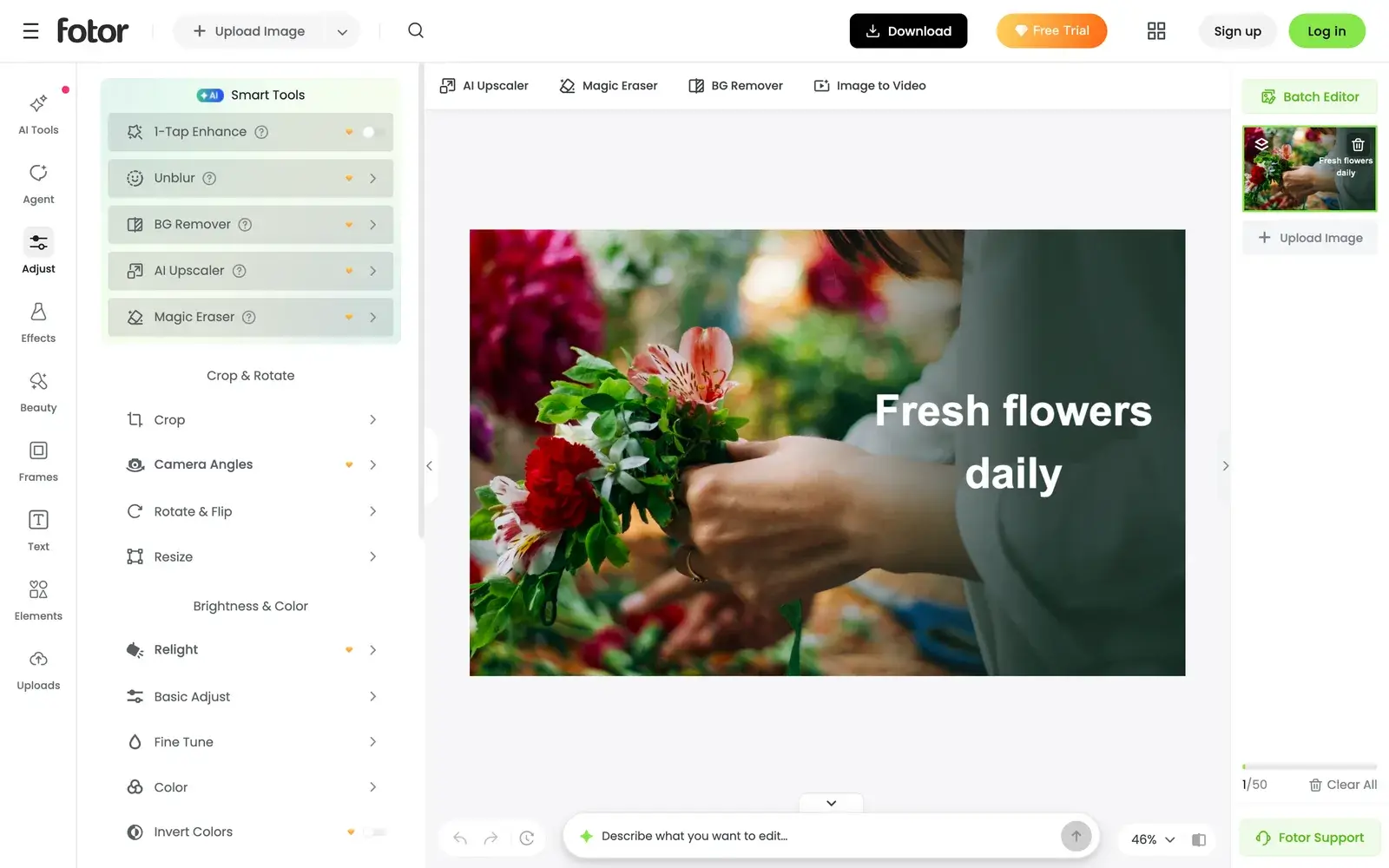
The other reason is files. Fotor's photo editor opened our PNG at once, with its adjustments, effects, beauty tools, frames, text and elements down the left side. It turned the PSD away, and it shows no layers panel, so once a title or a shade is part of the picture it stays there. Fotor's design tool does stack text, images and elements in order, and its Magic Layers feature splits a flat image into separate layers, at 20 credits per creation. If you edit the same photo many times, or someone sends you a PSD, that matters.
Fotor keeps shipping. In 2026 it announced an update to its AI Image Enhancer in January, ReShot in March, an AI tool that reframes, relights and retouches a snapshot, and in May an "AI Vibe Marketing Platform" for product photos, listings and video ads, each in a press release. All three are AI tools.
What to look for in a Fotor alternative
Sites and apps like Fotor differ most on five points:
- Which part of Fotor you use. The photo editor, the AI tools, the templates or the generators. Few apps do all four well, so pick for the one you open most.
- Layers. If you come back to the same photo, keep text and graphics on their own layers so you can change them later without starting over.
- How AI is paid for. Almost every editor here sells AI runs as credits inside a plan. Check what a run costs, whether credits roll over, and what a failed or poor result costs you.
- Renewal and refund terms. Read them before choosing yearly billing, and note the renewal date.
- Files. What each opens (HEIC, WebP, PSD) and what it saves: a flat image, its own project file, or a layered file other editors open.
Fotor alternatives compared
| Editor | Replaces in Fotor | How you pay | Layers | Best for |
|---|---|---|---|---|
| Pixuvia | Photo editor and AI tools | AI tools use credits (see pricing) | Full layers, masks and adjustment layers; opens and saves PSD | Quick AI edits with a layered editor behind them |
| Canva | Templates and design | A plan at no cost; Pro, Business and Enterprise plans | Design elements stacked as layers | Social posts, presentations and print from templates |
| Adobe Express | Templates and quick edits | A plan at no cost; Premium and other paid plans add generative credits | Layers panel for design elements | Marketing designs with brand kits |
| Picsart | AI tools, effects and generators | Pro and Ultra subscriptions with monthly AI credits | Layers with blend modes in designs | AI edits and effects for social media |
| Pixlr | Photo editor and AI tools | Plus, Premium and Ultra subscriptions with AI credits | Layers in Pixlr Editor and Pixlr Express | A quick editor and a layered one under one account |
| BeFunky | Photo editor and effects | Essential tools at no cost; Plus and Pro subscriptions | Layers kept in its own BFD project file | Plain quick edits, photo effects and batch edits |
1. Pixuvia: quick AI edits in the Studio, layers in the Editor
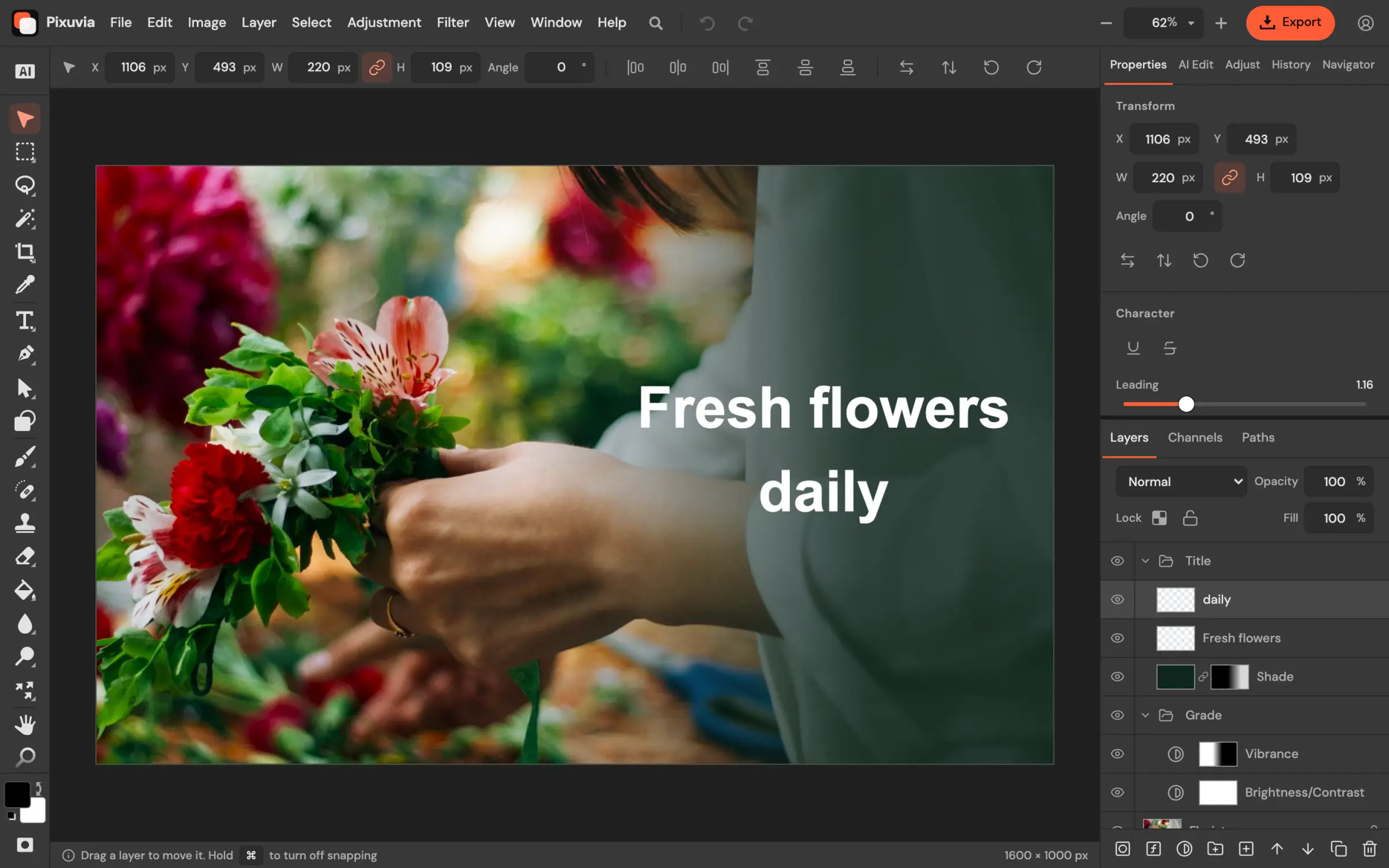
Pixuvia splits the work in two. The Studio is the quick side, closest to Fotor's photo editor: one-job AI tools (remove background, erase objects, generative fill, expand, upscale, relight and edit by prompt) next to adjustments, effects, filters, frames, text, collages and carousel splits. The Editor is a Photoshop-style layered editor with about 50 tools, which opens Photoshop files up to 60 MB and saves PSD back. Both run in the browser on computers, tablets and phones.
Good at
- The jobs most people open Fotor for, each as its own tool: the background remover, object remover, image extender, image upscaler and AI photo editor.
- A Standard background removal that runs without credits, beside the AI one.
- Real layers: 18 adjustment layer types, layer masks, blend modes and editable text, and PSD in and out.
- Opens JPG, PNG, WebP, HEIC, TIFF and PSD, and exports PSD, PNG, JPG, WebP, GIF, SVG, PDF and TIFF.
Keep in mind
- No library of design templates for flyers, posters, logos or presentations, no video tools, and no desktop or phone app to install.
- AI tools need a sign-in and use credits; plans are on the pricing page.
- PSD export is 8-bit RGB, and some Photoshop features such as warped smart objects open as pixels.
Best for: Fotor users who mostly fix and enhance their own photos, and want layers and PSD files for the edits they come back to. To start, see how to remove a background or edit a photo with AI.
2. Canva: templates first, photo edits inside the design
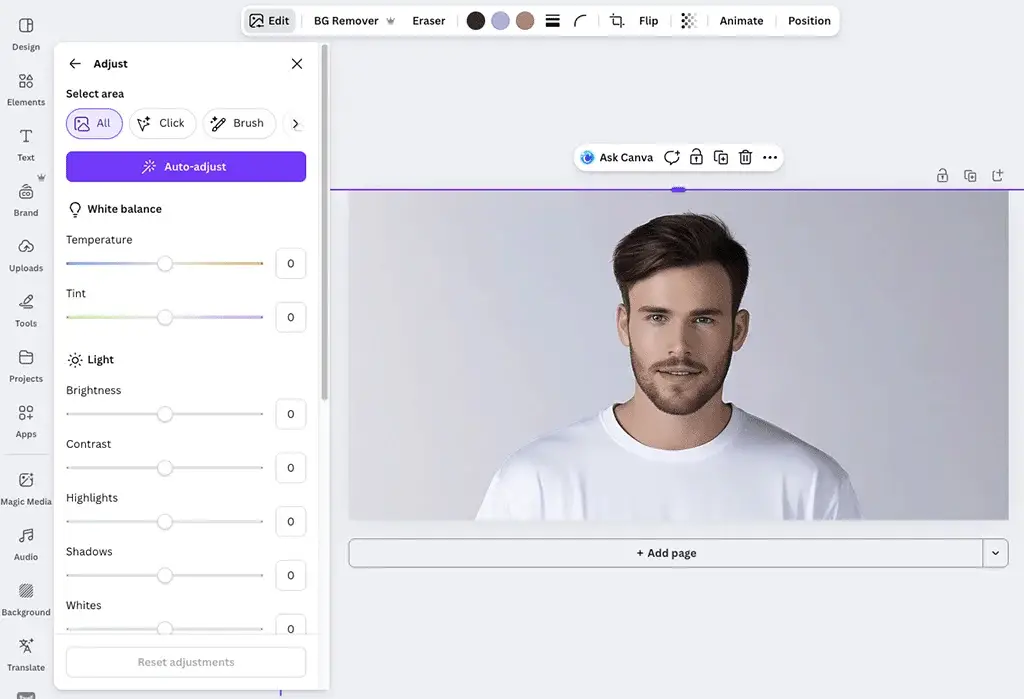
Canva covers the design half of Fotor and goes much further with it: templates for social posts, presentations, documents, video and print, with brand kits and team features on its paid plans. Photos are edited inside the design, with adjustments, filters, a background remover and an eraser on the image toolbar. Its help center says it can also import PSD files as editable designs, in a beta on canva.com in a desktop browser, and that "some elements might be rasterized."
Good at
- A very large library of templates, fonts and elements for social, marketing and print work.
- Resizing one design into several formats, and team brand kits and approvals on Business and Enterprise.
- Quick photo adjustments without leaving the layout.
Keep in mind
- Photo editing serves the design; there are no adjustment layers or masks for detailed retouching.
- Its pricing page lists a plan at no cost and Pro, Business and Enterprise plans, with AI use counted against an allowance that grows with the plan.
Best for: Fotor users who mostly start from a template. For a closer look at the trade-off, read Pixlr vs Canva.
Link: canva.com
3. Adobe Express: templates and quick edits with Adobe's AI
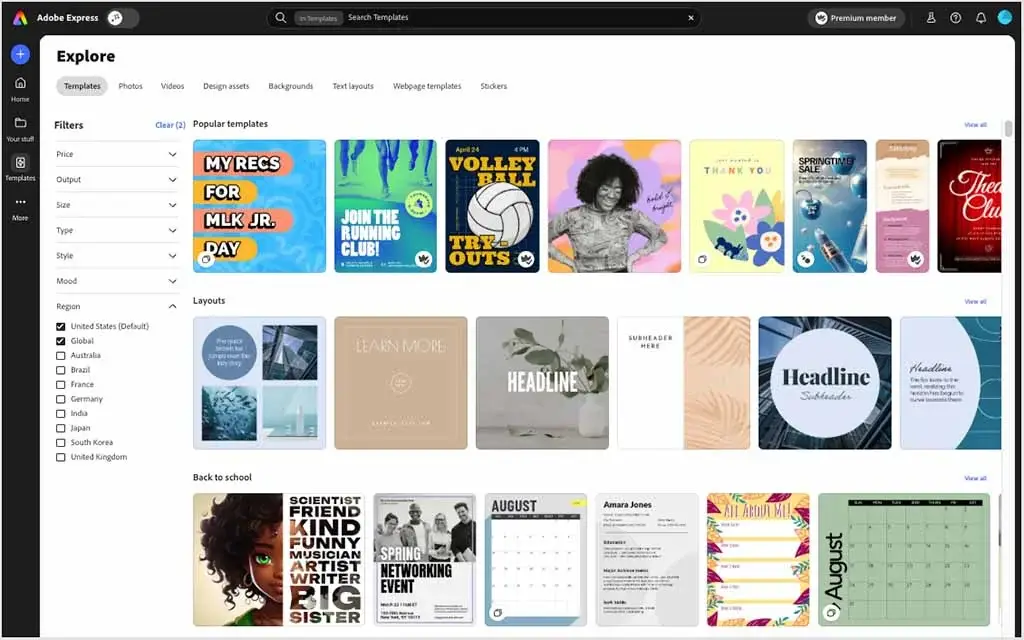
Adobe Express is Adobe's web and mobile design app. Its photo editor page lists the quick jobs Fotor's editor handles: filters, brightness, contrast and saturation, blur, background removal, crop, resizing to social sizes, text and effects, for JPEG, PNG and WebP photos under 40 MB. Templates, fonts and icons sit next to them, and its layers panel lets you reorder and lock each element of a design.
Good at
- Templates, brand kits and social formats in the same app as the photo tools.
- Generative AI from Adobe Firefly, with generative credits in its paid plans.
- Converting a Photoshop or Illustrator file into an editable Express design.
Keep in mind
- Adobe's help center warns that converted PSD text may not match exactly and that only the Multiply and Screen blend modes carry over.
- Its pricing page lists a plan at no cost with limited assets; Premium, Teams and Firefly Pro plans add premium templates and monthly generative credits.
Best for: Fotor users who make flyers, posts and small marketing pieces and want Adobe's templates and AI in one place.
Link: adobe.com/express
4. Picsart: AI edits, effects and generation for social media
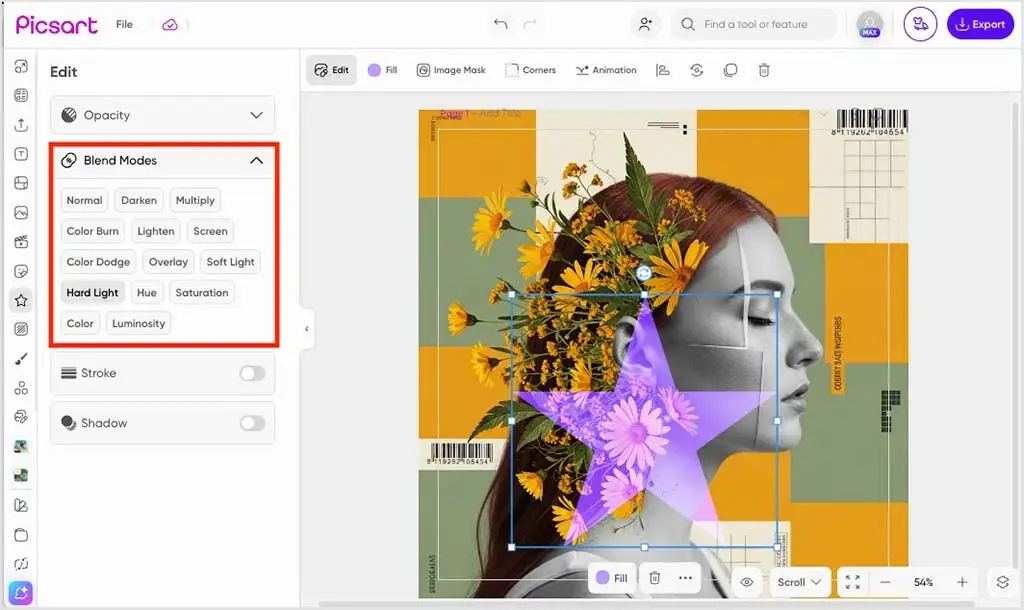
Picsart is the closest match for Fotor's AI side. It is a photo and video editor in the browser and on phones, aimed at social media creators, with background and object removal, a one-tap enhancer, AI image and video generation, stickers, fonts and templates. Its editor stacks photos, shapes and text as layers with opacity and blend modes, and its PSD to JPG page says it opens layered PSD files and exports JPG, PNG, PDF and video formats.
Good at
- Many AI tools and generation models in one app; its Ultra plan lists more than 200 AI models.
- Effects, stickers and templates made for social posts and short video.
- Bulk edits of up to 50 images on Pro and up to 100 on Ultra.
Keep in mind
- Its pricing page lists Pro and Ultra subscriptions, monthly or yearly, with AI use counted in monthly credits, much like Fotor.
- Its PSD page describes exporting images and video, not saving a PSD back.
Best for: creators who use Fotor mostly for AI effects and generation. See more options in our Picsart alternatives.
Link: picsart.com
5. Pixlr: a quick editor and a layered one under one account
Pixlr splits its editing in two, and the second half is the layered editor Fotor doesn't have. Pixlr Express is the quick editor, with a background remover, generative fill, generative expand, an upscaler that goes up to about 25 megapixels, and a collage maker. Pixlr Editor adds layers, masks and selections for detailed work. Express opened our PNG signed out, with its tools in a rail on the left and a layers button at the top right.
Good at
- A quick editor and a layered editor in the browser, so you can move up when a photo needs more.
- AI fill, expand, background removal and upscaling, plus AI image and video generators.
- Its .PXZ project file keeps layers between sessions.
Keep in mind
- Its pricing page lists Plus, Premium and Ultra subscriptions with monthly AI credits, says Pixlr does not process refunds once a payment is complete, and says subscription credits drop to zero when you cancel.
- History is only saved temporarily in the browser cache, so download a .PXZ file to keep your work.
Best for: Fotor users who want a quick editor today and layers when they need them. Our Pixlr alternatives and Pixlr vs Photoshop pages go deeper.
Link: pixlr.com
6. BeFunky: the plainest quick editor, with effects and batch edits
BeFunky's Photo Editor works most like Fotor's: one side panel with essentials such as crop, resize, exposure and color, then touch-ups, background and object removal, text, frames and effects that turn a photo into a painting or sketch. Its page says you can start without an account and download photos made with the basic tools without a watermark. AI tools such as Smart Edit, the image enhancer and Expand need Plus or Pro.
Good at
- A short, plain path from opening a photo to saving it.
- Photo-to-art effects, plus a collage maker and a design tool with templates.
- Batch editing of crops, resizes and adjustments, with AI batch tools on Pro.
Keep in mind
- Its help center lists JPEG, GIF, BMP, PNG and AVIF as the files it opens, up to 4088 × 4088 px.
- Its pricing page lists Plus and Pro subscriptions, monthly or annual, with AI credits that don't roll over.
Best for: Fotor users who want the simplest quick editor, with effects and batch edits.
Link: befunky.com
Which Fotor alternative fits your work
You use Fotor's photo editor for quick fixes
Pick BeFunky for the plainest set of tools, Pixlr Express for a quick editor with a layered one behind it, or the Pixuvia Studio if your quick fixes are mostly AI jobs such as removing a background, erasing an object or expanding a photo. Our photo tools also resize, crop and blur in the browser without opening an editor.
You want layers Fotor's editor doesn't give you
Pick the Pixuvia Editor or Pixlr Editor. Both keep text, graphics and adjustments on their own layers, and the Pixuvia Editor saves PSD files that open in Photoshop and other editors. If layers are new to you, start with our guide to how layers work.
You mostly use Fotor's AI tools
Every editor here sells AI the way Fotor does, as credits inside a plan, so compare what a credit buys and what happens to unused ones: Fotor's roll over for up to five months while you subscribe, BeFunky's do not, and Pixlr's subscription credits reset when you cancel. Picsart and Fotor offer the most generation models; Pixuvia focuses on editing a photo you already have, and also has an AI image generator.
You make designs from templates
Pick Canva or Adobe Express. Both have far larger template libraries than the photo editors here, with brand kits and team features. Picsart fits if your designs lean on AI effects and short video.
Whichever you choose, try it on a real photo before paying, check how a plan renews before you pick yearly billing, and keep your originals.
Questions
What is the best alternative to Fotor?
It depends on what you use Fotor for. For quick photo fixes and AI tools on a photo you already have, try the Pixuvia Studio, Pixlr Express or BeFunky. For layered editing that Fotor's photo editor does not offer, try the Pixuvia Editor or Pixlr Editor. For templates, flyers and social posts, Canva and Adobe Express fit best, and for AI effects and generation aimed at social media, Picsart.
Is there a Fotor alternative with layers?
Yes. The Pixuvia Editor and Pixlr Editor are layered editors in the browser, and the Pixuvia Editor also opens and saves PSD files with their groups, masks and adjustment layers. Canva, Adobe Express and Picsart stack text, images and shapes as layers in a design. Fotor's photo editor showed no layers panel in our test; its design tool has layer controls, and its Magic Layers feature splits a flat image into layers for credits.
What are some sites like Fotor for templates and collages?
Canva and Adobe Express have the largest template libraries for social posts, flyers and presentations, and both run in the browser. Picsart and Pixlr also have templates or a collage maker. Pixuvia's Studio makes collages, grid splits and carousels from your own photos, but it has no library of design templates.
Can Fotor open PSD files?
Not in its online photo editor. When we chose a layered PSD, it answered "Only JPG, PNG, HEIC/HEIF, WebP are supported to open." Its exports are JPG, PNG and PDF, with HD and transparent PNG on the paid plans.
Does Fotor renew automatically and give refunds?
Fotor's terms of service (last updated 18 September 2026) say its subscriptions renew automatically with recurring billing, that a cancellation must be made at least 24 hours before the current period ends, and that subscription fees are not refundable. Check your renewal date in your account settings before it comes round.
Do Fotor alternatives charge for AI tools?
Most do, the same way Fotor does: AI runs use credits that come with a plan. Canva, Adobe Express, Picsart, Pixlr and BeFunky all tie AI use to credits or allowances in their plans. Pixuvia's AI tools also use credits and need a sign-in; its Standard background removal and the classic tools in the Editor and Studio use none.
Sources
- Fotor: home page
- Fotor: Pricing
- Fotor: Terms of service (last updated 18 September 2026)
- Fotor: Magic Layers (image to layer)
- Fotor: Online photo editor
- Trustpilot: Fotor reviews
- Newsfile: Fotor AI Image Enhancer expands compatibility (January 2026)
- ACCESS Newswire: Fotor launches ReShot (March 2026)
- PR Newswire via TechNode Global: Fotor unveils its AI Vibe Marketing Platform (May 2026)
- Canva Help Center: Import Adobe Illustrator or Photoshop files
- Canva: Pricing
- Adobe Express: Online photo editor
- Adobe Express Help: Work with layers
- Adobe Express Help: Photoshop and Illustrator files in Adobe Express
- Adobe Express: Pricing
- Picsart: Pricing
- Picsart: PSD to JPG
- Pixlr: Pixlr Express
- Pixlr: Pricing and FAQ
- BeFunky: Photo Editor
- BeFunky: Pricing
- BeFunky Help Center: Opening a photo
- Style Factory: Canva review
- Style Factory: Picsart review